
FIX: MMC.EXE This app has been blocked for your protection. (Solved)
The following error message appeared suddenly on a Windows 10 based computer, when trying to run the "mmc.exe" (Microsoft Management Console) app: "User Account Control. This app has been blocked for your protection. An Administrator has been blocked you from running this app. For more information, contact the administrator. mmc.exe. Publisher Unknown. File origin: Hard drive on this computer. Program location: "C:\Windows\system32\mmc.exe" "C:\Windows\system32\compmgmt.msc" /s".
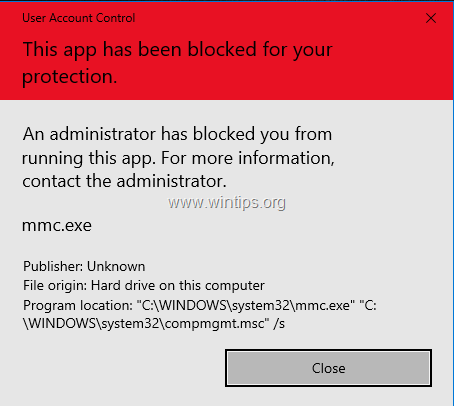
This tutorial contains instructions to resolve the "This app has been blocked for your protection" problem, when trying to open the Computer Management (mmc.exe), or when trying to run or to install an application in Windows 10.
How to FIX: App Has Been Blocked in Windows 10.
Method 1. Disable and Re-Enable the User Account Control (UAC) through Registry.
1. Simultaneously press the Win  + R keys to open the run command box.
2. Type regedit and press Enter to open Registry Editor.

3. Navigate to the following registry location:
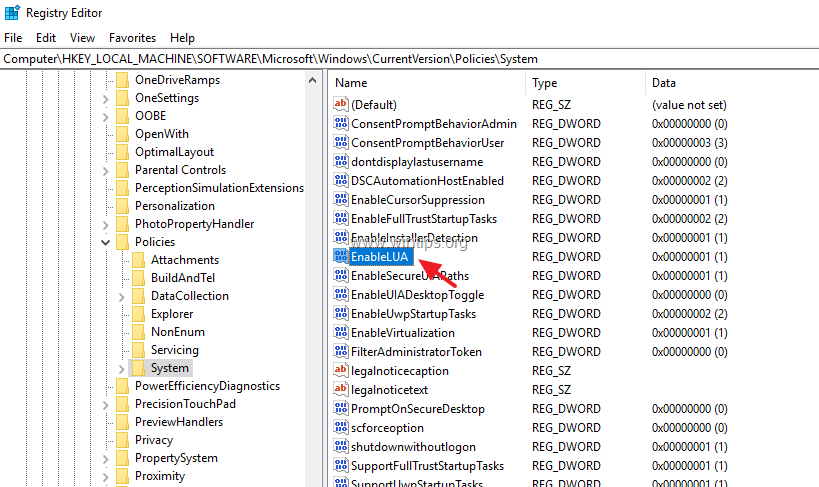
- HKEY_LOCAL_MACHINE\SOFTWARE\Microsoft\Windows\CurrentVersion\Policies\System
4. At the right pane, double click at EnableLUA REG_DWORD value.
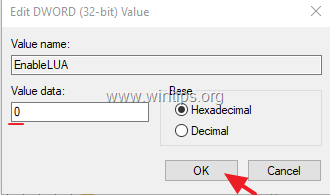
5. Change the value data from 1 to 0 and click OK.
6. Close the registry editor and restart your computer.
7. After restart you should open the mmc program without problems. If this happens, then…
a. Open again the registry Editor, and revert back the EnableLUA value to 1 (to re-enable the UAC settings.)
b. Close the registry editor and restart your computer and check if the problem "This app has been blocked for your protection", when executing the mmc.exe command, has resolved. If not, leave the "EnableLUA" to 0 (Disabled) or proceed to method 2 below.
Method 2. Enable the Administrator account and fix problems.
Step 1. Enable the Hidden Administrator Account
1. Open Command Prompt as Administrator. To do that:
a. In the Search box type: cmd (or command prompt).
b. Right click on the command prompt (result) and select Run as Administrator.

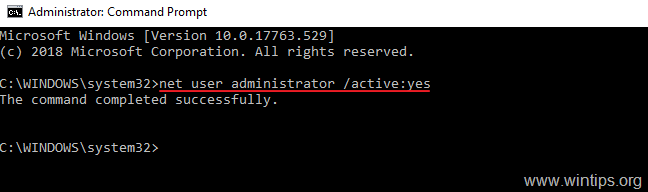
2. Inside the command prompt window, type the following command and press Enter, to enable the Administrator account: *
- net user administrator /active:yes
* Note: When you finish with the troubleshooting, proceed and disable the Administrator account, by giving the following command in an elevated command prompt:
- net user administrator /active:no
3. Close Command prompt and continue to step 2.
Step 2. Fix the Properties of the "Cryptographic Services" service.
1. Sign Out from the current account and Sign-In as Administrator. *
* Note: If you face the "This app has been blocked for your protection" problem, when you try to install a program, then you can install the program with the "Administrator" account, and then to sign-out and login to your normal account.
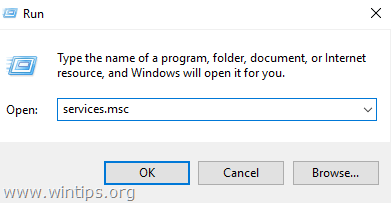
2. Simultaneously press the Win + R keys to open the run command box.
3. Type services.msc and press OK
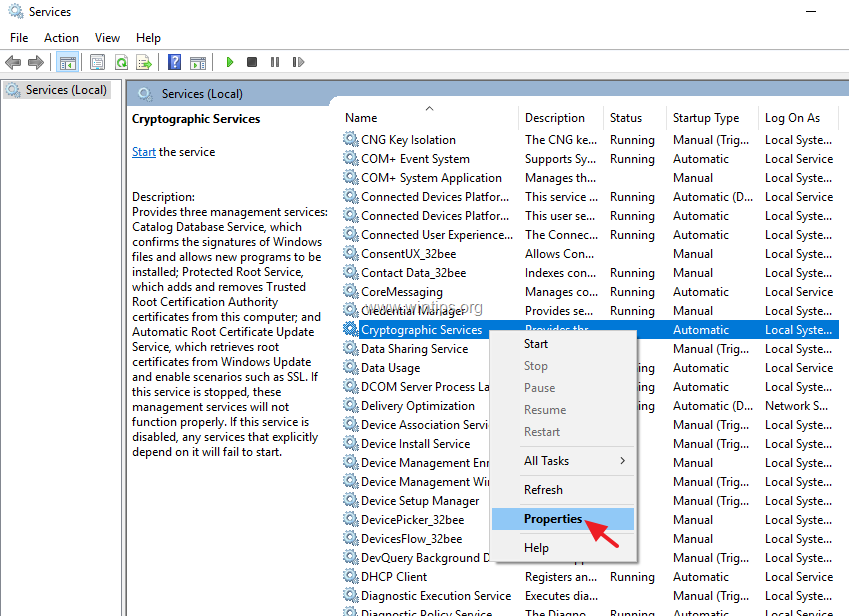
4. In services, right click at Cryptographic Services and choose Properties.
5. Make sure that the 'Startup Type' is Automatic and then click the Log On tab.
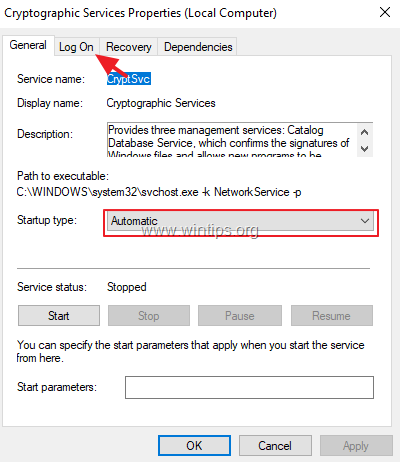
6. At 'Log on' tab, make sure that the 'Log on as:' is the "Network Service" and not the "Local System Account. *
* Note: If the 'Log on as:', is the Local Account then:
a. Click "This account" and then click Browse.
b. Type "network" at the object name and click Check Names.
c. Select the "NETWORK SERVICE" and click OK.
d. Clear the passwords (dots) on the two password boxes, and OK to exit from service's properties.
e. Restart your computer and login with your account.
f. Check if the "app has been blocked for your protection" error, has resolved. If not, continue to next step.

Step 3. Repair Windows System Files.
1. Sign-in with the administrator account.
2. Open Command Prompt as Administrator.
3. In command prompt, type the following command & press Enter:
- Dism.exe /Online /Cleanup-Image /Restorehealth
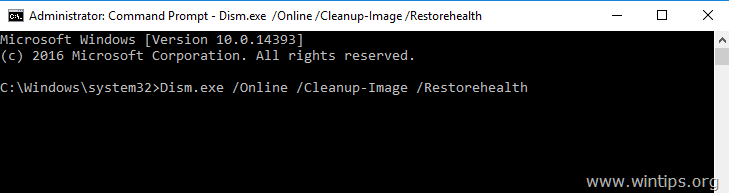
4. Be patient until DISM repairs component store. When the operation is completed, (you should be informed that the component store corruption was repaired), give this command and press Enter:
- SFC /SCANNOW
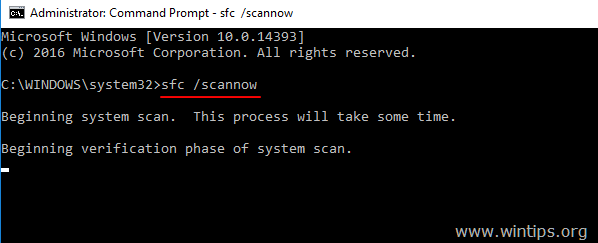
5. When SFC scan is completed, restart your computer and login with your normal account to check if the error has resolved.
That's it! Let me know if this guide has helped you by leaving your comment about your experience. Please like and share this guide to help others.


- Always On VPN Stuck on Connecting After KB5124008 Update: How to Fix - September 24, 2026
- How to Disable Passkey Prompts and Delay Enforcement in Microsoft 365 - September 24, 2026
- Remote Desktop (RDP/RDS) Stops Working After September 2026 Windows Update: How to Fix - September 15, 2026


August 7, 2026 @ 11:39 pm
Thanks for the solution, it worked!
July 26, 2026 @ 5:21 am
Buenas, gracias logre solucionar mi problema con su ayuda
February 10, 2026 @ 7:05 am
Method 1 worked for me too.
Thank you so much for your blog and saving everyone time by providing the details steps.
October 27, 2025 @ 7:05 pm
Thanks :) Method 1 worked
July 8, 2025 @ 4:49 pm
This was the only method that worked for me after countless different tutorials. thanks!
October 26, 2024 @ 7:55 am
Thank you, Sir Konstatinos Tsoukalas. It has solved my problem using Method 1. May God bless you.
June 7, 2024 @ 4:48 am
I spent more than 3 years looking for a solution to this problem, and I finally found the solution from you, thank yo
April 14, 2023 @ 3:12 pm
solution n 1 worked perfectly! thank you very much!!!!!
April 10, 2023 @ 1:34 am
Thank you so much! Method 1 finally worked and solved my issue. After searching the internet and microsoft website, this method was finally the one to work. Thank you.
March 31, 2023 @ 3:57 am
same issue on win10pro.
the first solution works for me too.
i also was in situation the Matthew has mentioned about.
i runed the windown update yesterday too.
i called it windown intentional and not windows, because it let you down in every aspect.
and look likes it causes too.
i also suspect the malware, virus, PUA and rootkit.
and scan with security softwares and problem still there.
how lucky we are that we have you and find this fix.
everybody knows that windown s*cks.
thanks for the guide that nanosoft itself can't provide for us.
March 19, 2023 @ 3:03 am
Thank you 1st answer worked!
February 8, 2023 @ 7:29 am
The registry edit fixed this problem EASILY. Thank you so much.
February 28, 2022 @ 12:25 am
1st Solution Worked. I despise windows 10, Required however for my job 😭
November 8, 2021 @ 3:52 pm
Looks like this problem plagues win11 as well, since win11 is the same ole' pig as win10 except with different color lipstick, this fix still works. :-)
June 1, 2021 @ 4:22 am
U sir just made my day thank you sooooooo much
March 18, 2021 @ 2:24 pm
crypo services as network service fixed it for me thanks
February 11, 2021 @ 11:29 am
Encountered this yesterday (Feb. 11, 2021) on a computer that was being used as a cash register w/ POS software. Was at first convinced that it had a damaged sdd drive, then on second thought that it was infected with malware. But in the end the situation was entirely resolved through "Method 1" above. A follow-up hd scan found no damage, and a full virus scan found no virus. Of note, windows update had just installed updates on the computer the night before… so i'm guessing winblows update caused the damage.
September 27, 2020 @ 8:56 am
You are a saviour, the EnableLUA=0 fixed it! Just been forced to infect my PC with win 10 and it's a most horrible experience, everything and every step is a battle/research just for making sh*t work, the sh*t that can be fixed, it is, because some can't. It's like a digital house of horrors, behind every click there is something dysfunctional or that cannot be done normally or at all.