
How to Auto Shutdown Windows 10/11 (Schedule Automatic Shutdown).
There are times when you want to let your device do certain tasks while you go away for a break or another job. Scheduling an automatic shutdown is best when you want to download large files or copy data to another drive without interruption overnight.
In Windows 10, you can schedule your computer to automatically shut down at a specific time of day when it's not in use. This will allow your device to cool down for a long time and will also improve its performance.
In this tutorial, we will show you 3 ways to schedule the automatic shutdown of your Windows computer at a specific time.
How to Schedule Windows to Shutdown your Computer at a Specific Time. *
* Note: The methods below will guide you to schedule an automatic shutdown on your Windows 10 PC, but the steps also apply to Windows 11, 8/8,1 and 7 devices.
- Auto Shutdown Windows with a Command.
- Schedule Automatic Shutdown from Command Prompt.
- Schedule Auto Shutdown in Task Scheduler.
Method 1: How to Schedule Auto Windows Shutdown with a Command.
To schedule Windows to auto shutdown, using a command:
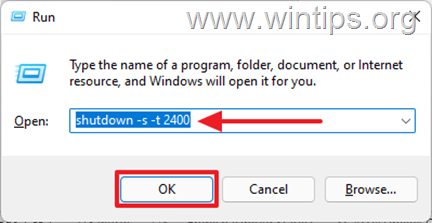
1. Simultaneously press the Windows  + R keys to open Run command box.
2. Type shutdown -s -t 2400 then click OK. *
* Notes:
1. The number "2400" represents the amount of time in seconds before the computer automatically shuts down. That is, in this example, "2400" means that the device will shut down 40 minutes after the command is executed. So, change this number depending on the time you want the device to shut down.
2. If you change your decision and want to cancel the scheduled shutdown, type the following command in Run command box:
- shutdown -a
3. Another syntax for the above command is the following:
- shutdown /s /t 2400
Method 2: How to Schedule Automatic Windows Shutdown using Command Prompt.
If you want to use the command prompt to schedule an automatic shutdown on your Windows 10 computer, use the same command above as follows:
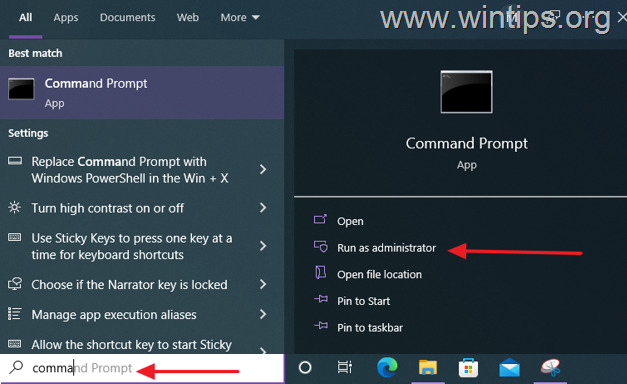
1. In the Search box type cmd or command prompt and select Run as Administrator.
2. Type the following command and press Enter: *
- shutdown -s -t xxx
* Note: Where "xxx" is the time in seconds after which your computer will automatically shut down. Change it according to your needs. e.g. to shutdown your computer in 40 minutes, type:
- shutdown -s -t 2400
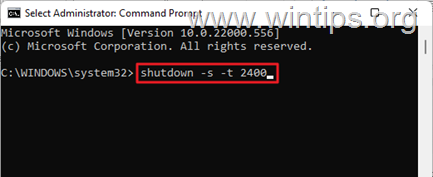
3. Once the command is executed, close the command prompt window and let your computer shut down automatically at the scheduled time. *
* Note: To cancel the scheduled shutdown, give this command:
- shutdown -a
Method 3. How to Schedule Windows to Automatic Shutdown using Task Scheduler.
Task Scheduler is an administrative tool on Windows devices for performing automated tasks on computers. To create a shutdown task in Task Scheduler, to automatically shut down your computer at a specific time or to repeat the automatic shutdown daily:
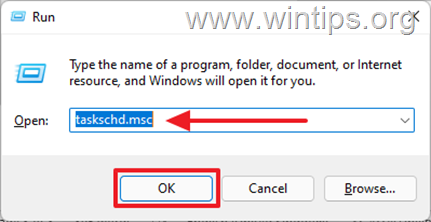
1. Simultaneously press the Windows + R keys to open Run command box.
2. Type taskschd.msc then click OK to open Task Scheduler.
3. Once Task Scheduler opens, select Create Basic Task… on the Action pane.
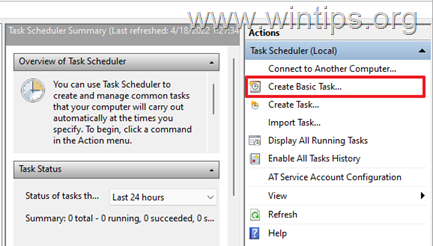
4. In the Name field, type Shutdown, then click Next.

5. Select the period you want the task to start. This could be Daily, Weekly, Monthly, or One time, then click Next.

6. On the next page, schedule the date and the time you want Windows to shut down the PC automatically and click Next.
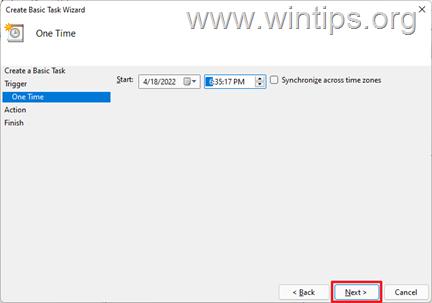
7. The next Window will prompt for the action you want to perform. Select Start a program, then click Next.

8a. At the next window, click Browse, navigate to C:/Windows/System32 folder, scroll down, select the shutdown.exe application and click Open.
8b. At Add Arguments (Optional) box, type -s and click Next.
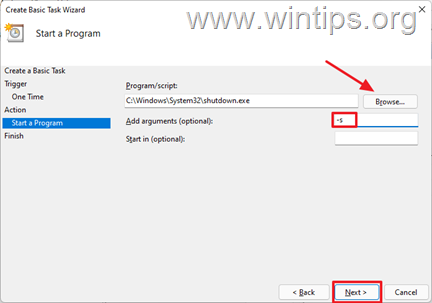
9. Once completed, select Finish. Now you have successfully scheduled your computer to automatically shut down at the specified time. *
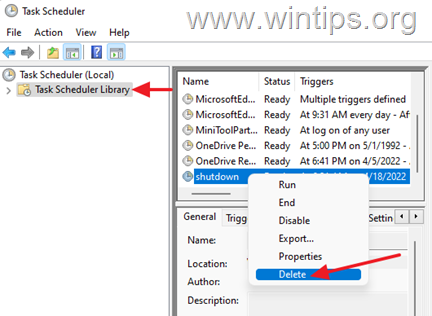
* Note: If you want to cancel the auto shutdown, open again the Task Scheduler, select Task Scheduler Library on the left and at the right-pane, locate and right-click the Shutdown task and choose Disable or Delete.
That's it! Let me know if this guide has helped you by leaving your comment about your experience. Please like and share this guide to help others.


December 17, 2024 @ 5:14 pm
On method 1 it says 2400 means 40 minutes but in method 2 it says 2400 means 40 seconds ..does it change because of the method?
December 17, 2024 @ 6:18 pm
Thanks for the correction. It means "minutes" in both examples. (article corrected)
September 29, 2024 @ 7:21 am
Thank you
May 6, 2024 @ 4:35 pm
this helped a lot, much appreciated. Is there a way to set a separate schedule for weekends as well as disabling the option to start the pc back up before a certain time, like the next morning?
May 8, 2024 @ 9:24 am
1. To separate schedule for weekends use the instructions on method-3 (Task Scheduler). 2. No, there isn't an option to start the PC back.
March 29, 2023 @ 11:28 pm
The article is nice, all methods work nicely, thank you.
November 10, 2022 @ 10:07 am
Thanks for the article. I used method 3 and it worked perfectly!