
FIX: Drive Access denied – Drive is not accessible (Solved)
This tutorial contains instructions to fix the "Access Denied" error while trying to access the contents of a disk/drive. The error "Drive is not accessible. Access is denied" in Windows, usually occurs after connecting the drive to a MAC computer, or if the drive was previously connected to a computer with a different or older version of Windows. In other cases, the "Access is denied" error, appear if the drive's file system is corrupted, or if the drive is locked with BitLocker protection. *
* Note: If the drive is locked with BitLocker, right-click on it and choose "Unlock drive" to unlock it using its protection password.
How to FIX: Drive not accessible, Access is Denied on Drive X: (Windows 10/8/7 OS)
Method 1. Fix Drive Access Denied error by Repairing Drive Errors.
Sometimes the "Access Denied" error on a drive can be related to drive errors. So first, proceed to check and repair the drive:
1. Notice the drive Letter of the drive with the "Access Denied" error in Windows Explorer.
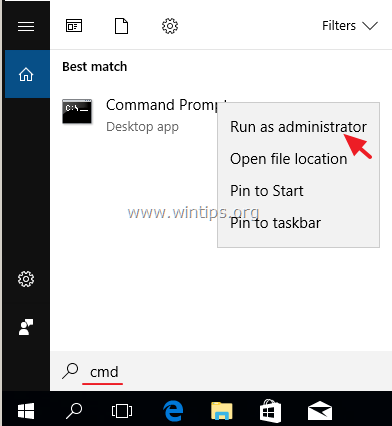
2. Open Command Prompt as Administrator. To do that:
-
- In the Search box type: cmd or command prompt.
- Right click on the command prompt (result) and select Run as Administrator.
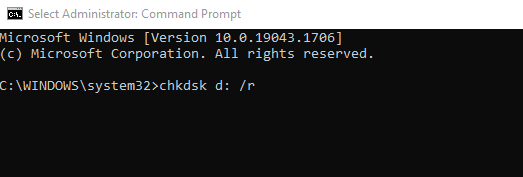
3. In command prompt, type the following command and press Enter: *
- CHKDSK X: /R
* Note: Replace the letter "X" on the above command, with the drive letter of the inaccessible drive.
e.g. If you want to check and repair the drive D:, you have to type this command:
- chkdsk d: /r
4. Wait for the CHKDSK operation to complete. When this done, restart your PC and try to access the inaccessible drive. If you still receive the "access denied" error, proceed to method-2 below.
Method 2. Fix Access Denied on Drive X: by Modifying Permissions on the Drive.
The second reason you may not be able to access a hard drive is the lack of permissions.
Step 1. Change the Owner of the Disk/Drive.
1. Right-click on the drive with the "Access Denied" error and select Properties.
2. At Security tab:
a. If you see the below screen with the message "To continue, you must be an administrative user with permission to view this object's security properties", click the Continue button.
b. If you don't see the above message, click Advanced and read the instructions in Step-1A below.


3. At the next window, change the Owner to "Administrators" group, as instructed below:
a. Select the Administrators group.
b. Check the "Replace owner on subcontainers and object" checkbox.
c. Click Apply & OK.

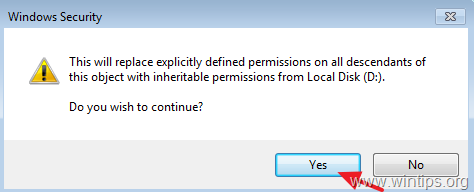
4. When prompted with the Windows Security information window click OK.
5. When the Operation is completed, close the drive's 'Properties' window and continue to step-2.
Step 1A. Change the Drive Owner (Alternative Method). *
Note: This is the usual way to change the Drive's Owner, after opening the drive's Properties and clicking Advanced…
1. Choose the Owner tab and click Edit. *
* Note: In Windows 10 click Change Owner at the first window that opens (after clicking 'Advanced'.
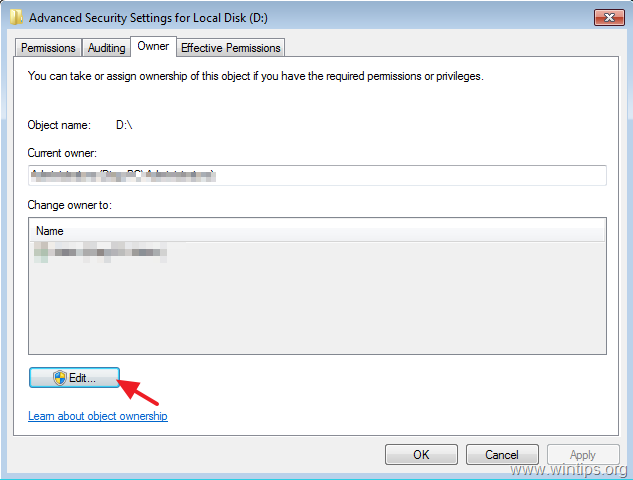
2. Click Other Users or groups.
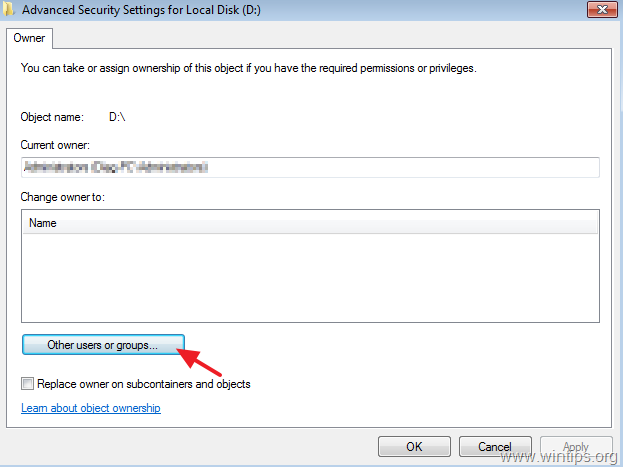
3. In object name, type Administrators and click OK

4. Check the "Replace owner on subcontainers and object" checkbox and then click Apply & OK.
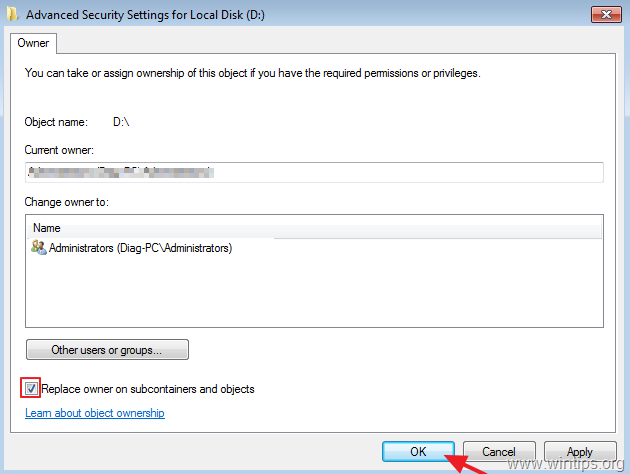
5. Click OK at the security warning window to replace the permissions.
6. After permissions are applied, close all windows and continue to step-2 below.
Step 2. Assign Full Control permissions to 'Administrators' Group.
1. Right-click on the "access-denied" drive an select Properties.
2. Now, at Security tab, click Advanced.

3. On"Advanced Security Settings for Local Disk" window, at 'Permissions' tab click Continue again.

4. At the next screen:
a. Ensure that the 'Administrators' has Full control permissions. *
b. Select the "Replace all child object permissions with inheritable permissions from the object" checkbox and click OK.
* Note: If the permissions of the Administrators group is not "Full control", click the Edit button, check the Full control checkbox and click OK.

5. At the next window, select Yes to "replace explicitly defined permissions on all descendants of this object with inheritable permissions from Local disk…"
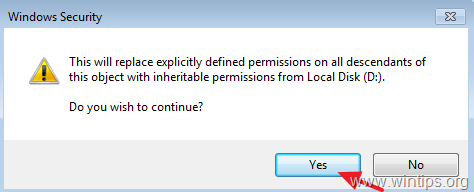
6. Wait until the permissions set.
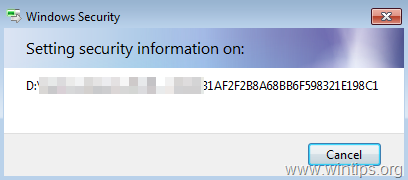
12. When the operation is completed, close all open windows and check if you can access the contents on the drive. If you still receive the "Access is denied" error", proceed to step-3 below.
Step 3. Assign Full Control permissions to 'Everyone' Group.
1. Right-Click on the inaccessible drive and choose Properties.
2. At Security tab, click the Advanced button.

3. Click Change Permissions.

4. Click the Add button.

5. In object name box, type Everyone and click OK.

6. Check the Full Control checkbox and click OK.
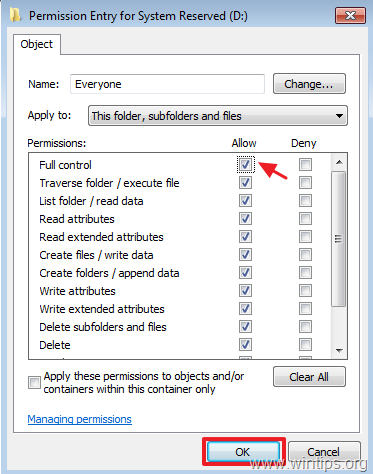
7. Now select the "Replace all child object permissions with inheritable permissions from the object" and click OK.

8. Wait until the permissions set.
9. When the operation is completed close all windows.
10. Normally now, you should access the drive's contents without problem.
That's it! Which method worked for you?
Let me know if this guide has helped you by leaving your comment about your experience. Please like and share this guide to help others.


- Windows Update Uninstall Failed with Error 0x800F0825: How to Fix - October 7, 2026
- Apps and Games Crash After KB5124010 Due to AC-3 Audio: How to Fix - October 5, 2026
- How to Fix Windows 11 Update Error 0x80073712 - October 5, 2026


May 18, 2025 @ 4:06 pm
Thanks for helping me fix my corrupted storage! Tried /r first but canceled it. Did /f later, now it's fixed, thanks also to W11 Copilot’s help.
January 4, 2025 @ 10:08 pm
My Sony Vaio laptop (Win8pro) went all black screen on me when I installed a Logitech driver. I was left with nothing but an onscreen cursor. Safe mode, recovery DVDs, F keys on start up – no luck.
Bought a new hard drive, restored windows from DVDs, bought a SATA USB enclosure, used it to plug the broken hard drive into the laptop. Immediately it found 3 of my 4 partitions, but only 2 of them were accessible. The one I wanted had the access denied error. It was the original C: drive and was password protected.
Ran through your steps above, but the menus I encountered were slightly different to the screenshots. There were only 5 tabs for properties, instead of 9 and there was no OWNER tab on the security one. I carried on as best I could and it's taken all day. The chkdsk alone took over 3 hours. At the end of every step, no change, still access denied.
Then…… on the last step, add EVERYONE…… hey presto, it's accessible. Woohoo!
*** All I can say is thank you very much indeed. ***
I don't store my important files on the computer, they are only on memory cards which are backed up frequently. But the laptop had accumulated a lot of less important files over the last 12 years, less important that is, until you lose them and realise how annoying it is to have to start again. Things like templates for printing, bluetooth files, game saves, downloaded programs I use but couldn't remember the names of, even my customised normal.dot file for word that has all my macros in it.
I have them back now thanks solely to you. So again, thanks very much. You're a star!
August 25, 2024 @ 9:54 am
That final step of using "Everyone" did it!
June 15, 2024 @ 4:41 am
Thank you so much for your guide! I did some of the steps provided from other guides but never Step 3 and it finally opened my drive.
December 13, 2023 @ 5:36 pm
Needed all steps up to step 3. Best guide I found thank you.
September 6, 2023 @ 8:35 pm
Hello all, thank you for this obvious but very helpful tip to retrieve access to an "inaccessible" drive with access denied. Here below is my personal use case:
– Windows boot drive corrupted after a BSOD crash
– drive copy and setup with diskpart and bceditedit in order to get it bootable on the new drive
/!\ booting issue with a black screen ignoring if Windows was running underground
– default boot drive permissions were broken with access denied under Explorer and access OK in Windows Console
– missing standard permissions for groups Users and Authenticated users restored with icacls but access still denied under Explorer and boot still with a black screen
– default ownership was restored from System to TrustedInstaller RATHER THAN GRANTED to Administrators as advised in first step here
=> access granted to Everyone on C:\root WITH object (OI) and container (CI) inhéritance BUT WITHOUT explicit propagation to child items as subfolders and files
/!\ BINGO! THAT SOLE STEP 2 DID THE TRICK! THE DRIVE BECAME IMMEDIATELY ACCESSIBLE AND READABLE UNDER WINDOWS EXPLORER
– then i booted from it, the screen remained black but I observed a huge disk and network activity and keyboard was active: I blindly managed to shutdown it properly
– this time I booted it in safe mode and the screen became active and I was able to open a user session and continue to troubleshoot: Metro apps and GUI to be repaired in order to get access back to the Start menu, the Action Center, the Windows Search and so on. I do know I will be successful :-) crossed fingers!
– at the end, I WILL REMOVE THE ACCESS GRANTED TO EVERYONE FOR SECURITY PURPOSE
THANKS AGAIN FOR THIS!
August 19, 2023 @ 9:58 am
That actually worked for me, my files are saved! thank you sooooo much for the amazing guide.
I had a laptop that went crazy with permissions, and completely locked me out of my drive and files after an automatic chkdsk operation.
went through the guide and my drive only showed after completing all the steps in the guide. not only that i can see my files in other computers, it also fixed very old permissions problem in the laptop itself.
February 27, 2023 @ 1:23 am
I tried to fix this problem with the instructions on probably 10 other websites and none of those worked. Method 2 through step 1.A. "Change the drive owner" on your site was the one that worked. I highly recommend your site, admire the detailed and accurate advice, clean ad-free instructions, and am overall very satisfied with your assistance. I will be donating after submitting this comment. Kudos and 5 out of 5 stars!