
FIX: Battery at 0% and not charging in Windows 10/11.
If your laptop battery is stuck at 0% load and won't charge, follow the steps in this guide that might fix the problem.
Today, for many of us, laptops as well as smartphones have become essential companions for our work, communication and entertainment needs. That's why when the laptop battery refuses to charge and stops at 0% it's disappointing.
What can cause the laptop battery not to charge?
A faulty charger or charging port, a dead battery, outdated drivers or firmware, incompatible power management settings, overheating, and physical damage are all potential culprits that can disrupt the charging process, leaving the battery stuck at 0%.
In this article, we will see how we can deal with the issue of laptop battery stuck at 0% and not charging in simple steps.
How to FIX: Laptop Battery Not Charging or Stuck at 0%.
A laptop battery usually won't charge when it's damaged/old or when the charger has a problem or isn't suitable for your laptop. To troubleshoot and diagnose the battery not charging problem on your laptop follow the below steps in order:
- Check Power Supply connections & Battery.
- Test on Different Power Source (Wallet)
- Check Power Cable & Battery Connection.
- Disconnect External Devices.
- Diagnose Battery Health.
- Run Windows Battery Troubleshooter.
- Uninstall & Reinstall Battery Device Driver.
- Update Chipset Drivers.
- Reset Power.
- Update BIOS.
- Replace Charger.
- Replace Battery.
Step 1. Check Power Supply and re-install the Battery module.
Before troubleshooting further, it's important to make sure you're using the correct AC charger for your laptop and that the battery pack is properly seated. By carefully checking and properly securing the AC charger connections and battery, you can eliminate the most common cause of a laptop not charging.
1. Turn off your laptop and disconnect the AC Power Charger from the wallet and your laptop.
2. Ensure that you're using the original AC Power Charger for your laptop. Many laptop's like DELL, does not charge with a compatible charger.
3. Inspect the power cords for any visible damage or kinks that could disrupt the connection. Replace the AC charger or its cable if it appears damaged.
4. If your laptop's battery is removable, carefully remove it from its place and re-seat it. *
* Note: The location of the battery unit varies depending on the model of your notebook. Some batteries are accessible and easily removed (from the bottom of the notebook), while others require you to remove the notebook case. So, turn your laptop upside down and check if you can remove the battery without opening laptop's case. Refer to your laptop's user manual for specific instructions on how to remove the battery.
5. Firmly plug the AC power cable into both the wall outlet and the laptop's power input port. Ensure that the connectors are fully inserted and locked in place.
6. Turn on your laptop and check if the battery is charging. If not, continue to next step.
Step 2. Test in Different Wall Outlet.
1. If you are using a power strip, remove it and connect the laptop's power supply directly to the wall outlet.
2. To rule out any problems with the current outlet, try plugging the charger into a different outlet. If the laptop charges successfully using the other outlet, the problem is most likely with the original outlet.
Step 3. Inspect Connectors for Dirt or Damage.
A dirty or damaged power supply connector can prevent your laptop from charging. To inspect the connectors on both your charger and laptop for dirt, debris, or signs of physical damage, follow these steps:*
* Note: If you are not comfortable inspecting the connectors yourself, you can take your laptop to a qualified technician.
1. Remove the power cable from both the wall outlet and your laptop.
2. Carefully examine the connectors for any signs of dirt, debris, or corrosion. You can use a magnifying glass to get a closer look at the connectors. Also, can shine a flashlight on the connectors to help you see any dirt or debris.
3. Do not use any abrasive materials to clean the connectors instead use a soft cloth or lint-free swab to gently clean the connectors.
4. Inspect the connectors for any signs of physical damage, such as bent or broken pins.
5. If you see any signs of damage, you will need to replace the charger or the connector.
Step 4. Disconnect External Devices.
Sometimes, external devices connected to your laptop can prevent the battery from charging properly. To check this:
1. Shutdown your Laptop.
2. Disconnect all peripherals from your laptop, such as USB drives, printers, memory card readers, docking stations, etc.
3. Then turn on your laptop and check if the battery is charging. If yes, then reconnect one-by-one the disconnected devices and see which of them causing the battery to not charge.
Step 5. Run Windows Battery Diagnostics
Windows offers a built-in battery diagnostics tool that can identify potential battery-related issues. Windows Battery Diagnostics tool can provide valuable insights into the health and performance of your laptop's battery. To run the tool, follow these steps:
1. Open Command Prompt as Administrator. To do that, type "cmd" or "command prompt" in the search and then click Run as administrator in Command Prompt result.

2. At the command prompt window, copy-paste the following command & press Enter:
- powercfg /batteryreport
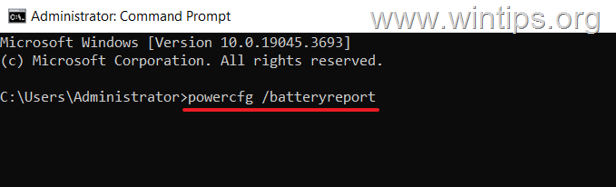
3. The tool will generate a report about your laptop's battery that will be stored in the user folder, and will include information about your battery's capacity, health, and usage.
4. To view the report, open File Explorer and navigate to the path displayed by the tool.
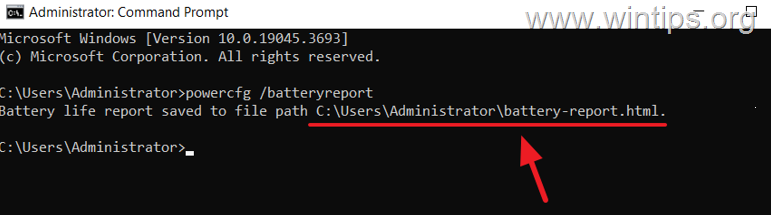
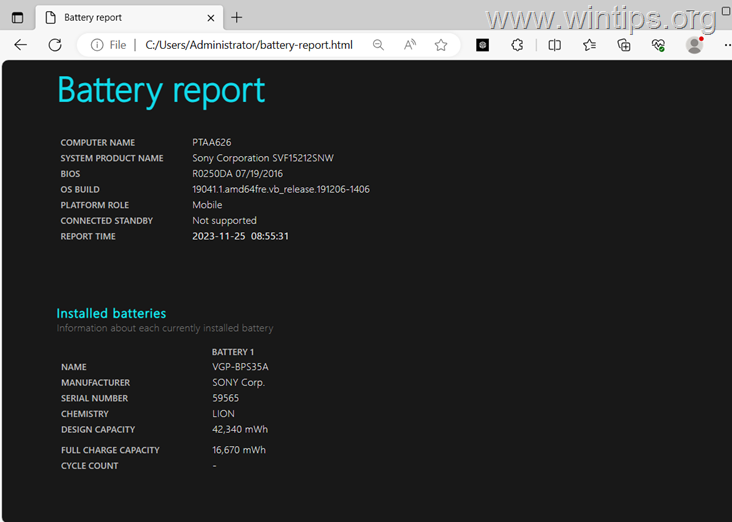
5. Double-click the file named "battery-report.html" to open it in your web browser.
6. The battery report will contain a wealth of information about your battery, including:
- Battery capacity: This is the maximum amount of charge that your battery can hold.
- Battery health: This is an overall assessment of the health of your battery.
- Battery usage: This shows how much power your battery has been using over time.
7. Review the battery report, and see if there are any possible problems with your battery. For example, if your battery health is low, replace the battery.
Step 6. Run Battery Troubleshooter
To see if Windows can fix the battery not charging problem, you can run the power troubleshooter.
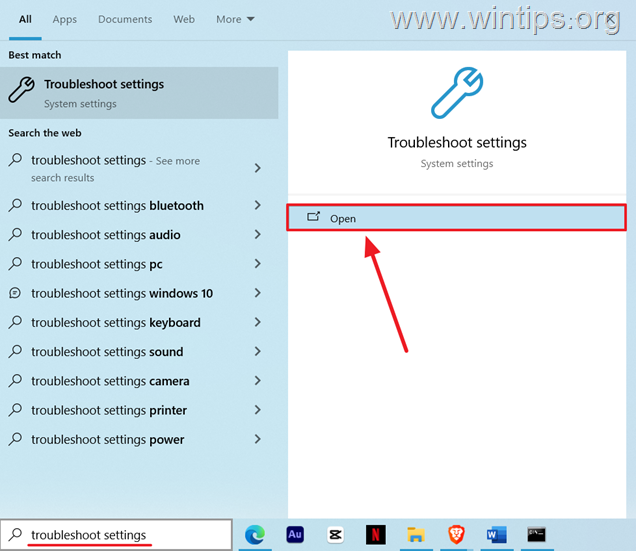
1. In the search type "troubleshoot settings" and then click to open them from the search results.
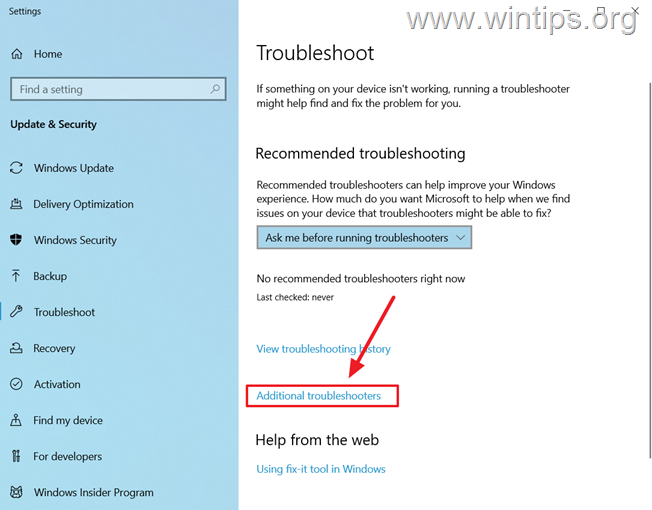
2. In the 'Troubleshoot' window, select Additional troubleshooters.
3. Scroll down and click on Power. Then click Run the troubleshooter.
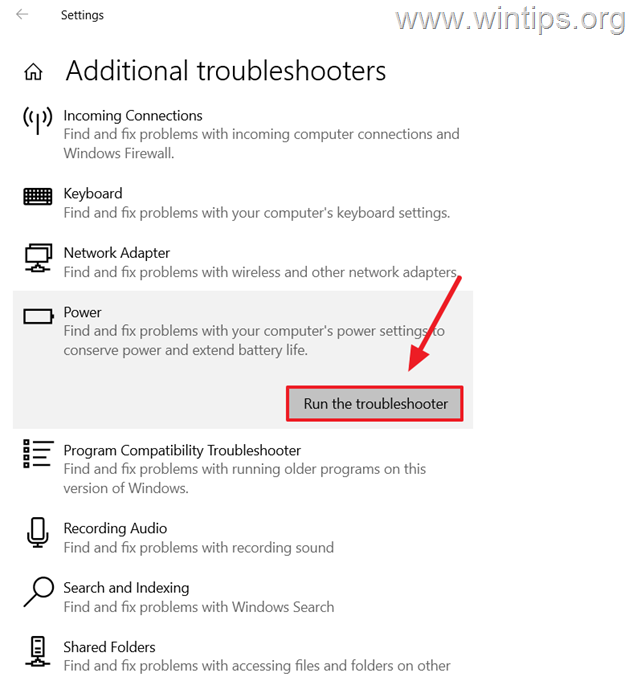
4. The troubleshooter will scan for any problems with your battery.
5. Once troubleshooting is complete, you'll see a report of the problems found and fixed. If the troubleshooter couldn't find or fix the battery problem, continue to the next step.
Step 7. Uninstall & Reinstall Battery Device Driver.
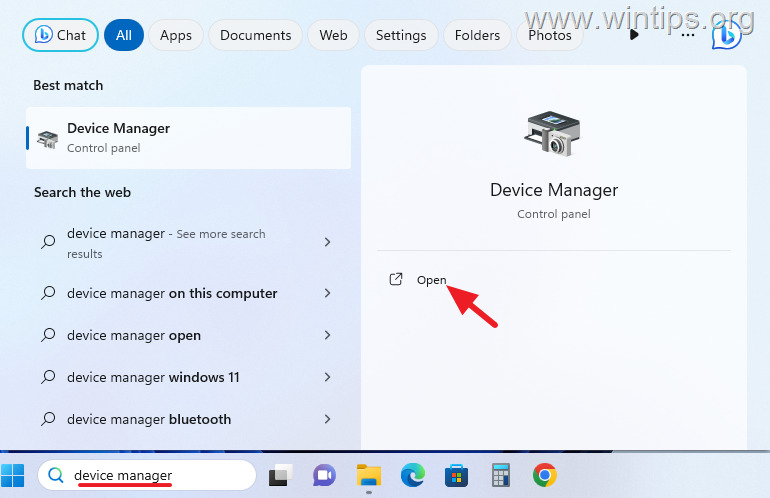
1. Type "device manager" in the search and then click to open Device Manager.
2. In Device Manager, expand Batteries and then right-click and Uninstall the Battery device.
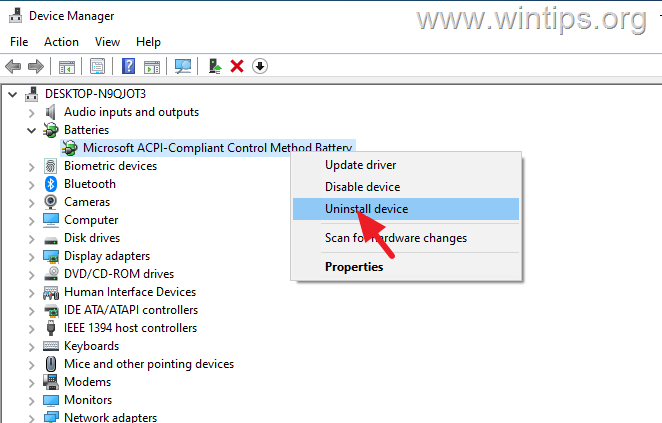
3. After uninstalling the Battery device, restart your PC and check if the Battery is charging.
Step 8. Update Chipset Drivers.
1. Visit your laptop manufacturer's website and navigate to the support section.
2. Search for your laptop model and navigate to Drivers section.
3. Check if the Chipset drivers are available for download. If so, download the latest chipset drivers compatible for your operating system.
4. Then open the downloaded file and follow the on-screen prompts to install the Chipset drivers.
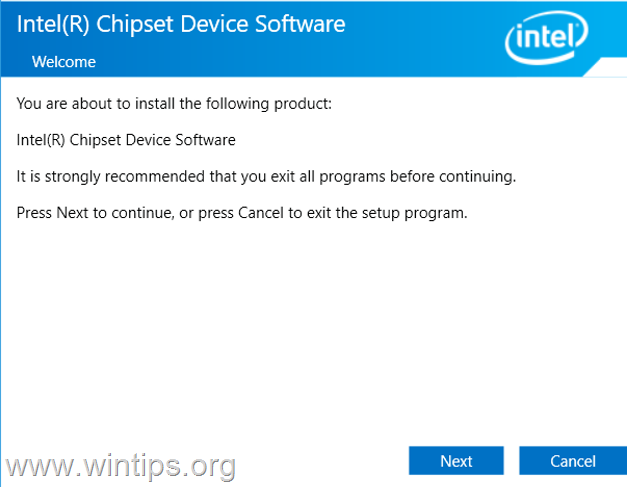
5. When the installation is completed, restart your PC and then check if the battery is charging.
Step 9. Perform a Power Reset.
The Power Reset (also known as "Power Drain" or "Power Button Reset"), completely drains the remaining power from your laptop's capacitors and sometimes fixes the battery charging problem as well. To perform a power reset on your laptop:
1. Completely Shut down your laptop.
2. Disconnect the AC power cable from both the laptop and the wall outlet.
3. If your laptop has a removable battery, carefully take it out.
4. Press and hold down the power button for 30 seconds. (This will discharge any residual power remaining in the laptop).
5. Release the Power button and reconnect the battery (if you removed it)
6. Plug the AC power cable back into both the laptop and the wall outlet.
7. Press the power button to turn on your laptop.
8. Once the laptop boots up, check if the battery is now charging properly.
Step 10. Update BIOS/Firmware.
An outdated BIOS can also affect battery charging. To update the BIOS on your laptop.
1. Turn on your laptop.
2. During your computer's boot process, press the appropriate key to enter BIOS settings.*
* Note: The common keys to to enter in BIOS are: F2, F10, Delete, and ESC.
3. Locate the BIOS version information within the BIOS settings. This information is usually found in the "Main" or "General" tab.
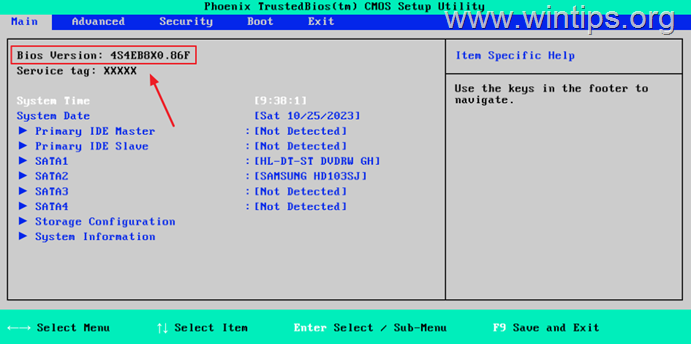
4. Now, visit your laptop manufacturer's website and navigate to the support section. Search for your laptop model and locate the BIOS/FIRMWARE downloads page.
5. Compare the BIOS version displayed on your laptop to the latest version available on the manufacturer's website.
6. If your BIOS version is outdated, download the latest BIOS update file. Ensure the update file is compatible with your specific laptop model.
7. Refer to the manufacturer's instructions on how to update the BIOS.*
* Caution: The BIOS Update is the last solution to solve computer problems, because if you incorrectly update the BIOS, you 'll make your computer unbootable and useless. So, be very careful when updating your BIOS and do not power off your PC during the BIOS update process. If you're not comfortable doing it yourself, it's always best to consult a qualified technician to avoid any potential issues.
Step 11. Use a Different Charger
It is important to check if your charger is causing the problem. To verify this, connect a different charger that is suitable for your laptop and see if your battery charges with it.*
* Notes:
1. If you don't have or can't borrow another charger, visit a computer repair shop and ask them to test with their own charger to see if the battery is charging. Then, if you find that the charger is the problem, buy a new charger.
2. On some laptops, (especially on Dell laptops) the battery will not charge if the charger is not original. So if you go ahead and buy a new charger, buy a genuine charger that is suitable for your laptop.
Step 12. Replace Battery Unit.
If you've tried all of the troubleshooting steps above and your laptop still won't charge properly, then there's a problem with either the charger circuit or the battery itself. So, before you go ahead to buy a new battery, I suggest to visit a professional computer repair shop to verify the culprit.
That's it! Which method worked for you?
Let me know if this guide has helped you by leaving your comment about your experience. Please like and share this guide to help others.


- Remote Desktop (RDP/RDS) Stops Working After September 2026 Windows Update: How to Fix - September 15, 2026
- Windows 11 KB5124008 Causes No Sound or USB Audio Code 10: How to Fix - September 14, 2026
- Copilot Missing or Grayed Out in Outlook: How to Fix - September 10, 2026



January 8, 2025 @ 10:58 pm
battery 1 charging but battery 2 not charging
October 31, 2024 @ 10:57 pm
I learned a lot moving through the steps but my battery still didn't charge. I guess my 6 month old knockoff battery is dead.
I had bought Dell 53Wh Type h5ckd 15v from Dell tech, but the battery that came with my laptop was a Dell 40Wh Standard Type JK6Y6 11.25v.
Im thinking about installing the Dell Tech battery I bought. Any thoughts regarding compatibility?
Mike
November 1, 2024 @ 1:20 pm
Unfortunately, I'm not sure if its compatible.
September 9, 2024 @ 4:05 pm
Step 9 (Power reset) worked for me on an HP Pavillion with a nearly new battery. Thank you!!