
How to fix “File is not in a recognizable format” error when opening EXCEL(x) 2007 -2010 files.
In a Windows 7 based computer with Office 2003 (Pro) and the 'Microsoft Office Compatibility Pack for newer versions of Word, Excel, and PowerPoint File formats' already installed, the following error appeared when the user tried to open Excel workbooks that were created in newer Office 2007 or 2010 versions (*.xlsx) : “The (excel) file is not in a recognizable format…..". Uninstalling and re-installing MS Office compatibility pack didn’t resolve this issue. Finally, after doing some research, the following solution fixed Excel’s “unrecognizable format” error message:
How to fix ‘File is not in a recognizable format’ error message in Excel.
1. Right-click on any “.xlsx” file you want (e.g. ‘Book1.xlsx’) and go to “Open With” > “Choose Default program”.

2. At Open With dialog, click “Browse”.

3. Navigate to "C:\Program Files\Microsoft Office\Office12", to select the “Moc.exe” * file and click “OK”.
* MOC = Microsoft Open XML Converter.
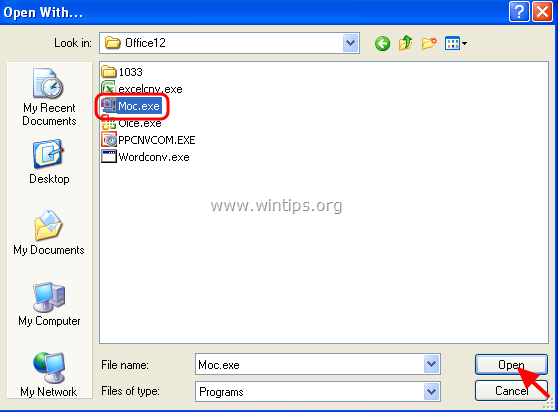
4. Now open your “.xlsx” workbook. Your problem should be gone!
That's it!
Still having trouble fixing this issue?
💬 Get WinTips Remote Support →

- FIX: Windows Hello for Business PIN error 'Your credentials could not be verified' with 'status: 0xc000005e substatus: 0x0' or 'status: 0xc0000bb, substatus: 0x0'. - October 20, 2026
- FIX: This Device Is Already Set Up in Another Organization in Company Portal or During Intune Enrollment - October 13, 2026
- Windows Update Uninstall Failed with Error 0x800F0825: How to Fix - October 7, 2026


January 13, 2021 @ 8:56 am
Wa It Solved. Thanks Dear
June 8, 2018 @ 6:34 pm
any other solution is there
May 19, 2018 @ 3:27 am
I thought I had already installed FileFormatConverters and I did, thanks for this solution! Saved me some potentially wasted time.
November 3, 2017 @ 10:37 am
Thank you very much for the solution with Moc.exe !!!
August 6, 2016 @ 1:40 pm
Simple and Effective. Thanks for the Solution