
Windows 10 Update Stuck while Downloading Updates. (Solved)
On a Windows 10 based computer, the Windows Update process is stuck at the same percent number (e.g. 30%, 40%, 55%, etc.), while downloading updates. The problem persists even after restarting the Windows Update service or the computer.
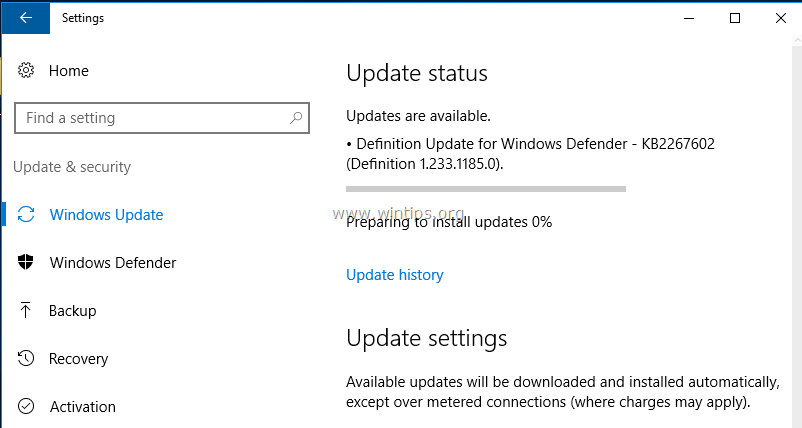
Windows Update problems, are common issues on Windows computers and at most cases occur because the update store folder (C:\Windows\SoftwareDistribution") becomes corrupted, for several reasons. At these cases the easiest solution to resolve such problems is to delete the "SoftwareDistribution" folder and let Windows recreate a new empty update store folder to download the updates.
Below you can find detailed instructions on how to resolve Windows 10 Update Freezing issues. (The method can be applied in Windows 8, 7 or Vista OS).
How to fix Windows Update Freezing on Windows 10, 8, 7 and Vista.
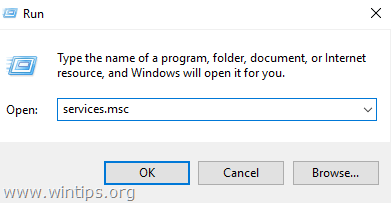
1. Simultaneously press the Win  + R keys to open the run command box.
2. Type the following command and press OK.
- services.msc
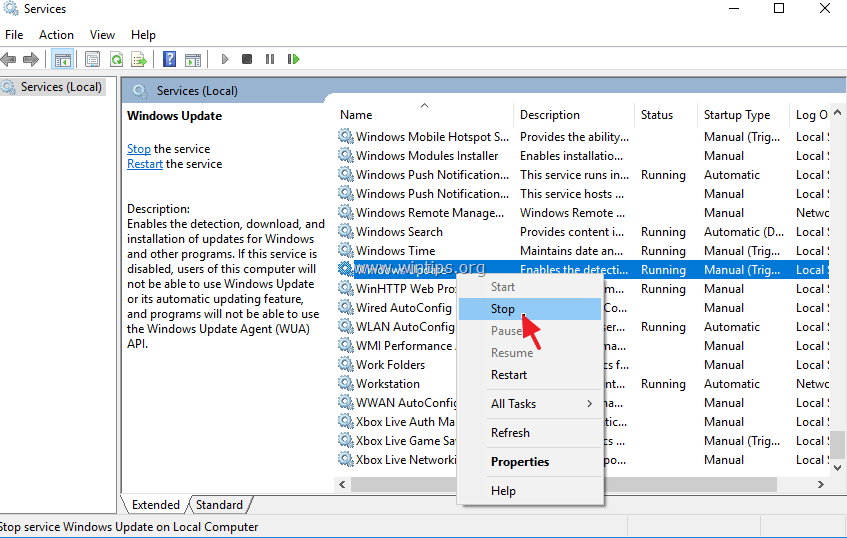
3. From the list of services, at the right pane locate the Windows Update service.
4. Right click on "Windows Update" service and choose Stop.
5. Close "Services" window.
6. Open Windows Explorer and navigate to C:\Windows folder.
7. Locate and then Delete the SoftwareDistribution folder. *
* Note: If you cannot delete the folder (folder in use), then restart your computer in "Safe Mode" and repeat the procedure.
8. Restart your computer.
9. After the restart, go to Start > Settings > Update & Security.
10. Check for updates. *
* Note: In some cases, the error "0x802402f" may appear after clicking the "Check for updates" option. If this happens, then simply restart your computer and let Windows to find and install updates automatically.

That's it! Let me know if this guide has helped you by leaving your comment about your experience. Please like and share this guide to help others.


- Remote Desktop (RDP/RDS) Stops Working After September 2026 Windows Update: How to Fix - September 15, 2026
- Windows 11 KB5124008 Causes No Sound or USB Audio Code 10: How to Fix - September 14, 2026
- Copilot Missing or Grayed Out in Outlook: How to Fix - September 10, 2026



September 16, 2025 @ 9:47 pm
Thank you!
I tried everything else to fix this problem including Microsoft's "troubleshooter" (which didn't have a clue what was wrong), as well as stopping and starting everything it seems.
Worked like a charm. Straight forward and with minimal fuss.