
FIX: VirtualBox Cannot register the DVD image (Solved)
This tutorial contains instructions to fix the VirtualBox error "Cannot register the DVD image 'VBoxGuestAdditions.iso'", after transferring a Virtual Machine to another computer.
Problem in details: VirtualBox VM cannot start with error "Failed to open virtual machine" with the following description in error details: "Cannot register the DVD Image 'VBoxGuestAdditions.iso' because a CD/DVD image 'VBoxGuestAdditions.iso' with UUID ….. already exists"
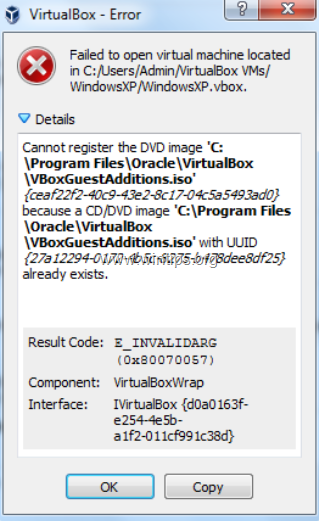
How to FIX: Cannot register the 'VBoxGuestAdditions.iso' DVD image in VirtualBox.
1. Open Windows Explorer and navigate to the location where the VirtualBox machine's .vbox file is stored. *
* Note: You can find where the .vbox file is located from the first part of the error message. e.g. "Failed to open virtual machine located at C:\Users\Username\VirtualBox VMs\WindowXP\WindowsXP.vbox".
2. Open the .VBOX file in Notepad or any other text editor you want.
3. Mark the line(s) between the <DVDImages> and </DVDImages> section and press Delete. *
* Note: After deleting the lines, this part of the .VBOX file, will look like.
<DVDImages>
</DVDImages>
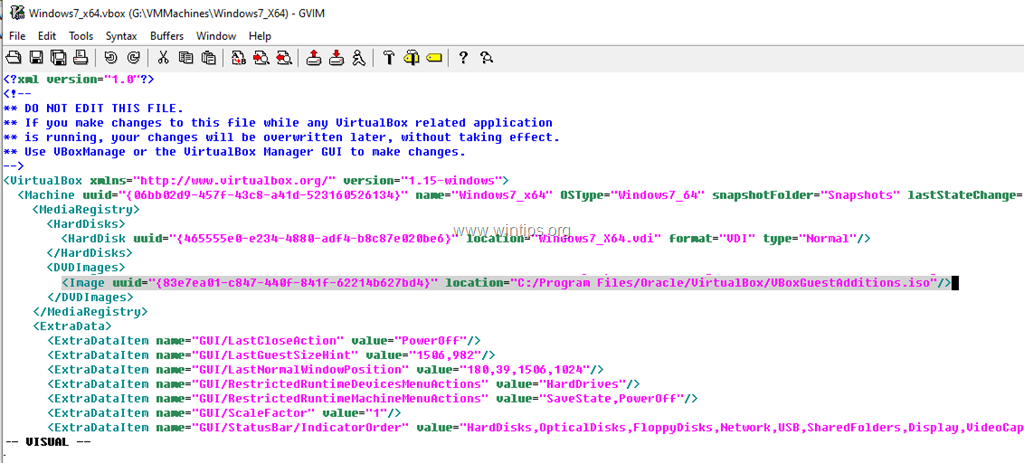
4. When done, save and close the .VBOX file.
5. Start the Virtual Machine. The error "Cannot register the DVD image 'VBoxGuestAdditions.iso' should be resolved.
That's it! Let me know if this guide has helped you by leaving your comment about your experience. Please like and share this guide to help others.


September 15, 2023 @ 9:03 am
Yes it helped
August 2, 2023 @ 2:21 pm
WOW! quick and concise help
March 24, 2023 @ 2:29 pm
Thank you very much!!!
December 2, 2022 @ 6:29 pm
thanks
January 30, 2023 @ 12:39 pm
!! THANKS !!
June 11, 2022 @ 4:46 pm
Thanks.
Removing the … section using vim editor worked well for me on macOS
October 13, 2021 @ 12:24 pm
Bonjour,
Avec ce message d'erreur m'empêchant d'ajouter la machine :
Échec du démarrage de la machine virtuelle /mnt/VMs/Chrome OS/Chrome OS.vbox.
Cannot register the DVD image '/home/moi/.config/VirtualBox/VBoxGuestAdditions_5.2.34.iso'
{5fb4d593-f742-41a2-8dd6-6a09937cf134}
because a CD/DVD image '/home/moi/.config/VirtualBox/VBoxGuestAdditions_5.2.34.iso'
with UUID {c48808a4-8e24-42da-9949-c981fa019f99} already exists.
Code d'erreur : NS_ERROR_INVALID_ARG (0x80070057)
Composant : VirtualBoxWrap
Interface : IVirtualBox {d0a0163f-e254-4e5b-a1f2-011cf991c38d}
Les lignes dans le fichier étaient un peu différentes par rapport à la solution proposée :
J'ai d'abord supprimé la ligne
Mais ça n'a pas fonctionné.
A tout hasard j'ai remplacé sur la même ligne "5fb4d593-f742-41a2-8dd6-6a09937cf134" par "c48808a4-8e24-42da-9949-c981fa019f99" et la machine a démarré !
Merci de m'avoir mise sur la piste, je n'aurais jamais trouvé ! :)
July 21, 2021 @ 6:22 am
It worked great! Thank you very much.
July 2, 2021 @ 4:38 pm
awesome!!! it worked!!!
thanks