
FIX: Application Specific Permission Settings do not grant Local Launch permission for Windows.SecurityCenter.SecurityAppBroker (Solved)
The warning event 10016 with description "The application-specific permission settings do not grant Local Launch permission for the COM Server application with CLSID
Windows.SecurityCenter.SecurityAppBroker", usually occurs on Windows 10 PCs and is related to the "Security Center" service.
According to Microsoft you can safely ignore events 10016, because they don't adversely affect functionality, but if you want to fix the problem, continue reading below.
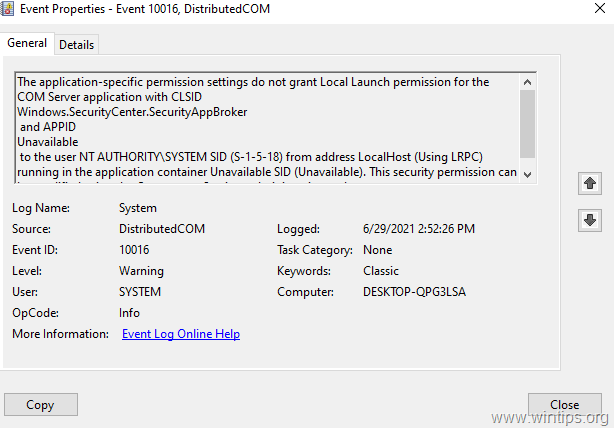
This tutorial contains step-by-step instructions to fix the 10016 warnings in event viewer on Windows 10 and Windows Server 2016/2019, with description:
Source: Distributed COM
Event ID: 10016
The application-specific permission settings do not grant Local Launch permission for the COM Server application with CLSID
Windows.SecurityCenter.SecurityAppBroker
and APPID
Unavailable
to the user NT AUTHORITY\SYSTEM SID (S-1-5-18) from address LocalHost (Using LRPC) running in the application container Unavailable SID (Unavailable). This security permission can be modified using the Component Services administrative tool.
The application-specific permission settings do not grant Local Launch permission for the COM Server application with CLSID
Windows.SecurityCenter.WscBrokerManager
and APPID
Unavailable
to the user NT AUTHORITY\SYSTEM SID (S-1-5-18) from address LocalHost (Using LRPC) running in the application container Unavailable SID (Unavailable). This security permission can be modified using the Component Services administrative tool.
The application-specific permission settings do not grant Local Launch permission for the COM Server application with CLSID
Windows.SecurityCenter.WscDataProtection
and APPID
Unavailable
to the user NT AUTHORITY\SYSTEM SID (S-1-5-18) from address LocalHost (Using LRPC) running in the application container Unavailable SID (Unavailable). This security permission can be modified using the Component Services administrative tool.
How to FIX: Application-specific permission settings do not grant Local Launch permission for the COM Server application: Windows.SecurityCenter.SecurityAppBroker (Event ID: 10016).
The error 10016 in Windows Security Center components Windows.SecurityCenter.SecurityAppBroker, Windows.SecurityCenter.WscBrokerManager and Windows.SecurityCenter.WscDataProtection, is reported because these components try to load too early when Windows starts, but fail.
To fix the problem, proceed and disable the DelayedAutoStart as follows:
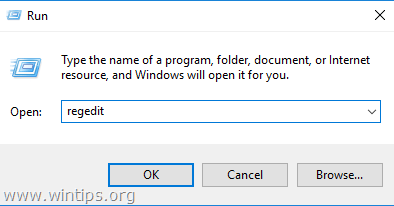
1. Open Registry Editor. To do that:
1. Simultaneously press the Win
+ R keys to open the run command box.
2. Type regedit and press Enter to open Registry Editor.

2. In Registry, navigate to the following location:
-
HKEY_LOCAL_MACHINE\SYSTEM\CurrentControlSet\Services\wscsvc
3. At the right pane open the DelayedAutoStart REG_DWORD value.

4. Change the value data from 1 to 0 and click OK.

5. Close the Registry Editor and restart the computer.
That's it! Let me know if this guide has helped you by leaving your comment about your experience. Please like and share this guide to help others.


- Always On VPN Stuck on Connecting After KB5124008 Update: How to Fix - September 24, 2026
- How to Disable Passkey Prompts and Delay Enforcement in Microsoft 365 - September 24, 2026
- Remote Desktop (RDP/RDS) Stops Working After September 2026 Windows Update: How to Fix - September 15, 2026


September 22, 2026 @ 5:09 am
Just disabling Onedrive as Start Up app also makes these errors on boot disappear.
June 1, 2026 @ 5:14 pm
The solution that you have suggested worked well. Thank you very much.
June 16, 2025 @ 4:03 pm
Having same error. DCOM warnings and errors have been happening for a few weeks. Some have key code numbers in the warning. Have tried to reset permissions for those specific keys but they will not apply. Running as administrator – still says cannot rewrite. My system has been rebooting randomly whenever these errors happen. running windows 11. Did a fresh format and re-install of windows 11 and the error with dcom 10016 is still happening. Sometimes get 4 errors in a row, with seconds between each error. Starting to fear this is a hardware error. not software, since a fresh install didn't fix the problem
May 13, 2023 @ 7:07 am
What do I do if it gives me the following error:
Error Editing Value
Cannot Edit DelayedAutoStart" Error writing the values's new contents.
The reason I am trying to do this is because My PC keeps freezing and then either I have to restart it or it restarts all on its own.
May 13, 2023 @ 1:48 pm
To modify the registry, you must log in as a user with administrative rights'. If you're already an administrator and can't make the change, I recommend doing a "Windows in-place upgrade".
April 24, 2022 @ 11:37 pm
It worked at least as I see it now.