
FIX: Windows 11 File Explorer is slow, lags and freezes.
Windows 11 File Explorer is slow, lags and freezes? If yes, in this guide you will find the most reliable methods to solve the problem.
Windows File Explorer 11, the tool for managing files and folders on your computer, is designed to make navigation seamless. However, some users have encountered the frustrating issue of slow, unresponsive File Explorer.
In particular, those who have upgraded from Windows 10 to Windows 11 have reported a noticeable drop in File Explorer performance, with delays of up to a minute between a click and fully opening a file.
Windows Explorer delays in Windows 11 can be caused by many reasons.
Sometimes Explorer lags are related to dead links to network files and drives, third-party programs or extensions, corruption of system files, OneDrive syncing, etc..
Windows 11 users rely heavily on File Explorer for productivity. But when Windows Explorer is slow or freezes, it can disrupt your work. But, don't worry! In this guide, we list all possible solutions to fix slow file explorer response in Windows 11.
12+ Methods to Fix Slow Windows 11 File Explorer.
- Restart Explorer.
- Install Updates.
- Virus Scan.
- Disable Startup apps.
- Disable Third-Party Services.
- Change File Explorer Options.
- Remove Network Links in Quick Access.
- Restore Quick Access Links to Default.
- Disable Third-Party Extensions.
- Repair Windows System Files.
- Run System Maintenance tool.
- Check Hard Disk.
- Other Solutions.
Method 1. Restart File Explorer.
If File Explorer has crashed or frozen, it may be a temporary problem that can be resolved by restarting the File Explorer (aka "Windows Explorer") process using Task Manager.
1. Press the Ctrl + Shift + ESC keys to open Task Manager.
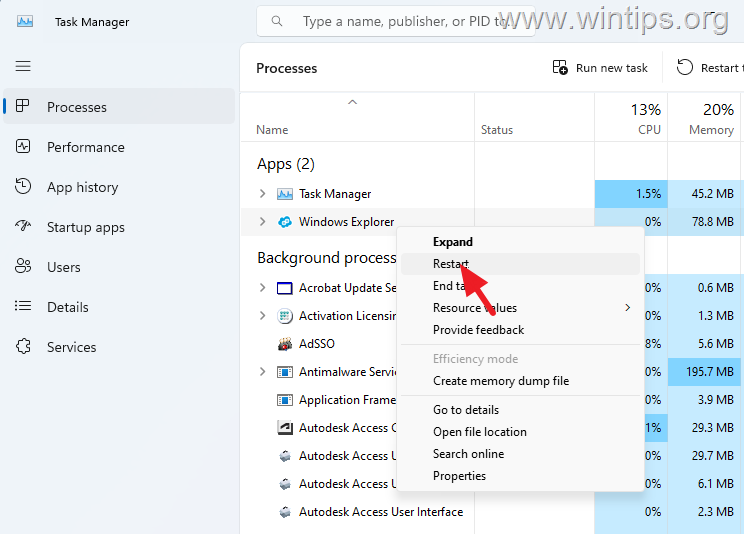
2. Go to the Processes tab, right-click on Windows Explorer and select Restart from the context menu.
Method 2. Install all Windows Updates.
The first step in solving problems with Windows 11 File Explorer, is to ensure that your system is fully up to date and that there are no pending updates to install. To do that:
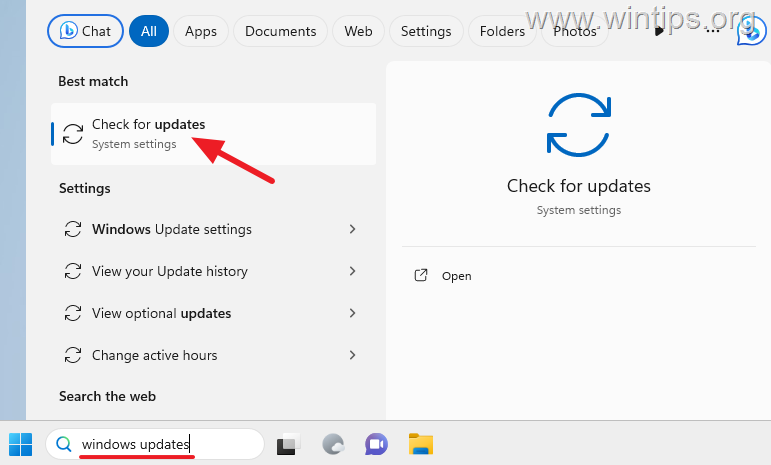
1. Type "windows updates" in search and then click Check for updates.
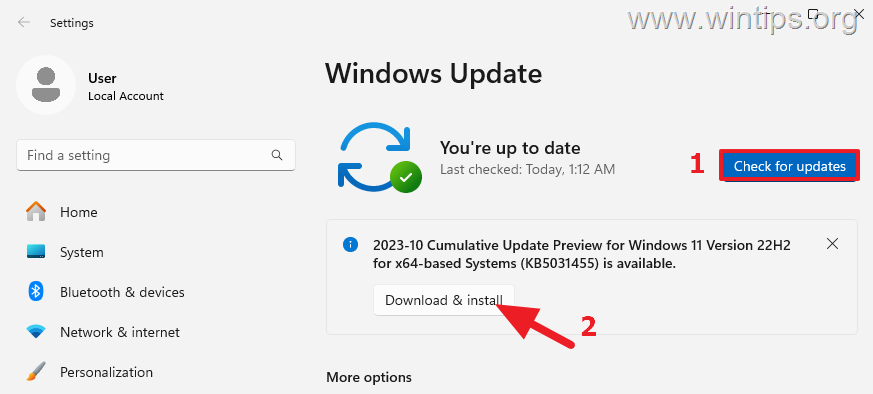
2. Then click Check for Updates [1] again and let Windows to search for updates. Then if updates found click Download & install [2] to install them.
3. After installing all Windows updates check if the problem is fixed. If not, continue to next step/method.
Method 3. Scan for Malware/Viruses.
Before proceeding further, ensure that your computer is clean from viruses and malware. To accomplish this task you can use this Malware Scan and Removal Guide to check and remove viruses or/and malicious programs that may be running on your computer.
After scanning and cleaning your computer for malware, check if the problem persists. If not, you're done here, otherwise continue to the next step.
Method 4. Disable Startup Programs.
The most common cause of Windows 11 File Explorer lags is an app running in the background, especially an app that syncs your files to the cloud. So, do the following:
1. Press CTRL + SHIFT + ESC to open Task Manager.
2. In the Startup apps tab, select and right-click to disable any third-party application, or unknown program or sync application app (like OneDrive, GoogleDrive, iCloud, etc.).*
* Note: The usual culprits for the slow performance of File Explorer in Windows 10/11 are the OneDrive & iCloud apps.
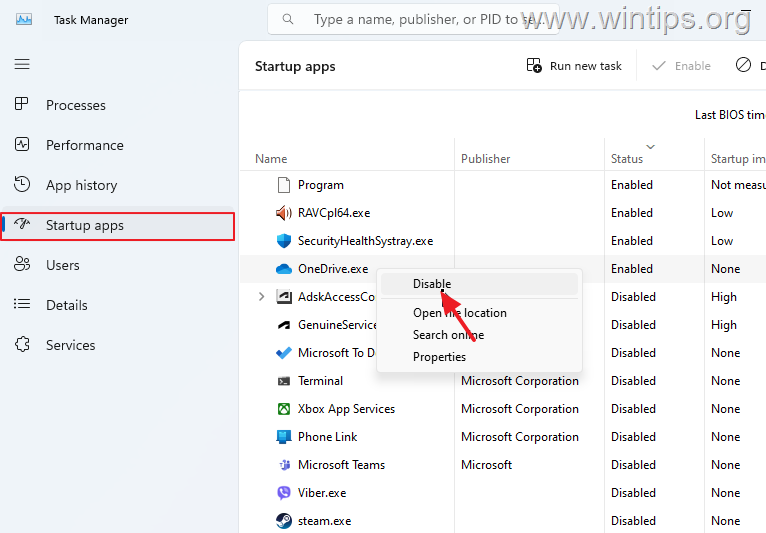
3. When done, restart your PC and then check if the File Explorer works smoothly. If the problem remains proceed to next method. If not, reopen the Task Manager and enable one by one the disabled programs and reboot until you find the culprit.
Method 5. Disable non-Microsoft services (Clean Boot).
A third-party service may also be the cause of the slow performance of File Explorer. To determine this, go ahead and perform a clean boot by disabling all third-party services.
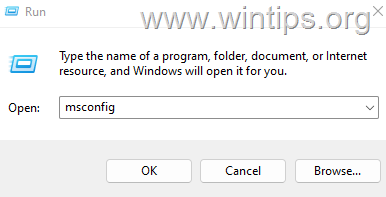
1. Press the Windows + R keys to open the 'Run' command box.
2. Type msconfig and press Enter to open the System Configuration utility.
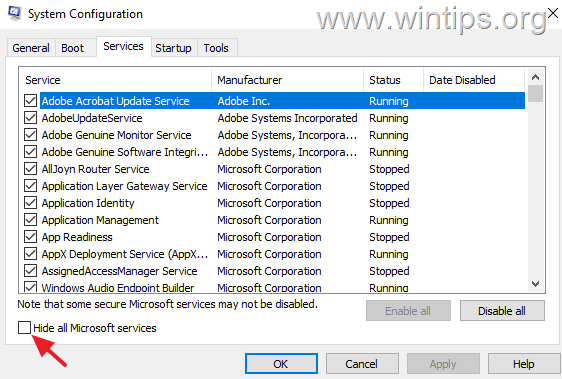
3. At Services tab, check the Hide all Microsoft services checkbox.
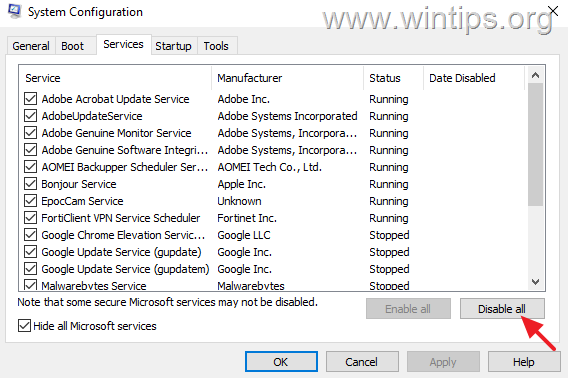
4. Then press the Disable all button, to disable all non Windows services that start with Windows. When done, click OK and restart your PC.
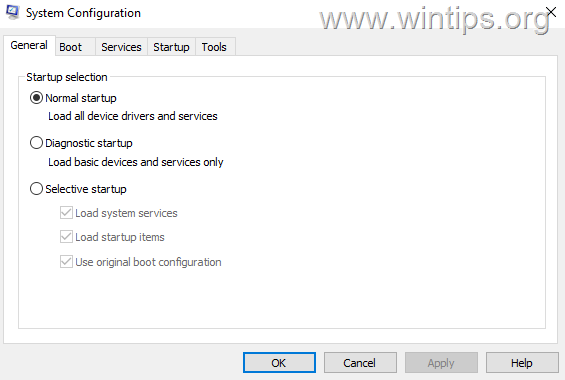
5. After restart, check if File Explorer works now without lags. If yes, open 'msconfig' again and enable one by one the disabled services and reboot until you find the culprit. If the problem persists, select the the 'General' tab, choose Normal Startup, reboot your PC and continue to next method.
Method 6. Change Windows Explorer options.
Some users reported that the slow performance of File Explorer in Windows 11 disappeared after they set File Explorer to open on "This PC" instead of "Quick Links" and after clearing the File Explorer's history.
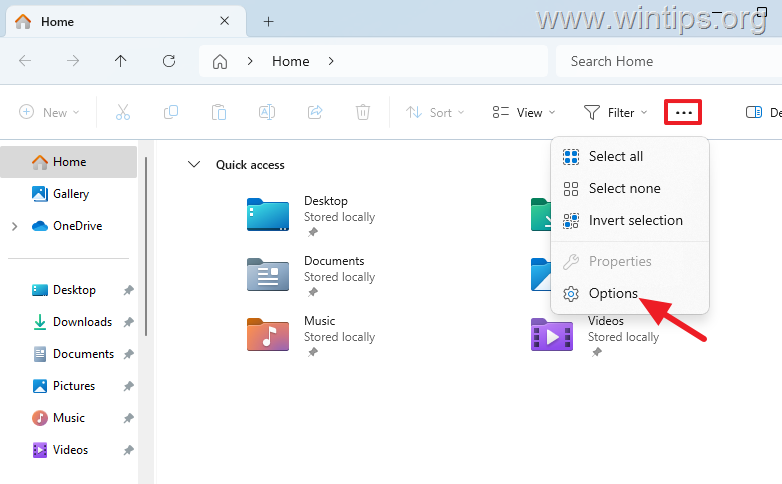
1. Open File Explorer and from the three dots menu, click Options.
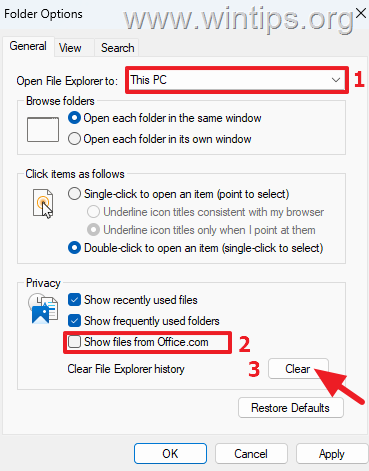
2. In General tab, do the following and then click Apply > OK:
- Change the Open File Explorer to: from Home (or "Quick Links" in Windows 10) to This PC.
- Uncheck the option Show files from Office.com
- Click Clear to delete File Explorer history.
3. Now close all File Explorer windows, reopen Windows Explorer again and check if the problem is solved.
Method 7. Remove Quick Access Network Links.
Windows displays in the "Quick access" menu, a list of recently visited folders/places and a list of the recently opened files.
Although this is very convenient, it can cause File Explorer to lag or not respond, especially when the Quick Access menu contains a location that no longer exists.* So, proceed as follows…
* For example: If the Quick Access menu has a shortcut to a network drive that no longer exists, it can cause delays in Windows Explorer.
1. Under Quick Access (aka "Home" menu in latest versions of Windows 11), remove any "Network Locations" that points to a network shared folder that is not currently available or to a drive/location that no longer exists.
2. Then close and restart File Explorer and see if it still lags. If so, then go ahead and also remove any other links to network sites (even if they exists).

Method 8. Reset Quick Access Links to default.
The next method to fix the File Explorer lags in Windows 11, is to reset the quick access locations to default and clear the recent files. To do that:
1. Navigate to the below mentioned locations and delete all contents in them:*
- %APPDATA%\Microsoft\Windows\Recent\AutomaticDestinations
- %APPDATA%\Microsoft\Windows\Recent\CustomDestinations
- %APPDATA%\Microsoft\Windows\Recent

* Notes:
1. To easy navigate to the above locations, copy-paste each address on Explorer's address bar and hit Enter.
2. You will notice that 2 files are not deleted from the folder "AutomaticDestinations". Don't worry, this is normal. BUT, if you still face the problem, try these steps:
1. Open Command Prompt as Administrator.
2. Navigate at the "AutomaticDestinations" folder, by giving this command:
- cd %APPDATA%\Microsoft\Windows\Recent\AutomaticDestinations
3. Now, without minimizing the command prompt window, open the Task Manager and in Details tab select the explorer.exe and click End Task.
4. Finally in command prompt window give the following commands in order:*
- del *.*
- explorer
* Hit Y when prompted to delete the files

2. After deleting the files under he above locations, restart the Windows Explorer process (see method-1), or restart your PC and check if Explorer is working normally now.
Method 9. FIX Slow Windows 11 File Explorer by Disabling Third-party Extensions.
File Explorer may freeze or become unresponsive due to a third-party shell extension. So, do the following:
1. Download the ShellExView utility from NirSoft.
2. Extract the ZIP file on a folder.
3. Open the extracted folder and double-click at shexview.exe application
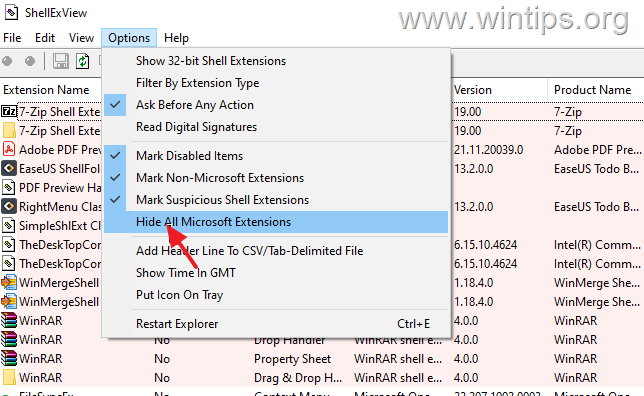
4. At Options menu, click on Hide All Microsoft Extensions.
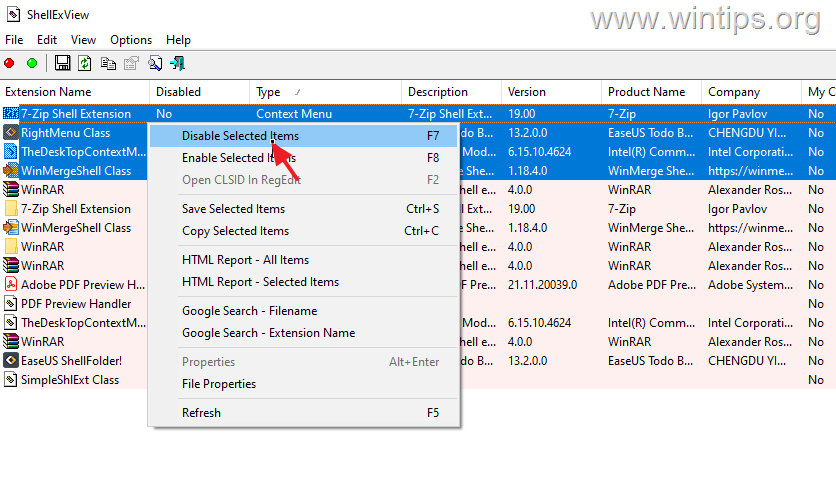
5a. Now press and hold-down the CTRL button and click one-by-one all the Context Menu extensions to select all of them.

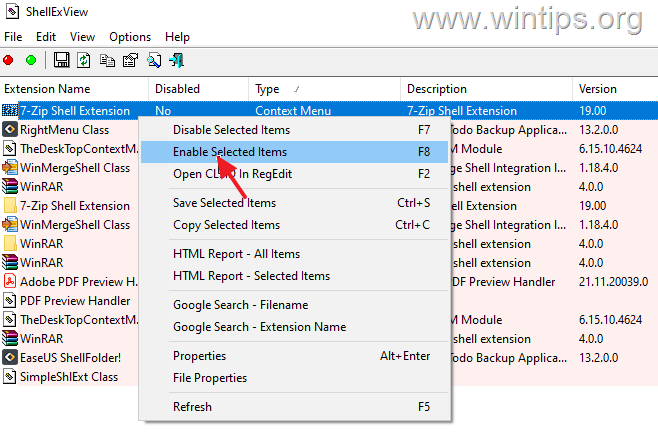
5b. Now, press F7 or right-click and choose Disable Selected items. Then ask Yes on the confirmation window.
6. Now reboot your computer and check if File Explorer has stopped crashing or freezing. According the result, proceed as follows:
- If the problem exists and the file explorer still crashing, repeat the steps 5a & 5b above, to enable all the disabled Context menu extensions and skip to net method.
- If the problem is fixed, proceed to find out which particular Context Menu extension is causing the problem by using the below procedure:
- Open the ShellExView utility.
- Click on the first Context Menu extension on the list and press F8 or right-click on it and choose Enable.
- Then restart your PC. If the File Explorer is working without problem, proceed to enable the next disabled Shell extension. If File Explorer is still slow, disable again the particular extension you enabled before or uninstall the program that installed it.
Method 10. Repair Windows System Files.
Repairing Windows system files is a common but important step in solving Windows 10/11 problems like the one mentioned here.
1. Open Command Prompt as Administrator. To do that, type "cmd" or "command prompt" in the search and then click Run as administrator in Command Prompt result.

2. At the command prompt window, copy-paste the following command & press Enter:
- Dism.exe /Online /Cleanup-Image /Restorehealth
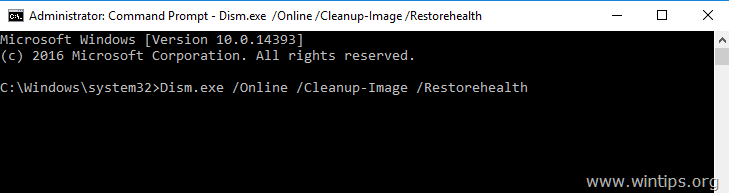
3. Be patient until DISM repairs component store. When the DISM operation is completed, copy-paste the command below and press Enter:
- SFC /SCANNOW
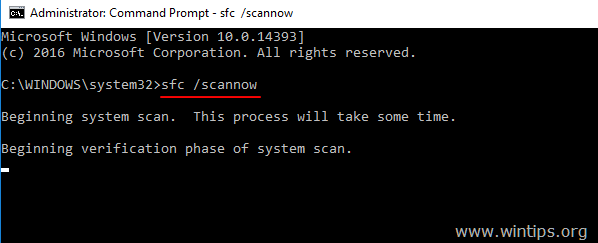
4. When SFC scan is completed, restart your computer and check if the problem is fixed.
Method 11. Run System Maintenance Tool
Windows 11 like Windows 10 has a built-in system maintenance tool to scan and fix Windows problems. When File Explorer starts to lag and become slow, using this tool can help fix the problems.
1. Type "maintenance" in Search and then open Security and Maintenance in Control panel.
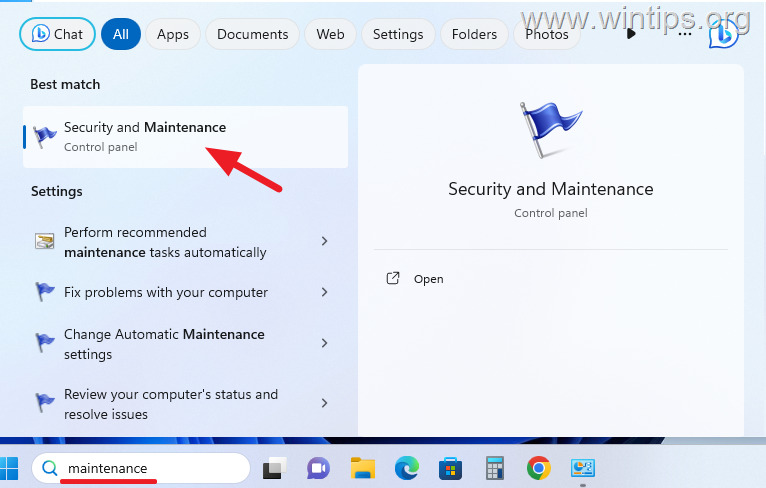
2. Expand the Maintenance section and select Start maintenance.
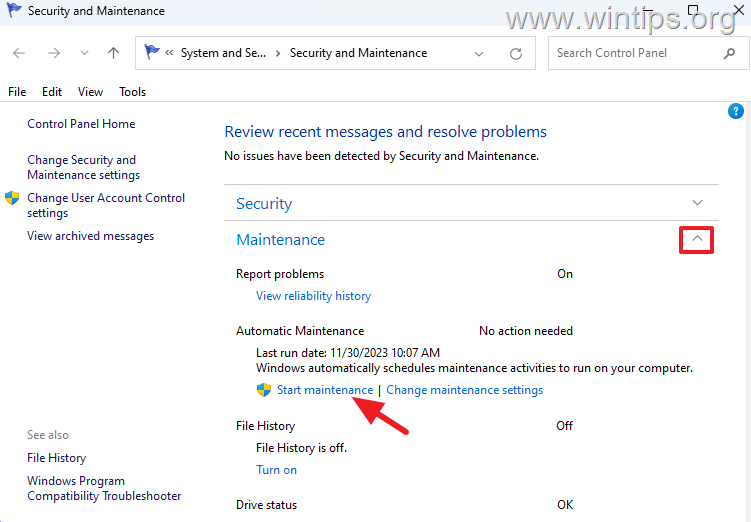
3. Wait the maintenance progress to complete and then check if the problem is fixed.
Method 12. Check Hard Disk for Problems.
In some cases the slow performance of File Explorer in Windows can be due to disk errors or disk hardware problems.
To check the health of the disk, download and run the CrystalDiskInfo utility, or see if your disk manufacturer offers a software that checks your disk for hardware problems.
To repair errors on disk, you can use the CHKDSK utility as follows:
1. Type "command prompt" or "cmd" in Search and then click Run as administrator in Command Prompt app.
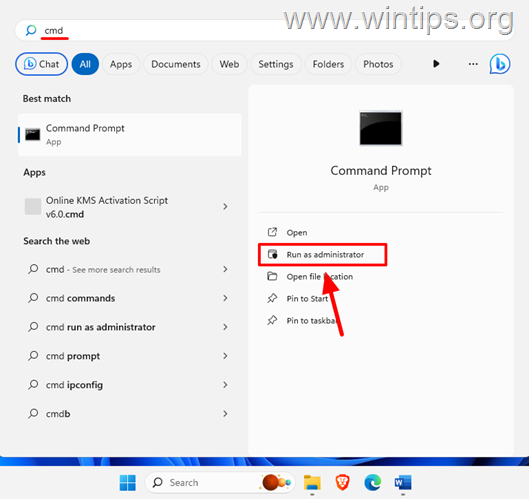
2. In the Command Prompt window, type the following command and press Enter.
- chkdsk /f
3. When asked if you want to check the disk the next time the system restarts, press the "Y" key.
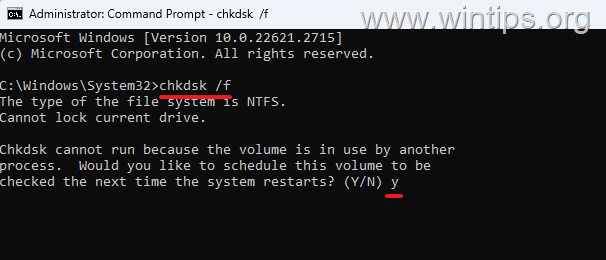
4. Now close all open programs and reboot your PC.
5. After restarting, Windows will scan the disk for errors and fix them.
6. When the operation is complete, your computer will restart automatically. After entering Windows, check if File Explorer works without lags.
Other Solutions to fix the Slow File Explorer on Windows 11/10.
If none of the above methods solve your Windows Explorer slowness and hangs issue, see if any of the solutions below work for you.
1. Uninstall 3rd Party Antivirus: Antivirus software is vital to computer security. However, if you're using a third-party AV program and experiencing problems with File Explorer, there may be a conflict. To check if this is the problem, uninstall your third-party AV software, restart your computer, and see if File Explorer behaves normally. If so, consider using the built-in Windows Defender or try reinstalling the AV program.
2. Reinstall OneDrive or iCloud app. As mentioned above, OneDrive and iCloud apps sometimes cause the Windows Explorer to crash or not respond. So, if you're using OneDrive or iCloud apps to sync your files on the cloud try to uninstall and reinstall these apps.
3. Repair Windows with In-Place Upgrade: If after following the methods above, you're still having problems, your last option is to repair Windows with an in-place upgrade. To do this, use the instructions in one of these tutorials, depending on your version of Windows.
- How to Repair Windows 10 with an In-Place Upgrade.
- How to Repair Windows 11 with an In-Place Upgrade.
That's it! Which method worked for you?
Let me know if this guide has helped you by leaving your comment about your experience. Please like and share this guide to help others.


- Remote Desktop (RDP/RDS) Stops Working After September 2026 Windows Update: How to Fix - September 15, 2026
- Windows 11 KB5124008 Causes No Sound or USB Audio Code 10: How to Fix - September 14, 2026
- Copilot Missing or Grayed Out in Outlook: How to Fix - September 10, 2026



March 23, 2025 @ 1:30 pm
I also had problems with Explorer in Windows 10, but it was related to the number of folders that were opened. As more folders are opened, the slower it becomes to open a file from within a folder.
It took me a lot of time to investigate the problem, but the solution I found was very simple and effective In/options/folder and options/view), check the box for "Open folder windows in a separate process." That's it. When this box is enabled, Explorer will start a separate process in which all the folder views are handled.
The problem, as far as I can see, is that in Explorer, the threads that are opened a folder opened are not terminated when the window with that folder is closed. So, over time, you will see a significant increase in the number of threads when this setting is not enabled. If it is enabled, not all threads are terminated when a window is closed, but performance remains acceptable. I think Microsoft has some programming to do to solve the issue, which means ending unused threads directly or within a specified time frame.