
How to display all Programs menu in Windows 8 taskbar.
Windows 8 desktop interface doesn't include the traditional “Start menu” button anymore. Because of that, you cannot easily find all the installed programs on your computer. This tutorial contains step by step instructions on how to add a new programs toolbar in your Windows 8 taskbar (desktop interface) in order to easily find all the installed programs on your computer, without using any third party software like Classic Shell.
How to add the ‘Programs’ menu toolbar in Windows 8 taskbar.
Step 1: Enable “Hidden Files” view.
First of all, enable the “Hidden files” view. To do that:
1. Navigate to Windows Control Panel and open “Folder options”.
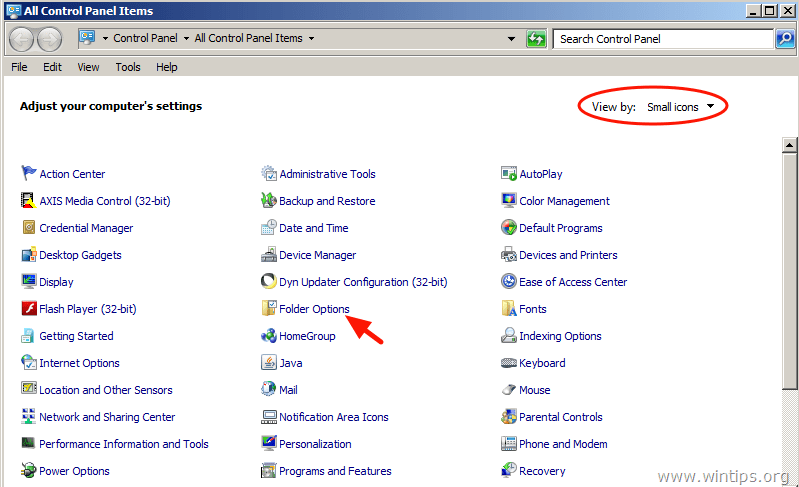
2. In the “View” tab, enable the "Show hidden files folders and drives" option and choose “OK”.

Step 2: Display the “Programs” menu toolbar in Windows 8 Taskbar.
To add a new “All Programs” menu toolbar on your Taskbar:
1. Go to your Desktop and press the “Right-click” key on your mouse over an empty space on your Taskbar.
2. From the menu that appears, choose “Toolbars” > “New toolbar”.
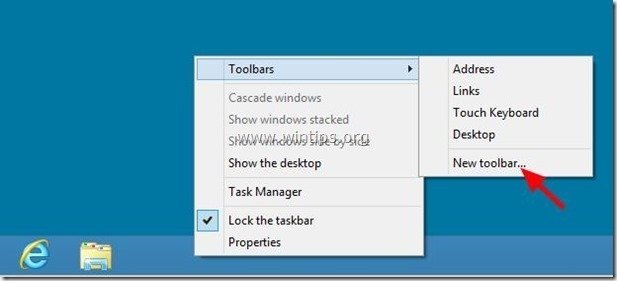
3. Navigate to the following path: “C:\ProgramData\Microsoft\Windows\Start Menu” and select the “Programs” folder.

From now on, you should have the “Start Menu” displayed on your taskbar, while using the Windows 8 desktop Interface.
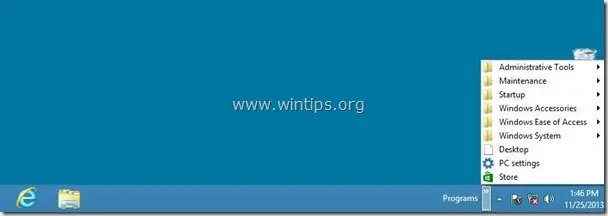
Enjoy!


- Fix "The Trust Relationship Between This Workstation and the Primary Domain Failed" - September 8, 2026
- Fix New Outlook and Teams Not Opening After KB5121003 on ARM PCs - September 3, 2026
- Windows 11 KB5120998 Breaks Mouse Cursor and Wallpaper Personalization (FIX) - September 1, 2026

February 11, 2016 @ 5:36 pm
Thanks…. Its helpful/
May 2, 2015 @ 9:54 pm
Oh man. Tq so much. It all make sense now
November 30, 2014 @ 7:29 pm
tnx, very good. goodluck
June 5, 2014 @ 11:45 am
That only shows one Start Menu folder, the per-user one, not the All Users menu.
June 5, 2014 @ 12:26 pm
Hello GK, This is for all installed programs from all users.
March 27, 2019 @ 4:58 pm
He meant this config needs to be created by each user and not a common setting which can be applied to all users or default user profile.