
FIX: VirtualBox Running Very Slow in Windows 10/11. (Solved)
After installing VirtualBox on a Windows 10 or 11 host machine you may notice that the guest VM machine is running very slowly for no apparent reason. If you are experiencing such a problem and want to make VirtualBox run faster, continue reading below.
This tutorial contains several methods to optimize VirtualBox's performance under Windows 10 and Windows 11 OS.
FIX: VirtualBox Machine Runs Slowly on Windows 11/10.
- Disable Hyper-V & Hypervisor.
- Remove & reinstall Guest Additions.
- Allocate More System Resources to VM.
- Set Power Plan to High Performance.
- Disable 3D Acceleration in VirtualBox.
- Change Graphics Controller in VirtualBox.
- Disable Host I/O Cache in Virtual Box.
- Change Chipset to ICH9.
Method 1. Disable Hyper-V & Windows hypervisor.
Hyper-V is a hardware virtualization product built into Windows 11/10/8.1 Professional and Enterprise Editions and on Windows Server 2012 and later versions. But, when Hyper-V feature is enabled, VirtualBox VM runs very slowly and must be disabled.
1. Navigate to Control Panel > Programs and Features > Turn Windows features on or off

2. Uncheck the following features:
- Containers *
- Hyper-V *
- Virtual Machine Platform
- Windows Hypervisor Platform
- Windows Sandbox
* Note: The 'Containers' and the 'Hyper-V' features exists only in Windows 10 PRO.

3. Restart the computer after uninstall.
4. Open Command Prompt as Administrator.
5. Type the following command and press Enter:
- bcdedit /set hypervisorlaunchtype off

6. Reboot your PC.
7. After reboot, start the VirtualBox VM machine and normally the problem will be fixed. If not, proceed to the rest methods below.
Method 2. Remove & re-Install VirtualBox Guest Additions.
The VirtualBox Guest Additions consist of device drivers and system applications that optimize the operating system for better performance and usability. But sometimes, especially after a Windows update of the guest machine, it needs to be reinstalled to fix performance issues.
1. Navigate to Control Panel > Programs and Features and uninstall the VirtualBox Guest additions.

2. After uninstall restart your PC.
3. Finally proceed to install Guest Additions again and check if the problem is fixed. If not, proceed to the next step:
Method 3. Allocate More CPU and Memory resources.
Another cause of slow VirtualBox performance is the low resources you have allocated to the virtual machine. For example, Windows 10 needs at least 4GB of RAM to run smoothly. To allocate more CPU and Memory on the VM machine:
1. Open VM settings and select System on the left.
2. At Motherboard tab, drag the slider to the right and maximize the allocated memory for the VM machine.

3. At Processor tab, drag the slider to the right and allocate more CPU's for the VM machine.
4. Also ensure that the processor's Execution Cap is set to 100%

Method 4. Change Power Plan to High Performance.
Another reason for the slow performance of VirtualBox, especially if you are using a laptop, is the power plan you use for how your device consumes and saves power. In order for VirtualBox to run smoothly and without delays, Power Plan must be set to High Performance.
1. Navigate to Control Panel > Power Options.
2. Select Change Plan Settings.

3. Click Change advanced power settings.

4. Change the Power Plan to High performance and click OK.

5. Start the VirtualBox machine and see if it continues to run slowly.
Method 5. Disable 3D Acceleration in VM Settings.
Another reason VirtualBox runs very slowly is when 3D acceleration is enabled.
1. Open VM settings and select Display on the left.
2. Uncheck the Enable 3D acceleration checkbox and click OK.

3. Now start the VM machine and see if it's running faster.
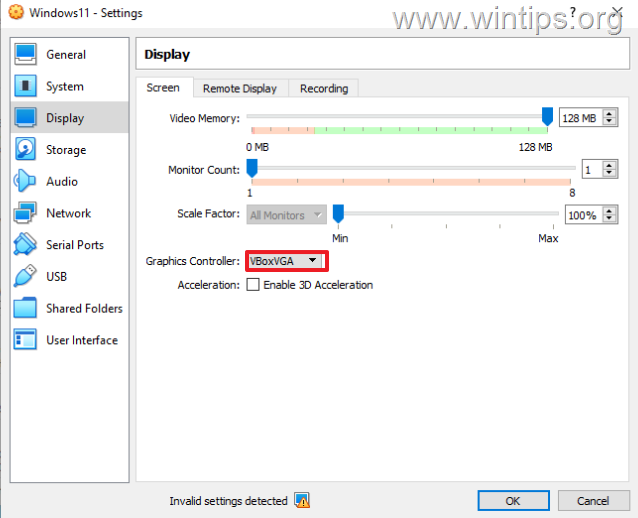
Method 6. Change Graphics Controller in VM Settings.
Another method to optimize VirtualBox's performance under Windows 10/11, is to use a deterrent graphics controller on the VirtualBox machine. So proceed as follows:
1. Open VM settings and at Display options change the Graphics Controller from VboxSVGA or VboxVGA. *
* Note: If it is already VboxVGA, change it to VboxSVGA and see if that makes any difference.
Method 7. Disable Host I/O Cache in SATA Controller.
Although the Host I/O Cache of the disk controller helps VirtualBox to run faster, in some cases it does not.
1. Open VM settings and select Storage on the left.
2. Uncheck the Use Host I/O Cache checkbox and click OK. *
* Note: If it is already Disabled then Enable it.
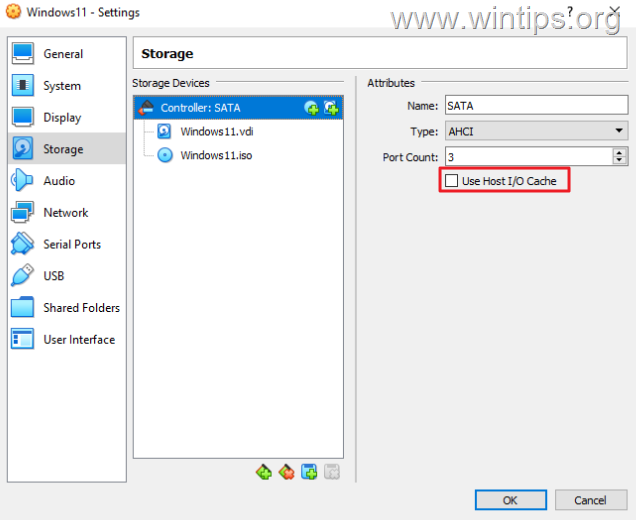
3. Start the VM and see if it running better now.
8. Change VM's Chipset to ICH9.
If, after following the methods above, the slow performance issue in the VirtualBox virtual machine is not fixed, try the following:
1. Open VM settings and select System on the left.
2. In 'Motherboard' tab change the Chipset type from "PIIX3" to "ICH9" and press OK.
3. Start the virtual machine and see if it's faster now.

That's it! Which method worked for you?
Let me know if this guide has helped you by leaving your comment about your experience. Please like and share this guide to help others.


- Remote Desktop (RDP/RDS) Stops Working After September 2026 Windows Update: How to Fix - September 15, 2026
- Windows 11 KB5124008 Causes No Sound or USB Audio Code 10: How to Fix - September 14, 2026
- Copilot Missing or Grayed Out in Outlook: How to Fix - September 10, 2026



March 7, 2025 @ 10:37 pm
For me, I caved and made a change to my VM's network settings,
Attached to: 'Bridged Adapter'
Name:
Promiscuous Mode: Deny
and check marked, 'Cable Connected'
Now D/L's through my VM are blazing fast.
August 17, 2024 @ 6:42 pm
It was very frustrating to use the system before changing these options. In my opinion the most important aspect is to regulate THE SYSTEM RESOURCES, Indeed, it is necessary to set to THE MAX VALUE POSSIBLE the parameter of motherboard and processor if You want to turn on a huge system like Windows 10/11.
Thank You very much, very helpful!
August 5, 2024 @ 12:24 pm
Thank u So Much the point 1 for we worked as a Champ. Very Helpful! Thank u
April 25, 2024 @ 6:50 pm
Great advices!!!! Should only add where to apply changes to Windows, at host or guest system….
February 6, 2024 @ 3:29 am
All last year it was working fine my Virtualbox and from January it was really sloow. I thought virus so I have scanned my laptop to deth and finally my friend send link to your site.
So far done everything up to and including step 4: it appears to have fixed the issue on my laptop.
Thanks
November 13, 2023 @ 2:26 pm
For Windows users:
Starting VirtualMachine hangs at 20%
Solution: Run as local administrator. (Right mouse click and select 'run as administrator'
September 13, 2023 @ 7:17 pm
Item 1 saves me… It tooks hours to enter on mac os installation and then hangs,
now its starting in 2 mins
June 29, 2023 @ 10:09 am
Helped a lot. ,thank you.
August 29, 2023 @ 11:00 pm
Very helpful! Thanks!