
FIX: Windows 10/11 Scrolling down on its own.
If Windows 10/11 scrolling down on its own, continue reading below to fix the problem.
One of the strangest problems you may encounter in Windows 10/11 is when the mouse automatically scrolling to the bottom of the screen without any user action. As you understand, if Windows starts to scroll up or down uncontrollably or if the pointer moves from one end to the other on its own, this is very frustrating and can also make your computer unusable.
The automatic scrolling down or up of the mouse, can mean a problem in the hardware or in the software of your computer and in this article we will help to solve the problem.
How to Fix: Mouse scrolling down on its own on Windows 10/11.
Step 1: Check the Hardware.
Whether you're using the laptop touchpad or an external mouse, there are a few simple steps to check if the uncontrollable mouse scrolling is caused by your hardware.
- Unplug and re-plug you mouse and see if the problem persists. Also, make sure that dirt is not blocking the mouse scroll wheel.
- Plug the mouse or the mouse receiver (if your mouse is wireless), into a different USB port.
- Make sure that the keyboard’s End or the Down-arrow key(s) is not pressed or damaged. This could force Windows to scroll down automatically.
- If you are using a wireless mouse, replace the battery and check if the problem has disappeared.
- If you're using a laptop with an external mouse unplug it and see if the problem persists. If yes, shut down the computer and clean the surface of the touchpad. If the touchpad is damp or greasy, the cursor may behave strangely.
- See if the problem occurs with another mouse or check the mouse on another computer.
- Remove any other pointing devices you may have, such a USB pen tablets or Game Controllers.
STEP 2: Troubleshoot the software.
If after following the above steps, Windows 10/11 still automatically scrolls to the bottom of the page or the mouse behaves erratically, the problem may be caused by incorrect Windows settings, recent unstable updates, or faulty mouse drivers. At such a case, follow in order the methods below:
- Turn Off ‘Scroll inactive windows when hovering over them’ option.
- Uninstall Mouse & Touchpad drivers.
- Scan and repair the system files.
- System Restore.
Method 1: Disable ‘Scroll inactive windows when hovering over them’ option.
This problem has been reportedly resolved by changing the Mouse settings.
1. Press the Windows key + I to launch the Settings app.
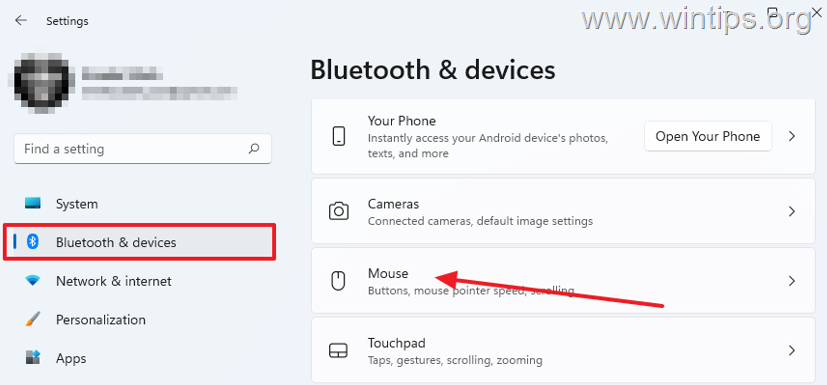
2. On the right pane, select Bluetooth & devices, then click Mouse. *
* Note: On Windows 10, go to Devices > Mouse.
3. Disable the option Scroll inactive windows when hovering over them under the Scrolling options.
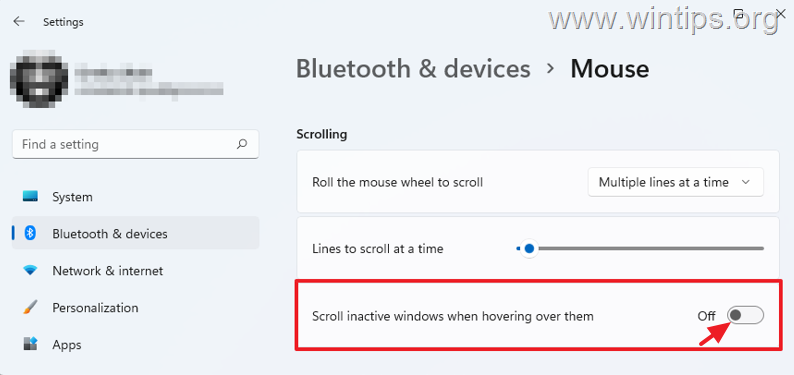
4. Once that is done, normally mouse will stop scrolling down on its own. However, if the problem persists, proceed to next method.
Method 2: Uninstall and Reinstall the Mouse/Touchpad driver(s).
The next method to fix the "mouse auto scrolling down" issue, is to remove all the mouse drivers from your PC and to re-install them. To do that:
1. Right-click on the Start menu and select Device Manager.

2. Expand Mice and other pointing devices and then right-click at each pointing device (mouse or touchpad), and select Uninstall device. *
* Note: If you own a laptop remove only all the mouse drivers and restart your PC. Then, if the problem persists remove and the touchpad driver(s).
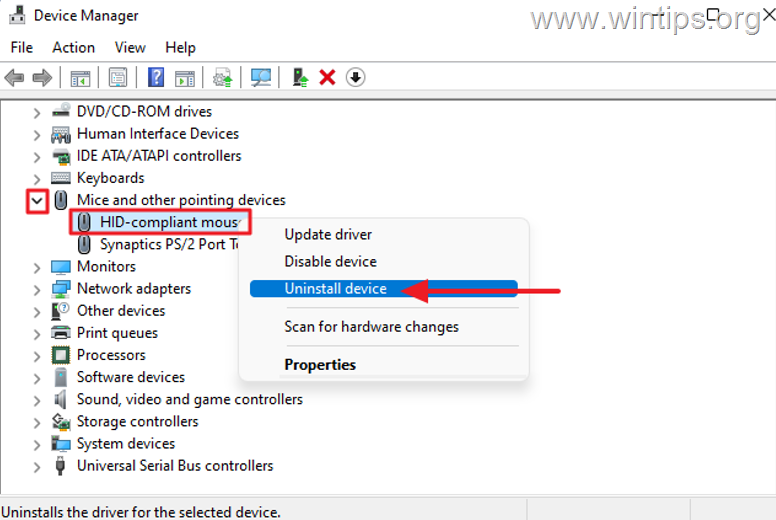
3. A dialog box will appear with a warning. Select Uninstall to confirm the removal.
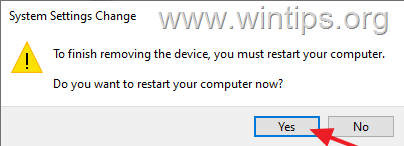
4. Do the same for all installed mouse or touchpad drivers and when prompted restart your computer. *
* Note. If during the operation you "lose" your mouse, press ALT + F4 and Enter to Shutdown your PC. Then turn it on again.
5. As soon as the computer is turned on, the appropriate driver for the mouse (or/and touchpad) will be re-installed. Check if the problem is fixed, and if it remains continue to the next method.
Method 3: Scan and repair Windows System files.
System file checker is a command-line tool for scanning and repairing corrupted or missing system files in Windows and can fix many problems.
1. Open command prompt as administrator.
1. In the Search box type: cmd or command prompt
2. Right click on the command prompt (result) and select Run as Administrator.
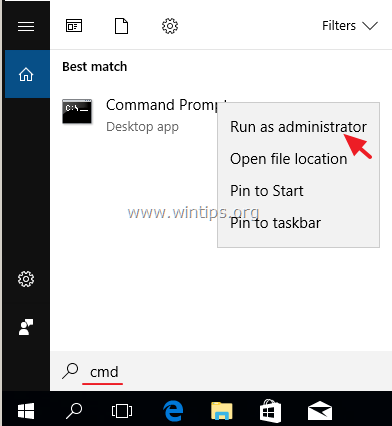
2. At the command prompt window, type the following command & press Enter:
- Dism.exe /Online /Cleanup-Image /Restorehealth
3. Be patient until DISM repairs component store. When the operation is completed, (you should be informed that the component store corruption was repaired), give this command and press Enter:
- SFC /SCANNOW
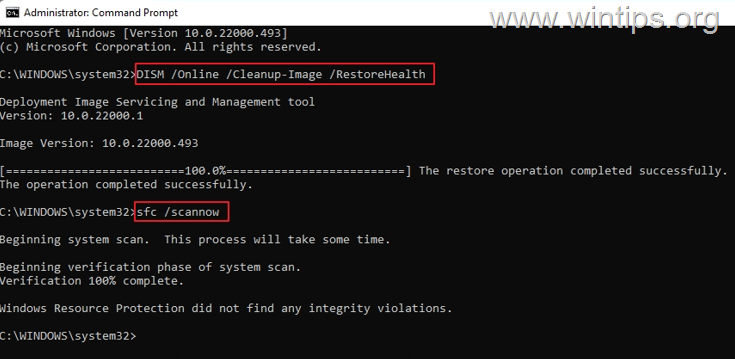
4. When SFC scan is completed, restart your computer and check if everything is working properly now.
Method 4: Perform System Restore.
If the problem persists, you can restore the PC to the state it was in before the problem occurred. To do that:
1. Simultaneously press the Windows  + R keys to open the 'Run' command box.
2. In run command box, type rstrui and press Enter.

3. Click Next at the first screen.
4. Tick Show more restore points, select a preferred date when your computer was working fine and click Next.

5. Finally click Finish to restore your PC on the selected date.
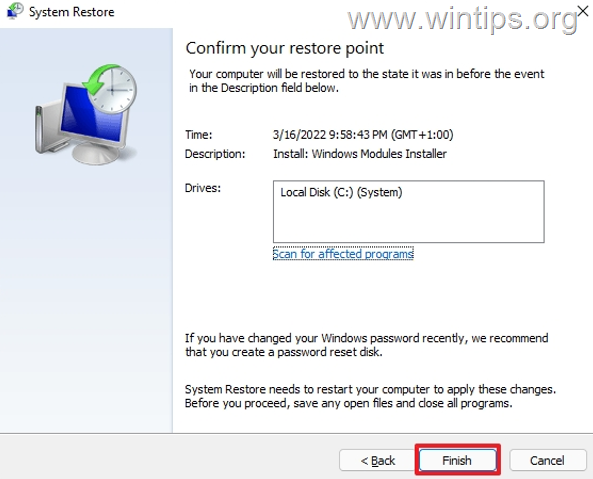
6. Depending on the speed of your computer and the number of files on it, the restore process can take a few minutes or an hour. Therefore, be patient until it is over and the computer restarts back to Windows.
That's it! Which method worked for you?
Let me know if this guide has helped you by leaving your comment about your experience. Please like and share this guide to help others.


- Remote Desktop (RDP/RDS) Stops Working After September 2026 Windows Update: How to Fix - September 15, 2026
- Windows 11 KB5124008 Causes No Sound or USB Audio Code 10: How to Fix - September 14, 2026
- Copilot Missing or Grayed Out in Outlook: How to Fix - September 10, 2026




October 12, 2025 @ 10:38 pm
None of the above worked. Five different youtube how to stop windows scrolling down. This is the best with those handy Admin commands. First time through it found three corrupt files. And fixed them. Second time through. All clear.
I have 14 day version of Malwarebytes running and normal and deep scan.
Nothing found. I have two computers running the same screen. Same mouse, Same keyboard. No problem on computer 2. Only this one. (computer 1)
Windows 10. Fully patched. All mouse, keyboard drivers deleted and re-done.
USB drivers uninstalled and re-installed.
Action example. click on windows icon (bottom left corner) Tap the down or up arrow keys and it scrolls to the bottom last entry in the menu. Some other windows like in control panel scroll up. Windows version 10.0. Pro 19045 Build 19045
May 6, 2025 @ 3:59 pm
lmao, this just happened to me, after a W10 update, and assumed the worst. i had googled and found something about deleting the display driver, which didn't help. another deeper dive into that thread & someone mentioned the mouse usb dongle being the problem. then i found this thread. i simply unplugged the dongle, blew it out, & plugged into a different usb port. problem solved!
March 3, 2024 @ 10:02 am
Thanks for the reminder to swap USB ports – that stopped the crazy scrolling. (It began when I plugged in an unruly docking station.)