
FIX: Bluetooth Adapter Cannot Start Code 19 (Solved)
The following error may appear on the Bluetooth Adapter, on a Windows 10, 8 or 7 based computer: "Windows cannot start this hardware device because its configuration information (in the registry) is incomplete or damaged. (Code 19)"
The problem "cannot start this device" with error code 19 on the Bluetooth adapter is usually caused by an invalid registry configuration.
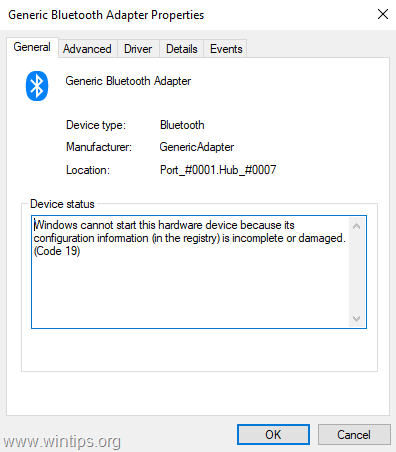
In this tutorial you'll find step by step instructions to resolve the Device Manager error "Device Cannot Start (Code 19)" on Bluetooth Adapter, on Windows 10/8/7 OS.
How to FIX: Bluetooth Adapter Cannot Start (Code 19).
Method 1. Uninstall and reinstall the Bluetooth Adapter Driver
1. Navigate to Device Manager. To do that:
1. Press Windows
+ “R” keys to load the Run dialog box.
2. Type devmgmt.msc and press Enter to open the device manager.

![image_thumb[22]](https://www.wintips.org/wp-content/uploads/2019/05/image_thumb22.png "image_thumb[22]")
2. In device manager, right click on the Bluetooth adapter and select Uninstall device.

3. Click Uninstall.
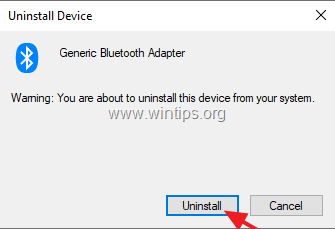
4. Reboot the computer and check if the problem has solved.
Method 2. Remove Invalid Registry Entries for the Bluetooth Adapter.
1. Open Registry Editor. To do that:
a. Simultaneously press the Windows
+ R keys to open run command box.
b. Type regedit and press Enter.

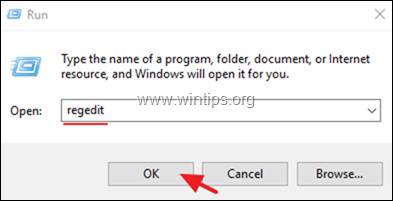
2. At the left pane, navigate to this registry key: {e0cbf06c-cd8b-4647-bb8a-263b43f0f974}
- Computer\HKEY_LOCAL_MACHINE\SYSTEM\CurrentControlSet\Control\Class\{e0cbf06c-cd8b-4647-bb8a-263b43f0f974}
3. At the right pane right click at the UpperFilters key and choose Delete.

4. Perform the same action (Delete) with the LowerFilters key, if found.
5. Close Registry Editor.
6. Restart your computer.
7. After restart the error 10 on the Bluetooth Adapter should be resolved.
That's it! Which method worked for you?
Let me know if this guide has helped you by leaving your comment about your experience. Please like and share this guide to help others.


- Fix "The Trust Relationship Between This Workstation and the Primary Domain Failed" - September 8, 2026
- Fix New Outlook and Teams Not Opening After KB5121003 on ARM PCs - September 3, 2026
- Windows 11 KB5120998 Breaks Mouse Cursor and Wallpaper Personalization (FIX) - September 1, 2026

March 10, 2025 @ 11:56 pm
Thank you so much!! Was struggling the whole of yesterday trying to sort out this issue. Finally came across you're fix.
November 16, 2023 @ 8:45 am
I don't see the "Upper Filters" item in the list
August 2, 2021 @ 12:05 pm
Method 2. Tried various forms of method 1 for the last 2 hours then I see this article and it is solved in 1 minute. Thank you.