How to check and update the DirectX version installed on your system
DirectX (by Microsoft) is a collection of application programming interfaces (API) for handling multimedia tasks in modern computers, especially on game programming and video. The name of these APIs starts with the word “Direct” such as Direct3D, DirectDraw, DirectSound, etc. DirectXs are required in most modern computer games for their proper operation.
Microsoft DirectX is included by default in Windows Operating System. In the list below are mentioned the DirectX versions supported in each version of Windows operating system.
Microsoft DirectX and Supported Windows Versions:
DirectX 11.2: Windows 8.1, Windows RT 8.1 Preview, Windows Server 2012 R2 Preview
DirectX 11.1: Windows 8, Windows RT, Windows Server 2012, Windows 7 Service Pack 1 (SP1) και Windows Server 2008 R2 SP1.
DirectX 11.0: Windows 7, Windows Server 2008 R2, Windows Vista Service Pack 2 (SP2), Windows Server 2008 SP2.
DirectX 10.1: Windows Vista SP1 or later, Windows Server 2008.
DirectX 10.0: Windows Vista.
DirectX 9.0C: Windows XP SP2 or later, Windows XPx64 SP1 ore later, Windows Server 2003 SP1 or later.
If you want to update to the latest DirectX version, then navigate to this link: DirectX End-User Runtime Web Installer.
To check which DirectX version is installed on your computer, follow the steps bellow:
How to check which DirectX version is installed on your computer (Windows 8,7,Vista, XP)
Step 1: Run the DirectX Diagnostic tool.
Open DirectX diagnostic tool by clicking the Start button and then type “dxdiag” on the search box. To do that:
If you have Windows 7, Vista, XP:
Press "Start" menu button.
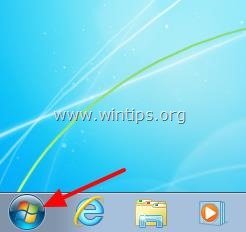
In the "Search" box type "dxdiag" and then press "Enter".
![dxdiag-windows-7[3]](https://www.wintips.org/wp-content/uploads/2013/12/dxdiag-windows-73.jpg "dxdiag-windows-7[3]")
If you have Windows 8.
Right-click at the screen’s bottom-left corner and from the pop-up menu, choose "Run".
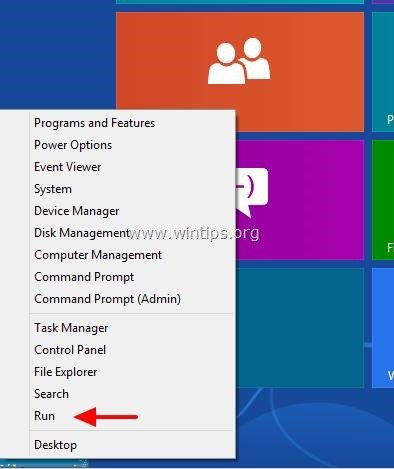
In the “Run” box type: dxdiag and press “Enter”.
![dxdiag[5]](https://www.wintips.org/wp-content/uploads/2013/12/dxdiag5.jpg "dxdiag[5]")
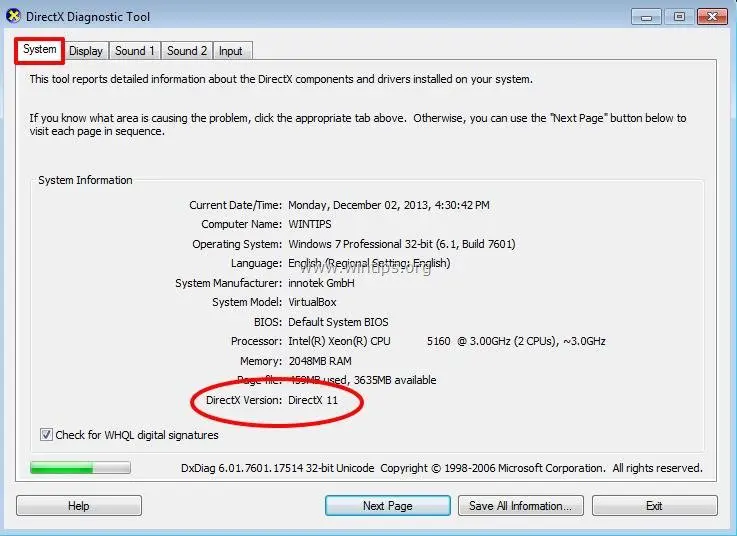
Finally find the DirectX version for your system at DirectX Diagnostic Tool.
At “System” tab, under “System Information” you can view the DirectX Version number. (e.g. DirectX 11).
That’s it.