How to fix “widgets-tweet_button.html.torrent” download on WordPress
,
Yesterday, I noticed that when I tried to open a page from my wordpress blog (https://www.wintips.org), a torrent file named “widgets-tweet_button.html.torrent” started to download.

After checking my blog settings, I finally found the following solution to resolve this problem.
1. Navigate to WordPress administrative panel and from the left pane, select “Settings” > “Sharing”.
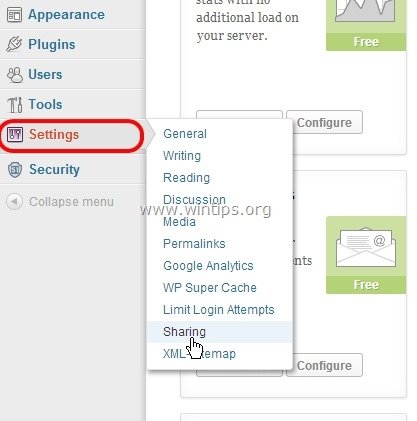
2. At “Sharing” settings, change the “Button Style” appearance (near the end of page) from “Official buttons” to “Icon+text”.

After that action, the “widgets-tweet_button.html.torrent” download stopped occurring.
I hope the above solution also helps others until “Twitter” platform fixes its error.
If this article was useful for you, please consider supporting us by making a donation. Even $1 can a make a huge difference for us in our effort to continue to help others while keeping this site free:


Konstantinos is the founder and administrator of Wintips.org. Since 1995 he works and provides IT support as a computer and network expert to individuals and large companies. He is specialized in solving problems related to Windows or other Microsoft products (Windows Server, Office, Microsoft 365, etc.).
Latest posts by Konstantinos Tsoukalas (see all)
- Windows Update Uninstall Failed with Error 0x800F0825: How to Fix - October 7, 2026
- Apps and Games Crash After KB5124010 Due to AC-3 Audio: How to Fix - October 5, 2026
- How to Fix Windows 11 Update Error 0x80073712 - October 5, 2026