
Solved: Windows update cannot currently check for updates in Windows 8, 7 or Vista
Windows Update error “Windows update cannot currently check for updates because the service is not running. You may need to restart your computer” probably occurs when Windows temporary update folder (SoftwareDistribution folder) is corrupted. To easily fix this error, follow the below steps in this tutorial.
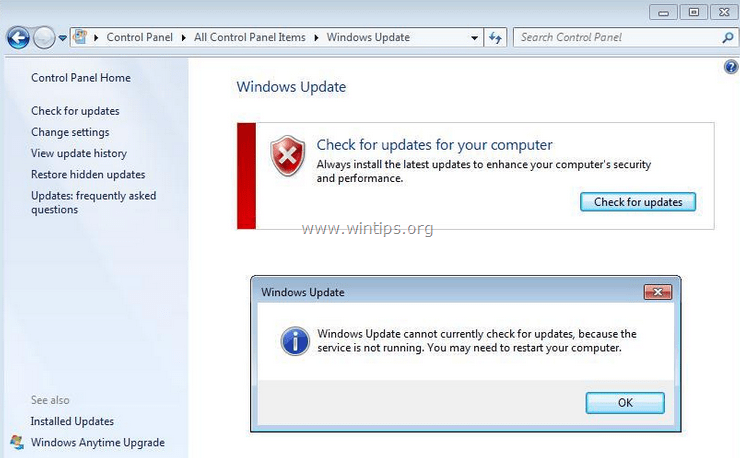
How to resolve Windows (8, 7 or Vista) update error: “Windows update cannot currently check for updates because the service is not running” when you check for updates.
Solution 1: Solve Windows Update cannot check for updates” error using Microsoft Fix It utility
Update: Unfortunately Microsoft has removed the FixIt utility. So, ignore this solution and continue to solution 2.
1. Download the Microsoft Fix It utility to your computer from: https://support.microsoft.com/kb/2730071.
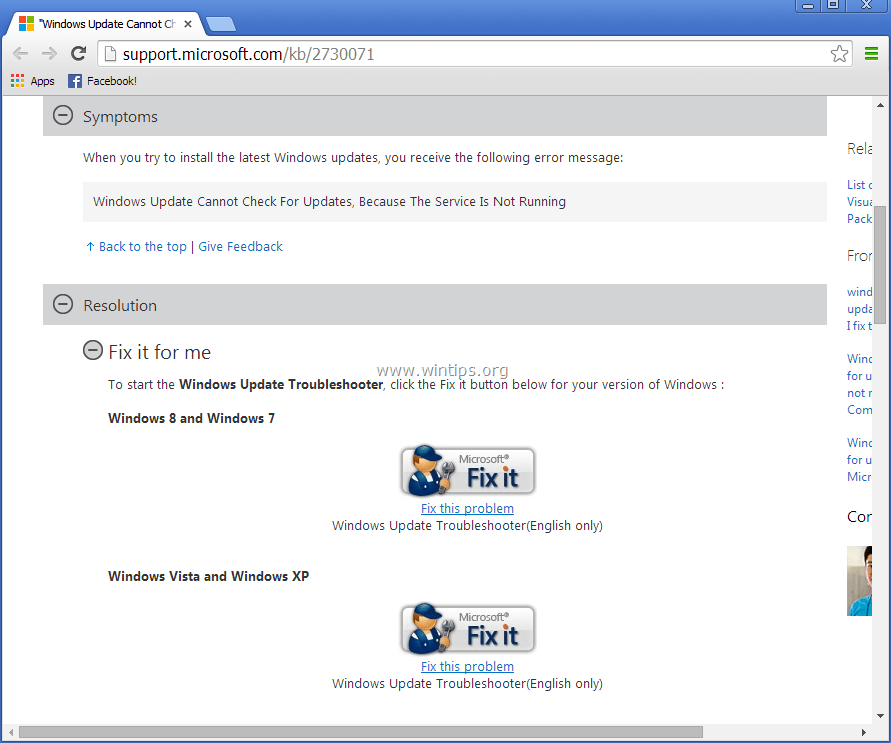
2. Run Microsoft Fix It tool and press “Accept”.
3. Select “Detect problems and apply the fixes for me (Recommended)” option.
4. Let the troubleshooter to fix Windows Update problems and press “Next”. *
* If the problem is fixed, close the troubleshooter and check for Windows updates again. Otherwise continue to Solution 2.
Solution 2: Solve Windows Update cannot check for updates” error manually.
Step 1: Stop Windows Update service.
To do this:
a. Simultaneously press Windows key + R to open run command box.
b. Inside run command box, type: services.msc and press Enter.
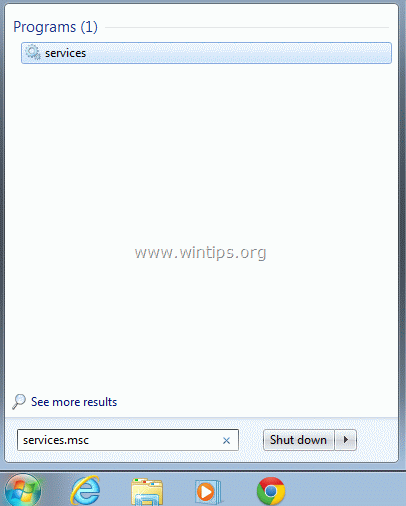
c. Search for Windows Update service, then right click on it and select Stop.

d. Without closing the services window, proceed to the next step.
Step 2: Delete or Rename Windows update temporary storage folder.
To do this:
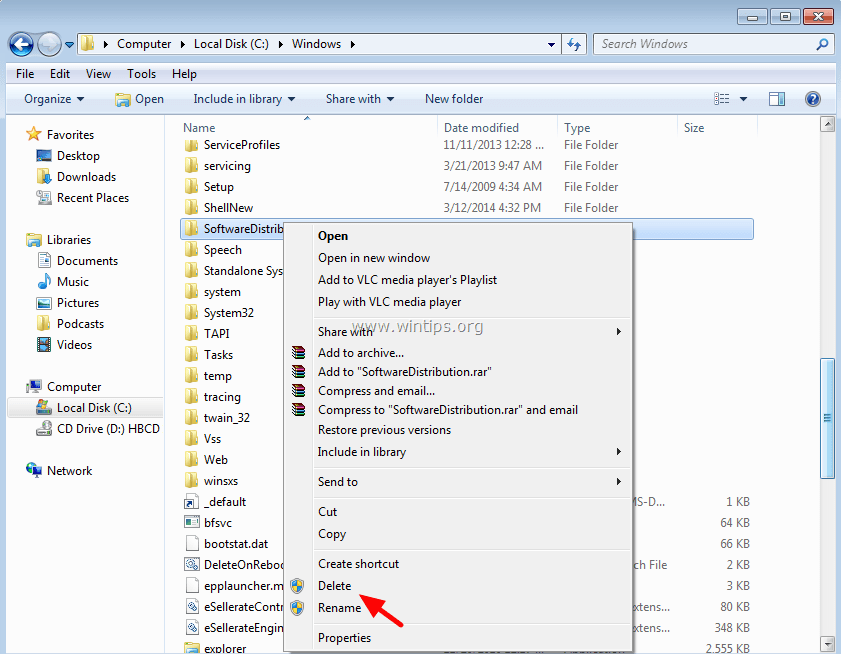
a. Open “My Computer” and navigate to “C:Windows”folder.
b. Delete (or Rename e.g. to “SoftwareDistributionOLD”) the “SoftwareDistribution” folder.
Step 3: Start Windows Update service.
a. Go to Windows services and “Start”the Windows Update service.

b. Try to update Windows again.
Solution 3: Install the KB3102810 Standalone Update.
- Download and install the KB3102810 security update. After installation restart your computer and check for updates. (Applied to: Windows 7 SP1 & Windows Server 2008 R2 SP1.)
- Restart your computer.
- Stop Windows Update Service. (See Solution 2: Step 1)
- Delete the Software Distribution Folder. (See Solution 2: Step 2)
- Restart your computer and then check for updates. Leave your computer about an hour to find Updates.
Solution 4: Update the Intel Rapid Storage Technology Driver.
Install the latest Intel Rapid Storage Technology Driver (Intel RST). *
* You can download the latest RSTS driver from your computer's manufacturer website or from the Intel® Rapid Storage Technology (Intel® RST) Download Center
Hope this helps!


- Windows Update Uninstall Failed with Error 0x800F0825: How to Fix - October 7, 2026
- Apps and Games Crash After KB5124010 Due to AC-3 Audio: How to Fix - October 5, 2026
- How to Fix Windows 11 Update Error 0x80073712 - October 5, 2026

February 16, 2022 @ 5:07 pm
Hey solution 2 also worked for me. Very easy fix to stop windows update/delete software dis folder/restart windows update, Bam ! All done. Thank you.
July 20, 2021 @ 10:50 pm
Thank you so much. Used solution #2 and worked great. I couldn't get my new antivirus to install without the windows update. cheers
December 12, 2019 @ 11:59 pm
Troubleshooting my mom-inlaws pc (Acer-Win7 Home Pro 64 bit)700 miles away that hasn't seen an update or the internet for 8 years over the phone and she is NOT tech savvy….solution 2 worked and she is now a happy camper. I'm way happier cause the requests for support stopped!!
November 14, 2019 @ 12:42 pm
Thank you so much for this information. Solution 2 worked.
September 19, 2019 @ 10:11 am
Thank U SOo much
September 18, 2019 @ 6:48 am
I have also face this issue for some time but could not find any way of solving the problem. And also I have gone through various blogs regarding these but did not find any blog of my satisfaction but, yeah at last your blog was very useful and satisfying.
September 9, 2019 @ 12:39 pm
Thanks! Solution 2 eventually worked for but only after I rebooted my laptop (Windows 7 Professional). So I followed the instructions exactly, but at stage 3(b) it failed (same error message I started off with). So I rebooted my computer and went back to Start>Control Panel>Windows Update>Check for Updates. This time it worked.
<<>> – I don't think this is mentioned anywhere, Microsoft updates can only occur in stages. So once you have successfully completed the updates to your computer, reboot your computer and look for updates again and install them. Repeat this until 'check for updates' says there are no more updates to install. Surprisingly, When I went Control Panel>Update Windows after the second install, the screen greeted me with a message saying there were no more important updates. Nevertheless, I clicked on 'check for updates' and it found another 11 important updates and 15 optional ones. So keep going until clicking on 'check for updates' says there is nothing left!
And yes, I will donate £10 to this site. These self-help sites are a life saver for non-techies like me. It would have cost me 3 times that to get my local computer fixer to do exactly the same as what it says on this site. Donate :)
September 6, 2019 @ 8:36 pm
Solution 2 worked for me. thanks!
August 20, 2019 @ 1:51 pm
Solution 2 was a dream! Thank you so much!
August 12, 2019 @ 12:47 pm
Thanks a lot. This has saved me a lot of headache. You are the best. May God bless you with a life full of abundance!!
July 18, 2019 @ 1:34 am
Thank you so much! Honestly I was getting so frustrated with this! The walk through was great, and very easy to follow! Thank you so much!!
July 28, 2019 @ 6:18 pm
Thanks buddy!!
had looked for other solutions but this worked like a piece of cake.
June 9, 2019 @ 1:48 am
Worked great!! thanks
June 22, 2019 @ 2:52 pm
Worked for me. Thank you!
March 20, 2019 @ 1:15 pm
Thanks also managed to get update to work.
March 15, 2019 @ 8:56 am
Thanks much
March 15, 2019 @ 2:13 am
worked perfectly. thanks for the tip. But makes a good reason to go to macs;-) I can't imagine my mum being able to follow these steps. thanks again
February 22, 2019 @ 3:47 pm
Thank you, very much, it seems to have worked.
(just have to wait for my PC to find all updates of the last 2 years to be sure, now)
March 8, 2019 @ 12:48 am
Brilliant – Solution 2 worked perfectly. Many thanks
March 19, 2019 @ 12:21 pm
Just worked for me as well. #2 FTW
January 27, 2019 @ 4:38 pm
Thanks! Great work guys!
January 22, 2019 @ 11:54 pm
Thank you very much!!! Solution 2 worked for me
January 8, 2019 @ 10:40 am
Solution 2 Worked.
Thanks
January 7, 2019 @ 4:29 pm
hello, why i didn't find windows update on my services? (solution no 2) thank you.
January 8, 2019 @ 10:13 am
@xuan lee: Follow the instructions in this article to solve your issue: https://www.wintips.org/fix-windows-update-service-bits-service-missing/
December 30, 2018 @ 12:34 pm
Very usefull article. Thanks
December 6, 2018 @ 8:59 pm
Bob's easy method worked instantly for me! My machine is now installing updates and it hadn't been updating since 2016! Thanks for the great info Bob!
December 5, 2018 @ 2:15 pm
Awsome. Thank you very much. Solution 2 fixed it. Cheers.
November 30, 2018 @ 11:51 pm
Thank you!!
November 19, 2018 @ 9:58 pm
Thank you soooooo much…
November 16, 2018 @ 1:19 am
For 18 months I had resigned myself to the fact that Windows 7 on my PC would no longer update. I had not tried any of the 'fixes' shown on this web page.
Out of curiosity, I opened Windows update in Control panel and clocked 'Change settings'. I changed them from 'Automatic Updates' to 'Never' & OK. I then clicked 'Check for updates' and Hey Presto! it updated!! I then reset it back to 'Automatic Updates' and it is working fine!!
Worth a shot?
November 21, 2018 @ 3:25 am
None of the proposed solutions worked for me. However, Bob's trick worked! Thanks Bob!
November 27, 2018 @ 10:49 pm
Bob V ROCKS!
His solution worked perfectly for me after many frustrating attempts using other suggestions.
Thanks Bob………….
November 29, 2018 @ 8:42 pm
Bob, you are amazing. That worked right away.
December 20, 2018 @ 2:49 am
solutions 2 and 3 didn't work for me. Bob's did. Thans!
January 1, 2019 @ 12:49 am
Bob V, I followed your suggested steps and I am now up-to-date with all Windows updates and the Automatic Updates is functioning properly. No more error pop-ups. I figured I would start with simplified method first, so I didn't try any of the solutions listed above. Thank you for posting your fix!
January 5, 2019 @ 9:54 am
Worked like a charm. Thanks!!
January 12, 2019 @ 9:45 pm
You, Sir, you are a life saver
May 19, 2019 @ 6:06 pm
I'd tried everything on various sites but none worked, but yours did Bob, my computer is now searching for updates for the first time in 3 years! Many thanks,PJ.
June 4, 2019 @ 12:39 pm
Bob did it again!! thanx Bob
November 15, 2018 @ 1:29 am
This seems to work. Windows hasn't completed process ye but it looks good. I is is now checking for updates
October 31, 2018 @ 2:26 pm
Yes! This worked for me!
October 26, 2018 @ 7:50 pm
i appreciate that done 100%
October 25, 2018 @ 6:08 pm
solution 3 worked for me. Thanks
October 17, 2018 @ 12:41 pm
Solution #2 worked for me – THANKS
October 14, 2018 @ 1:52 am
updgrading the Intel drivers solved my problem.
Thanks,
Ken
October 10, 2018 @ 8:52 am
1. Click Start > type “services.msc” > press enter.
2. Find “Windows Update” in the list, right-click, choose “Stop”. This service must be in the “stopped” state, or the next 2 steps will fail.
3. Open Windows Explorer and navigate to “C:\Windows\SoftwareDistribution”.
4. Delete every file inside the folder. If you receive an error message that some of the files are in use, check to be sure the Windows Update service (step 2.) is stopped.
5. Reboot the computer, and try running Windows Update again.
In a few cases, this procedure didn’t work. In that case, it turns out that some of the .dlls involved with Windows Update were not correctly registered. If this happens to you, here are the steps to correct the issue:
a. Complete steps 1-2 to stop the “Windows Update” service again.
b. Click Start > type “cmd” > right-click and choose “Run as Administrator”.
c. Type the following commands to register the Windows Update services, pressing the “Enter” key on your keyboard after each one:
regsvr32 wuapi.dll
regsvr32 wuaueng.dll
regsvr32 wups.dll
regsvr32 wups2.dll
regsvr32 wuwebv.dll
regsvr32 wucltux.dll
d. Reboot the computer immediately and then check for updates once you log back in.
September 21, 2018 @ 8:27 pm
solution #2 worked for me. Thx
September 26, 2018 @ 9:34 pm
#2 worked for me as well. Small donation made.
October 1, 2018 @ 6:32 pm
How long did it take when checking for update
October 3, 2018 @ 12:23 am
#2 worked for me too
September 20, 2018 @ 9:22 am
many thanks S2 worked for me.
September 16, 2018 @ 6:55 am
Excelent tips! #2 worked for me. Thanks so much.
September 14, 2018 @ 7:26 pm
Solution 2 worked for me
September 14, 2018 @ 6:32 am
Awesome, thanks folks, solution 2 fixed the issue.
September 11, 2018 @ 11:12 pm
Solução 2 para mim foi perfeita. Muito obrigado!
September 11, 2018 @ 9:49 am
Thank you so much. Solution 2 worked for me.
September 8, 2018 @ 11:21 pm
Solution 3 was the ticket!
thanks a million
September 5, 2018 @ 8:44 pm
Solution 4 worked for me, I have an 9 yo HP laptop, Windows Update stopped working when installing HP drivers on a fresh Win 7 Ultimate x64 installation at some point (and a new WD 1tb drive). Thanks a lot, because the HP drivers page of my model does not include the patch you suggest.
Regards
August 30, 2018 @ 9:04 pm
Solution 2 worked for me too!
August 26, 2018 @ 6:20 pm
solution #2 worked for me (win7). thanks!
August 24, 2018 @ 4:06 am
You're angel (Solution 2)
August 23, 2018 @ 11:39 am
solution 3 worked for me. Thank you
August 10, 2018 @ 10:07 am
Solution 2 is just great. Thanks a lot!
August 16, 2018 @ 6:10 am
eazy as fish
Thanks
September 4, 2018 @ 3:03 pm
Same here
August 26, 2018 @ 9:53 pm
True! Works!
July 28, 2018 @ 8:11 pm
Solution 2 worked like a charm!
July 27, 2018 @ 4:45 pm
4 is ok
thanks
July 26, 2018 @ 1:19 pm
solution 2 took less than 1 minute and worked, thank you. one note that may help others: i had left the windows update window open while performing solution 2 and found that i had to close the previously open windows update window and then open windows update again for this to work. (i think microsoft has conditioned us all to restart programs when settings are changed but i still forget occasionally)
July 21, 2018 @ 7:39 pm
going for solution 2 : but in services on my system there is no option windows update.
what to do?
July 22, 2018 @ 9:31 am
@ruma: follow the instructions in this article: https://www.wintips.org/fix-windows-update-service-bits-service-missing/
July 21, 2018 @ 3:18 pm
Solution 2 has done the job. Thanks!
July 12, 2018 @ 4:52 pm
Thanks, solution 2 worked for me. My problem started when windows file explorer would shut down when I clicked on "recent places", and one of the solutions was to make sure my windows was updated, and I discovered my updates was not working. Unfortunately, clicking on "recent places" is still causing windows explorer to quit.
July 10, 2018 @ 7:56 pm
2ND SOLUTION WORKED FOR ME THANKS MAN
July 9, 2018 @ 12:04 am
Solution 2 is simple and works fine ( win 7 64 bit ).
Thanks.
July 6, 2018 @ 6:22 pm
Yes, I appreciate this greatly. I can now relax and play some games on my PC without crashing to Blue screen.
July 9, 2018 @ 8:34 am
Thanks…
June 30, 2018 @ 6:44 pm
Solution 2 worked!
June 29, 2018 @ 7:51 pm
Solution #2 worked perfectly. Thank you!
June 27, 2018 @ 12:50 am
thank you very, very, very much
not only solution 2 worked perfectly, but you also made me feel like a tech savvy (while I am far from being one, I don't even have a "smartphone", because it is too smart for me…)
thanks again
June 27, 2018 @ 12:30 am
This is still relevant and it worked for me. Many thanks.
June 21, 2018 @ 7:48 pm
Worked fine!! Thanks :)))!!!
June 21, 2018 @ 4:14 am
PERFECT,2 IS WORKED FOR ME THANKS A LOT
June 15, 2018 @ 1:01 pm
Solution 2 worked for me. Thanks.
June 15, 2018 @ 9:34 am
worked for mee to.. THANKS
June 15, 2018 @ 4:37 am
Solution 2 worked perfectly…nice to see there are still people willing to help …instead of wanting to hack or infect…
June 12, 2018 @ 1:32 am
Thanks man. Solution two worked…
June 10, 2018 @ 8:45 pm
Solution 2 worked for me.
June 7, 2018 @ 6:13 pm
Helpful thanks a lot
June 6, 2018 @ 5:00 pm
CHEERS MATE ALL SEEMS TO BE WELL. NOW UPDATING.
June 2, 2018 @ 5:22 am
Number two worked great. Thank you.
June 7, 2018 @ 6:53 am
thanks working Step 2: Delete or Rename Windows update temporary storage folder.
June 2, 2018 @ 1:20 am
Option #2 worked for me. Thanks!
May 30, 2018 @ 10:09 pm
It worked. Oh man. Excited!
May 26, 2018 @ 11:14 am
Many thanks!
May 22, 2018 @ 5:57 pm
Solution 2 worked for me on windows 7 64 bit but only with pc restart.
July 1, 2018 @ 3:34 pm
“Windows Update cannot currently check for updates, because the service is not running. You may need to restart your computer.”
Solution 2:
Windows Update: STOPPED
I Renamed “Software Distribution” to “Software DistributionOLD”
Right Clicked: Windows Update: Clicked START
Clicked on ‘Check for Updates.’
– Didn’t work
Went to Solution 3.
– Was about to go for the Download in Setp 1 of Solution 3.
– Decided “Not yet”
– I read the posted comments and T.Y. to:
– andrei – MAY 22, 2018 @ 17:57:20
“Solution 2 worked for me on windows 7 64 bit but only with pc restart.
– Also: wondered… What happens with the Renamed Software Distribution file? “I’ll give it a try anyway” AFTER I checked the “Settings” on Windows Update. duh!
– Bingo! I changed the settings from (When I choose) Update, to the “Install automatically (Recommended)” THEN went for the PC Restart.
– I closed down all apps & folders to “Restart”
– Voilà !!! Hol-ee Cow! Finally something EASY! THAT WORKED!!
THANK YOU http://WWW.WINTIPS.ORG!!
May 22, 2018 @ 8:29 am
Thanks……………….
May 18, 2018 @ 4:38 pm
4 worked, but I had to find the right version for my machine. Last version from Intel RST not even install.
May 17, 2018 @ 5:31 pm
Thank you it worked
May 16, 2018 @ 9:29 am
Solution 3 Worked with me.
Thanks a lot .
May 4, 2018 @ 1:07 pm
Solution 2 worked for me. Thanks!
May 16, 2018 @ 10:17 am
Solution 2 is it.
May 3, 2018 @ 2:19 pm
yuhuu…. option 2 is Work. Thx.
May 2, 2018 @ 10:28 pm
Thank you, the 2nd step worked perfect for me. I left my computer off for around 8 months then this problem happened.
May 2, 2018 @ 2:08 pm
Solution 2 work for me . thank you
April 25, 2018 @ 6:07 am
Solution 2 worked for me! Thanks.
April 25, 2018 @ 1:10 am
Solution 3 worked. Thank You!
April 23, 2018 @ 1:52 am
Thanks – your solution 2 worked very well!!!
April 19, 2018 @ 4:46 am
thanks, the 2nd solution works
April 19, 2018 @ 12:10 am
thank you so much!!!! I wasted hours trying to fix mine and solution 2 did the trick.
April 17, 2018 @ 8:45 pm
You Guys are awesome ! Solution 2 worked for me! THANK YOU !
April 15, 2018 @ 8:45 pm
Option 2 worked! 😀 Just updated windows first time since November. Thanks appreciate it..
April 15, 2018 @ 7:09 pm
You people rock! Solution 2 worked. Thank you so much.
April 14, 2018 @ 4:34 pm
Many Many thanks (2nd option worked)
April 13, 2018 @ 5:07 pm
Thanks for the help! I tried following the instructions from Microsoft, and kept running into snags. No issues with your way!
April 13, 2018 @ 2:36 pm
Thanks for your help with this post. Solution 2 worked for me.
April 11, 2018 @ 6:01 pm
Thanks for this advice, solution 2 worked for me perfectly!
April 3, 2018 @ 4:43 pm
I want to add my thanks–and a little something more tangible–for this. Solution #2 worked for me. I've had update issues for six months and the only solutions I found before this involved changing Registry among other steps. I was hesitant to do that, and finally found your solutions this morning. Basically as simple as renaming a folder. Sheese, so easy and what a relief! Thanks again!
April 5, 2018 @ 8:26 am
Thanks!!! Solution two worked for me as well.
April 6, 2018 @ 2:12 am
Me, too. Thanks so much! Update is installing now. I hadn't had updates since November 2017. One site said this would entail reinstalling Win7!
April 5, 2018 @ 11:17 pm
Thanks so much
like many others i was unable to get updates but your solution 2 worked for me
April 6, 2018 @ 11:14 pm
Thanks guys. This really works.
April 2, 2018 @ 6:05 pm
Solution 2 fixed the issue for me. I am so thankful I found this website. Thank you so much for giving your time and effort to help others that don't have your skillset or knowledge on the subject.
March 30, 2018 @ 4:07 pm
Get-Service "windows update" | Stop-Service
Get-Service "bits" | Stop-Service
Start-sleep 5
Rename-Item C:\Windows\SoftwareDistribution -NewName SoftwareDistribution_old -Force
Start-Service "windows update"
Start-Service "bits"
wuapp
March 26, 2018 @ 8:33 pm
thanks solution 2 works for me !!!
March 22, 2018 @ 11:19 pm
Solution 3 worked great. Steps were much easier to follow than those provided by Microsoft!
March 20, 2018 @ 4:59 pm
this worked, thanks a lot i couldnt update for the longest time because of this
March 16, 2018 @ 1:04 pm
What worked for me was changing the settings to never check for updates then i clicked check for updates and it worked
March 24, 2018 @ 7:39 pm
Thanks, that worked and it was the easiest way yet!
March 25, 2018 @ 6:34 am
This worked for me as well. I changed the settings to "Never check for updates", then manually checked for updates, and finally selected "Install updates automatically."
April 8, 2018 @ 3:30 am
Nina that's brilliant! And so random how/why that worked! You gotta love when simple solutions like that fix windows quirks with no rhyme or reason. Thank you for the time saver!
March 14, 2018 @ 4:12 pm
Renaming "SoftwareDistribution" folder to “SoftwareDistributionOLD" worked great. Downloading updates right now – thank you!
March 8, 2018 @ 6:28 am
That worked excellent. Thank you for your help
March 14, 2018 @ 5:20 pm
Solution 3:
1. Change settings
2. Choose "do not update"
3. close.
4. Change setings
5. Chose "always update"
6. Close
7. Update
March 16, 2018 @ 10:40 am
This is how its done. Perfect.
March 29, 2018 @ 7:00 pm
Simple solution. Thanks.
March 7, 2018 @ 2:25 am
Solution 3 Worked for me…
March 4, 2018 @ 6:33 pm
After a frustrating hour of getting no where on the Microsoft site I decided to to a non Ms site. Fortunately yours was the first I tried and 2 minutes later the problem was solved:) Thank you very much, donated $5.
March 1, 2018 @ 12:01 pm
Solution #2 worked. Thanks.
February 28, 2018 @ 12:19 am
Cheers for this mate
February 27, 2018 @ 3:54 am
(I didn't have an error code … just "Red wording" as the picture shows.) Step 2 worked for me. Note: restart is required. Be sure to restart you puter… check to make sure the update in services is on. Try to do your windows update and wait…. wait…. it did and will work. I had my doubts…. if you have tons of updates, it might take you a bit longer before you harvest all the updates.
Win7 Pro
February 25, 2018 @ 2:02 pm
Solution 2 worked for me! Thank you so much :)
February 28, 2018 @ 12:56 am
I wish I had found your solution 2 sooner.
Thank you for giving me back my sanity!
April 1, 2018 @ 1:20 pm
Solution 2 worked for me as well.
Many thanks
Phil
April 2, 2018 @ 5:29 pm
Worked on my desktop too!
February 23, 2018 @ 9:49 pm
Number 2 was brilliant!
February 23, 2018 @ 7:55 pm
Thanks for this fix! Have an older Dell running Wndows 7, and renaming the "SoftwareDistribution" file worked for me!
Thanks!
February 21, 2018 @ 10:21 pm
Solution 2 did the trick for me also. Thanks.
February 21, 2018 @ 5:34 pm
Option 2 did it. Thank you!
February 21, 2018 @ 11:29 am
Awesome! Thank you very much! Option 2 worked like a charm :)
February 19, 2018 @ 7:18 am
seems to be working let you know soon
February 13, 2018 @ 7:15 pm
Tried #2 and it did not work. But telling it to never update and then checking for updates worked like a charm.
February 18, 2018 @ 3:57 am
Amazing. It works for me!
February 21, 2018 @ 1:34 am
Perfect. Same here for Vista Home — tell it to never check for updates, then manually tell it to check for updates. Thanks!
February 21, 2018 @ 2:38 am
YASSSS. Thank you so much!
February 28, 2018 @ 1:45 pm
Create a .bat file with this code:
cls
@echo off
@echo This Process will repair windows update services:
@echo Remember to run this file as administrator, Press key to continue…
Pause
cls
@echo Repairing Windows Update Services, registering services…
net stop wuauserv
regsvr32 /s wuapi.dll
regsvr32 /s wuaueng.dll
regsvr32 /s wups.dll
regsvr32 /s wups2.dll
regsvr32 /s wuwebv.dll
regsvr32 /s wucltux.dll
net start wuauserv
@echo Process finished, press key to Exit…
Pause
ETIT
February 10, 2018 @ 10:12 pm
Option #2 worked for me. Thank You :-)
February 4, 2018 @ 11:15 pm
Thanks for all of the options…#2 is the one that restored my update capability. Worked perfect.
January 31, 2018 @ 7:13 am
You are a wizard! Microsoft's fix didn't work but your #2 fixed it. Thank you!!
January 31, 2018 @ 4:25 pm
Just want to mention that "Step 4: Update the Intel Rapid Storage Technology Driver" actually made my computer not boot at all. I downloaded the updated drivers at the location that was mentioned in this article and got met with Microsoft Windows 7 always booting into the Startup Repair screen. Luckily I had an image of my machine and just reapplied that image, however that step is dangerous and does not apply to every machine.
Also what eventually worked for me (because my problem was on the image) was simply running a "Disk Cleanup" mode and cleaning everything out including the system files.
That allowed the Windows update utility to work just fine… and probably should be the first step everyone tries.
January 18, 2018 @ 1:07 pm
2nd Solution worked a treat. Loveleh.
January 24, 2018 @ 2:12 pm
I'd been trying to fix this for a while now. Solution #2 worked for me also.
January 17, 2018 @ 7:01 pm
There's a new fix. Change the settings to "Never check for updates (not recommended)". Windows Update might magically let you check, then you can change your settings back.
January 18, 2018 @ 12:05 pm
Thanks. This worked perfectly well for me after i had unsuccessfully tried some of the earlier suggestions.
January 29, 2018 @ 3:10 am
This worked for me THANKS
January 18, 2018 @ 1:30 pm
Thank you very much. Worked perfectly.
January 18, 2018 @ 10:26 pm
Never check updates, then do a check for updates worked. Thanks
January 20, 2018 @ 11:20 pm
Well, I'll be a sonofa…this worked!! Thank you VERY much for posting that. My computer just started having this error just a few days ago and was not having any luck in fixing. Who knew it would be something that simple…
January 22, 2018 @ 4:38 am
Good job. Holy shit finally!
January 23, 2018 @ 4:02 am
You are absolutelly right Jessica.
You are the Best
January 24, 2018 @ 12:00 am
Freaky! I'm an old Dad, like an hour into this, looked at 20 videos, all advising the same thing, almost ready to go deep into the tricky solutions … then one last search and Jessica's suggestion pops up. Totally worked! Thank you!
January 24, 2018 @ 6:36 pm
Thanks this worked. Paid to fix it and it didn't work some service called Regutilities cancelled it and was refunded right away total scam. Yours is working so far will continue to let you know progress. Thx you thx you
January 24, 2018 @ 10:40 pm
THANK YOU! Worked perfectly. Glad I saw this and tried before digging deeper.
January 29, 2018 @ 4:02 am
Thanks Jessica – worked great. So simple, compared to many of the other lengthy & complicated options from IT experts, which do not work anyway. This fix should be widely distributed to save lots of wasted time researching & reading other possible solutions – that in the end do not even work. Microsoft especially should publicise it. Many thanks.
January 31, 2018 @ 11:06 pm
This worked for me as well!
February 3, 2018 @ 8:58 am
Woooooow!! Yep!! lmbao!! Who woulda known this would work?^^ I saw all the comments and had to try myself, took less than 1 second. Clicked not check for updates(not recommended) and instantly was able to check for updates. Thank you, but now my old problem is probably back. Actually DOWNLOADING the updates successfully, gotta quick fix for that too!^^ But yeah, this worked, perfectly!! Thanks again!
March 15, 2018 @ 12:03 am
Thank you Jessica, this worked perfectly for me.
January 16, 2018 @ 7:45 pm
Thank you. Solution 2 worked. Donation made.
January 14, 2018 @ 4:05 pm
Solution #2 seemed to work for me as well. Easy. Thank you. Made small contribution to the cause, will bookmark this site for sure.
January 11, 2018 @ 8:36 pm
Thanks – this seems to have worked for me as well. But, the checking for updates has takes "a very long time".
January 11, 2018 @ 11:59 am
Solution#2 worked flawlessly. It's as easy as flinging my potato. Thanks wintips.
January 10, 2018 @ 4:49 am
Solution 2 worked, for my PC, Win7 64-bit. I tried Microsoft support first, their suggestions were no help. Thank you! Donation already in your tip box :)
January 9, 2018 @ 8:04 pm
Worked perfectly. It was quick and easy. Donation made as a 'Thank You' for eliminating aggravation and helping to keep my blood pressure down.
January 9, 2018 @ 7:11 pm
Solution #2 did the trick – Thanks!
January 9, 2018 @ 8:09 am
Thanks. Solution 2 Worked for me.
January 9, 2018 @ 6:42 am
THANK you
January 9, 2018 @ 12:38 am
Solution #2 was the Golden Ticket. Without this information, I would not have been able to resolve on my own. (I made a small donation as I appreciate this service). Thank you very much.
January 7, 2018 @ 11:14 pm
Solution #2 worked on Windows 7 Ultimate 64 bits.
Thank you.
January 6, 2018 @ 10:13 pm
Of course the MS fix was useless. Solution #2 worked like a charm.
January 6, 2018 @ 8:41 pm
Thank You. I worked through the solutions. Nothing remedied the issue until I got to Solution 4, which did.
I donated (a little).
January 6, 2018 @ 2:50 am
Thank you kind person! May you live long, and your troubles few!
January 5, 2018 @ 11:42 pm
#2 worked for me. Initially made the mistake of stopping the service through the control panel, then I followed the directions exactly and it worked, quick and easy. I'm so thankful that it's the first time I ever donated to a web site like this.
January 5, 2018 @ 8:27 pm
Surprise, surprise – The Microsoft 'resolution' (https://support.microsoft.com/en-gb/help/2730071/-windows-update-cannot-check-for-updates-error-message-when-you-try-to) did not work at all.
Thankfully, Solution 2 worked for me.
January 5, 2018 @ 7:37 pm
Thank you for this page of help, step 2, so simple why doesnt Microsoft have it available!!. Worked perfectly for me.
I just donated and I never normally do that, thank again. :)
January 5, 2018 @ 10:21 am
Thank you!
January 4, 2018 @ 9:04 pm
2nd solution works for me as well. Thx for the support!!
January 4, 2018 @ 7:54 pm
Tried Solution 2 on Windows 7 Pro. Finally! It's searching for updates! THANK YOU.
January 3, 2018 @ 7:56 pm
Works! I just needed to restart the computer between step 3a and 3b.
January 1, 2018 @ 8:53 pm
Thank you!
December 28, 2017 @ 10:37 pm
Good work. . Method 2 worked on Win 7 Home Premium on Dell desktop and note book. Can't buy a thrill ?!! Yes you can. Thanks so much.
Markdale Canada
December 28, 2017 @ 2:31 pm
Great its wroking.thank you
December 27, 2017 @ 9:31 pm
Thank you. It is updating now after renaming the software update folder.
December 27, 2017 @ 5:27 pm
Found a very simple fix that works for Windows 7.
1- Open the Updates control panel and click Change settings on the left
2- Make a note of the current settings under "Important updates"
3- Change the Important updates setting to "Never check for updates (not recommended)" and click OK at the bottom
4- After the Update control panel reappears, click on Change settings again and return the Important update setting back to whatever it was before.
Verified these steps re-enabled Windows update on 5 different PC's running both 32 & 64 bit Windows 7 without having to do anything else and without losing any of the previous update history.
December 29, 2017 @ 7:40 am
This simple fix worked for me too! Thank you!
December 30, 2017 @ 7:28 pm
Worked for me too. Many thanks
December 30, 2017 @ 10:24 pm
OMG!!!!!
This fix actually worked on a Dell workstation running Win 7 SP1 after wasting nearly a month reviewing and analyzing numerous questionable, lengthy and complicated fix methods that were either rejected or didn't work.
Thanks a bunch!!!
December 30, 2017 @ 11:35 pm
fixed it well
January 1, 2018 @ 10:49 pm
Thanks a lot for that very simple and effective fix! Update history preserved, unlike other earlier method I used three weeks ago on another Windows-7 system.
January 2, 2018 @ 12:23 am
Al's option for Win7 worked for me as well. Great job!!!
January 2, 2018 @ 2:08 am
This simple solution worked for me. Thank you!
January 2, 2018 @ 10:23 pm
Worked for me, too. Thanks
January 5, 2018 @ 12:04 am
Worked like a charm – simple and quick. BUT all the responses in a very few days raise the question of why so many of us ran into the same problem at the same time. Any ideas?
January 5, 2018 @ 12:56 am
Thanks very much Al, this worked. I'm no computer whizz so very grateful to folk like you who make these things simple for numpties like me!! Happy New Year!
January 5, 2018 @ 12:08 pm
Has just worked for me also. Many thanks.
January 5, 2018 @ 10:34 pm
Good Job Al!
A very simple fix that worked fine.
MAGA with a new president…impeach and lock him up!!!
January 5, 2018 @ 10:39 pm
This easy solution worked for me after none of the methods described in the article worked.
January 6, 2018 @ 2:10 am
Bless you for sharing that solution! Simple & it works! thank you so much
January 8, 2018 @ 9:20 am
Quite simply thank you guys, particularly al whose solution worked like a charm!
January 12, 2018 @ 5:23 am
Excellent! Brilliant. Works like a charm. Thanks
January 14, 2018 @ 5:40 am
Worked for me too, thank you!
January 14, 2018 @ 1:39 pm
Awesome! that's the best fix as it preserves the history of previous updates, hence simplifies the updating process
January 19, 2018 @ 12:48 am
Worked for me as well Al. I fixed two windows 7 computers in under 5 min. Thank you!
January 30, 2018 @ 11:15 pm
worked for me, thank you so much!!!
December 24, 2017 @ 4:00 pm
IT REALLY WORKS!!! THANKS A LOT
December 23, 2017 @ 10:18 pm
Worked like a charm!!
December 22, 2017 @ 10:55 pm
I tried running the WindowsUpdateDiagnostic tool which did not work. I then tried the following which did get Windows Update working for Win7
Select "Control Panel"
Select "Administrative tool"
Select "System Configuration"
Select (administrative) "Tools"
Select option "Windows Troubleshooting"
Under System and Security select > “Fix problems with Windows Update”
Will fix problem and after seconds will show “Updates available”
January 9, 2018 @ 5:50 pm
This worked for my PC on Win7. Thank you Janusz!
December 22, 2017 @ 1:25 am
Solution 2 worked a treat. Thank you
December 21, 2017 @ 1:41 am
I've recently had to use the second (manual) solution on two Windows 7 Pro 32-bit systems.
Forcing it to create a new SoftwareDistribution folder gets it back on track. Many thanks!
December 20, 2017 @ 8:59 pm
solution 2 is working but you are going to loose all the window update history. This is good for people who are using window at home. But if you are going to try this method at any professional environment then its mean you have to download all the updates from the first day of your window installation. I don't recommend this method for professional environment.
December 21, 2017 @ 9:50 am
@jawad: It's not true. You only miss the update history log for the installed updates.
December 20, 2017 @ 8:13 pm
Solution 2 worked for me. THANX!
December 19, 2017 @ 8:15 pm
Microsoft were no help whatsoever, I'm so pleased I stumbled on your site.
Solution 1 worked straight away. A small donation on it's way.
Thank you.
December 19, 2017 @ 1:07 pm
Thanks so much for your solution. I especially liked your recommendation for the renaming instead of deleting.
The second solution helped instantly.
December 17, 2017 @ 9:51 pm
Second solution worked!! Thanks!!
12/17/17
December 16, 2017 @ 1:53 am
solution 2 worked, but can i now delete the SoftwareDistributionOLD folder?
December 16, 2017 @ 9:46 am
@david: Yes, you can.
December 15, 2017 @ 9:52 pm
#2, Fixed, Thanks! Why cant microsoft make this kind of stuff self-healing?
December 14, 2017 @ 8:07 pm
Solution #2 worked for me. Windows 7. Thank you.
December 14, 2017 @ 6:29 pm
The link in Solution 1 actually works, even though the Microsoft Fix It utility is gone. Microsoft walks you through a few simple troubleshooting steps and then lets you download the Windows Update troubleshooter program (http://aka.ms/diag_wu). Further steps continue to troubleshoot the issue if the Windows Update troubleshooter program doesn't fix it.
December 13, 2017 @ 7:49 pm
Lord God Windows sucks ass. Too bad I have to use it. The folder deletion worked.
December 13, 2017 @ 6:58 pm
Solution #4 worked for me. Tried all the others on this site and others and was down to considering a rebuild, but the Intel RTS install (downloaded from site rts site posted in article).
Thanks…Awesome!
December 13, 2017 @ 6:15 pm
Much appreciated. Solution 2 is working for me.
December 13, 2017 @ 6:26 am
Solution 2 worked a treat. Hope the small donation helps. Efcharistó !!
December 12, 2017 @ 7:44 pm
Awsome so far, worked! Will see if I get an update ever again though!
December 11, 2017 @ 1:45 am
Solution 3 worked for me!!! I have been trying to fix this for almost 24 hours. ::golf clap::
December 10, 2017 @ 1:03 pm
After struggling for five frustrating hours I found your site and Solution 2 worked first time.
Thank you so much.
December 9, 2017 @ 4:01 pm
Many thanks for this very helpful information.
Solution 2 fixed it for me.
To determine if your 'temporary storage folder' is corrupt select "View update history" and if nothing appears then your 'temporary storage folder' needs to be deleted / renamed.
December 9, 2017 @ 6:37 am
Thanks! Solution 3 worked for me.
December 9, 2017 @ 3:21 am
Option #2 worked flawlessly. Very well explained and documented steps you have provided. Well done, and thank you.
December 8, 2017 @ 11:25 am
thank you step 2 worked for me perfectly. I deleted the folder instead of rename and it worked fine showed new updates and downloading
December 8, 2017 @ 10:23 am
thanks..
step 2 worked..
god bless you..
December 7, 2017 @ 1:15 am
Second solution works fine , thank you very much sir
December 6, 2017 @ 11:24 pm
Thanks Solution 2 was the one that fixed it for me and was the easier of the 4 to do
December 5, 2017 @ 9:39 pm
Thank you. Used solution 2. worked in minutes.
December 5, 2017 @ 11:13 am
Solution 2 worked for me – just repaired 7 PCs. Thanks very much.
December 5, 2017 @ 9:38 am
Thank You very much! Solution 2 WORKS!
December 5, 2017 @ 2:31 am
So far, so good. Solved my problem using #2. Utterly grateful for the directions. Have a Happy Holiday!
December 4, 2017 @ 11:48 pm
Thanks, it appears to be working (solution 2).
Too bad Microsoft can't write decent software
December 4, 2017 @ 11:01 pm
It worked! Huge thanks.
December 4, 2017 @ 9:13 am
wow thanks man numder 2 worked perfectly for me montreal canada
November 29, 2017 @ 11:22 am
2nd solution works like charm
November 18, 2017 @ 7:06 am
Thnakyou so much
November 18, 2017 @ 7:07 am
second solution is good
November 15, 2017 @ 7:59 pm
Hi – I tried all solutions listed… TWICE. None of them worked… step 4 results in a message stating that my device doesn't meet compatibility requirements, yet I'm running an HP with Windows 7 Pro as the administrator…. Any other suggestions?
November 16, 2017 @ 1:36 pm
@Jason_PL: Try the methods mentioned in this guide: https://www.wintips.org/how-to-fix-windows-update-problems-in-windows-10-8-7/
October 17, 2017 @ 8:31 pm
Really thank u the second solution worked for me and please also provide solution on how to install Microsoft net framework 4.5
October 10, 2017 @ 4:28 pm
Thing after thing i tried before this and all were a waste of time,,, but this did it . This fixed update problems like a champ and easily. thanks
October 1, 2017 @ 6:21 pm
hi i am from iran
thamk you …second way help me
August 20, 2017 @ 8:08 am
The 2nd solution works for me too
Thanks alot.
August 5, 2017 @ 1:46 am
1st solution dosnt have the FixIt but
the 2nd on WORKS like charm.
10x & cu
August 4, 2017 @ 4:26 pm
first. u should stop "services" from msconfig in start menu and then try to rename "SoftwareDistributionOld"
otherwise ur file will not allow u to rename or delete "SoftwareDistribution" folder file
July 26, 2017 @ 3:12 am
2nd solution it works for me, many thanks
July 20, 2017 @ 7:09 pm
i cannot find windows update in services.msc , please help me
July 21, 2017 @ 9:43 am
@abhijeet avhad: Follow the instructions on this tutorial: https://www.wintips.org/fix-windows-update-service-bits-service-missing/
July 10, 2017 @ 10:18 am
Thanks. Worked for me.
June 18, 2017 @ 5:18 am
I want to try solution 2, but when I go to services the windows update is not there. its ordered alphabetically, and goes from windows time to winHTTP Web Proxy Auto
I have a windows Vista 64 bit, any suggestions?
I'm unable to turn on network discovery also or turn off the windows firewall. I get the service is not installed error. I have already went to enabled started automatic all of the recommended services. I'm almost lost all hope.
June 18, 2017 @ 8:51 am
@Tea: Download and import to your registry this reg file: wuauserv.reg
June 16, 2017 @ 9:43 am
Solution 2 did the trick for me!
Many thanks.
June 14, 2017 @ 4:59 am
SOLUTION 4 WORKED!!!! THANK YOU!!!!
June 13, 2017 @ 5:45 pm
thanks, Solution 4 worked for me
June 6, 2017 @ 1:25 am
Solution 2 fixed it first try, many thanks
June 1, 2017 @ 10:25 pm
thanks it works !!!!
May 15, 2017 @ 10:17 am
Hey, following Step 2, i couldnot find "WIndows Update" in services.msc
May 15, 2017 @ 1:55 pm
@skt_singh: Follow the steps in this tutorial: https://www.wintips.org/fix-windows-update-service-bits-service-missing/
April 26, 2017 @ 8:58 pm
Thank you! Easy to follow and it works!
April 21, 2017 @ 3:31 am
THanks a lot
Solution 2 Worked with no problem
April 20, 2017 @ 12:19 pm
Thank You, succeeded with solution 2!
Best Regards
April 15, 2017 @ 6:15 am
My error is
"Windows cannot update important files and services while the system is using them. Save any Open files and restart computer, and then try to check for new updates"
April 15, 2017 @ 9:31 am
@Peaceandlove: 1. Ensure that Year/Date/Time settings are current 2. Install Internet Explorer 11 3. Install the KB3102810 security update 4. Try to update your computer.
If the update fails again, then see if the Windows Update Troubleshooter can fix the problem >
April 15, 2017 @ 6:11 am
When i try to use solution 2, after stopiing and renaming the folder once i start the windows update it creates a new folder SofwareDistribution and again gave me same errror? even i do restart or what ever i got the same errror again
April 13, 2017 @ 5:43 pm
Well, my problem was the clock, bad time/date… it seem windows update has a problem when your pc's clock is off. Used solution #2 before I realized the problem so did it again after setting time/date, now it works. Would advise check clock first.
April 1, 2017 @ 7:52 pm
Thanks Solution 2 worked for me
March 10, 2017 @ 1:34 pm
Thanks! Nailed it!
March 9, 2017 @ 6:06 pm
Solution #2 is a lifesaver. It helped me revive my old tower!
March 3, 2017 @ 5:49 pm
Best Solution ever!
Click Start
Type: cmd
Right click on cmd in start menu and select 'Run as Administrator'
Type: net stop wuauserv
Hit Enter
Type: ren c:\windows\SoftwareDistribution softwaredistribution.old
Hit Enter
Type: net start wuauserv
Hit Enter
Type: exit
Hit Enter
Attempt to download updates
March 1, 2017 @ 7:20 am
ThankYou For Helping Me Out
February 28, 2017 @ 9:00 pm
Thank you. Solution 2 worked for me.
February 24, 2017 @ 11:03 pm
thanx alot….so much thank u
method 2 works good
February 18, 2017 @ 9:07 am
Thanks! Solution 2 worked for me.
February 12, 2017 @ 2:17 pm
FIX IT DOES NOT EXIST AT LINK GIVIN' IN SOLUTION 1….sry for caps
February 13, 2017 @ 11:01 am
@stevieWONDER: Microsoft has removed the FIxIt utility. Please continue to solution 2
January 31, 2017 @ 1:25 am
Hello,
Long story cut short, but my updates were not working at all.
Solution 4, intel IRRT Driver, worked fine after everything else would not.
It is possible that my updates were not working since I shoe horned a larger HDD in the PC.
Thanks.
January 30, 2017 @ 11:42 pm
Needed to do Option #3, but that worked perfectly!
January 24, 2017 @ 11:56 am
Step 2 worked just fine. Thanks. Thumps up!
January 18, 2017 @ 10:43 pm
I used solution 2 and it worked like a charm. Thanks so much.
January 16, 2017 @ 11:46 am
woow..solution 2 real worked!!
much thanx
January 12, 2017 @ 2:40 pm
Thanks a lot solution 2 worked
January 11, 2017 @ 8:38 pm
Thanks a lot guy! On first solution cannot resolve, but the second fix the error fast!
Thankss!
January 9, 2017 @ 8:40 pm
many thanx i tried solution 2 and it's worked
thanx again
December 27, 2016 @ 8:56 am
@lakonst: I have tried all the solutions in the tutorials but none worked on my PC. Any further help will be greatly appreciated.
Thanks.
December 17, 2016 @ 7:13 pm
I tried all the three solutions but none worked for my HP pavilion g6 notebook. I noticed that there is no "windows update" listed when i carried out the step 1 of solution 2 by opening the services(local) window. 'windows time' is listed followed by 'WinHTTP web proxy auto-discovery service'.
Someone should please help out.
December 18, 2016 @ 10:00 am
@jerry: Try the steps in this tutorial: Fix: Windows Update Service or BITS Service is Missing from Windows Services.
December 17, 2016 @ 5:44 pm
thank you. Solved
December 16, 2016 @ 8:50 am
Solution 5 works properly
December 15, 2016 @ 7:30 am
thank u bubs…second solution worked for me…..Great work dude…..
December 10, 2016 @ 11:39 pm
I went through them in order and tried them all twice. Solution 4 was the one that worked for me!
Thanks very much,
j.
December 7, 2016 @ 7:45 am
That worked like a charm Go for solution 2
December 5, 2016 @ 1:54 am
Solution 2 worked like a charm thanks so much
December 3, 2016 @ 8:29 am
Thanks man.2nd solution work for me
thanks for help
November 30, 2016 @ 11:59 am
Very Very Thanks.
solution 2 helped me.
Really very good solution.
November 11, 2016 @ 5:59 pm
this article was very useful……it did the trick
November 8, 2016 @ 10:42 pm
I kept getting WINDOWS CAN'T CHECK FOR UPDATES when my Vista started or resumed. I noticed the "Most recent check" date (9/12/16) was behind the "Updates were installed on" date (11/2/16) in the Windows Update Control Panel window. I must have shut down Vista before the updates had a chance to fully complete the process. My bad. I have used Step 2 above. Both dates reset to NEVER. It is now going through a very l-o-n-g process of checking the updates already installed on my Vista against the Windows download site. It is also rebuilding the "SoftwareDistribution" folder.
If you noticed #5 in Step 3, it said to check for updates then "Leave your computer about an hour to find Updates." I will check back in a couple of hours. If it seems stuck on "Checking for updates" — I will do a System Restore to go back to before my last update (11/2/16). Hopefully that will do the trick. But for now I'm waiting to give Step 2 a chance to finish. LOL, in an age of instant everything, patience is truly a virtue.
November 1, 2016 @ 7:15 pm
SOLUTION 4
DID IT FOR ME TNXXXXXX
November 1, 2016 @ 5:30 am
its worked effectively thank you very much for your solution 2nd solution
October 21, 2016 @ 5:23 pm
Thank you so much solution 2 worked perfectly.
October 9, 2016 @ 4:49 am
I tried Step 2, but there was no Windows update in that folder. It just was not on the list. Help!!
October 9, 2016 @ 9:29 am
@Mike: Please read more carefully before comment…The name of the folder is "SoftwareDistribution"
October 6, 2016 @ 8:00 pm
You are tha man !! Many thanks
October 2, 2016 @ 1:50 am
Solution 3 worked like a champ. THANKS a million!
September 28, 2016 @ 10:22 am
Thanks, solution 2 worked perfectly
September 23, 2016 @ 11:16 am
Solution 2 was a great solution.
September 21, 2016 @ 9:52 pm
Solution 2 was really perfect for me.
September 21, 2016 @ 7:38 pm
Solution 2 worked fine. It showed error again but after about 1 minute, it started updating automatically. Thank you very much.
September 9, 2016 @ 9:47 am
Tried Solution 2 but Windows update is not listed in my list of services. Any ideas?
September 9, 2016 @ 5:14 pm
@Carter: Try the solutions from here: https://www.wintips.org/fix-windows-update-service-bits-service-missing/
September 6, 2016 @ 3:13 am
WOOOOW THANKS SO MUCH SOLUTION 2 WORKED FOR ME PERFECTLY,
YOU ARE AWESOME
August 30, 2016 @ 1:17 am
I have been searching for days for a solution after Windows Fixit didn't work. Your solution 2 worked like magic! !l Thank you so very much!
August 21, 2016 @ 12:00 pm
Awesome fix and directions! Option #2 solved my intransigent problem with Windows Update!!
Many thanks.
July 27, 2016 @ 5:30 pm
Whaou !
Thank you so much
July 27, 2016 @ 5:31 pm
Solution 2 was the good one
July 8, 2016 @ 1:30 am
Solution 2 Thumbs Up!
July 5, 2016 @ 12:52 pm
Thank You,
Thank you so much for this post. Solution 2 worked for me.
July 2, 2016 @ 11:43 am
solution 2 just fixed it correctly thanks alot
June 29, 2016 @ 10:14 am
Gracias amigoooo!!!
June 25, 2016 @ 2:21 pm
Solution 2 helped me. Thanks a lot for a very cool post.
June 24, 2016 @ 2:58 am
After Step 3 my PC started picking up the updates.
Should I still follow Step 4 – install Intel RSTS Driver? My PC manufacturer (DELL) does not have the driver available for my PC (Dimension E510). Should I just install version available from Intel?
June 24, 2016 @ 7:51 am
@Greg: If your problem was solved, you 're ok.
June 22, 2016 @ 12:29 am
1st & 2nd Didn't work for me :-( not tried the 3rd.
June 18, 2016 @ 6:11 pm
Worked, Thanks very use full
June 18, 2016 @ 1:53 am
You're a life saver!
I have been installing Windows for friends and own PC/Notebook for years and didn't encounter such problem until my latest notebook. Tried MS's FixIt, WindowsUpdateDiagnostic, etc. but nothing worked until I read this posting.
Step#2 worked!
Thank You.
May 27, 2016 @ 3:45 pm
Great ! Solution #3 worked for me. Thanks a lot.
May 23, 2016 @ 9:18 pm
second fix worked for me, much appreciated
May 20, 2016 @ 1:43 pm
Windows fix was useless. Your Solution 2 did the job. Why don't Microsoft know this?
Thanks a lot.
May 15, 2016 @ 4:24 am
I tried every single one of these, and have been trying to fix this problem for too many hours. Then I googled the error code instead of the error message and 2 minutes later my windows were updating. Check out this link http://www.sevenforums.com/windows-updates-activation/287435-re-installed-windows-7-windows-update-will-not-work-properly.html
I have to go restart now, after the update. Hope this saves others some time.
May 13, 2016 @ 3:58 am
thx worked like a charm #2
May 6, 2016 @ 9:00 am
Thank you. I'm glad I bumped into your website. The steps you provided fixed the Windows update error which I have been trying to fix for several months in a matter of minutes. Kudos
May 1, 2016 @ 4:53 am
Had to reinstall Win7U from a system image dated three years ago, got to the point of checking Windows Update, got the dreaded "service is not running", tried several fixes offered by Microsoft itself to no avail, and then learned to delete the Software Distribution Folder here, and after hours of frustration, success. Sad Microsoft is so useless, but glad google found your site!
April 29, 2016 @ 7:14 pm
Gracias!!!!!
Con la Solution 3 me han salido las actualizaciones.
April 27, 2016 @ 1:50 pm
It work , Thanks so much
April 20, 2016 @ 4:35 pm
Dear admin,
many thanks.
Problem solved after using your advice.
April 17, 2016 @ 10:31 pm
I tried solution 2 and it didn't work, but then tried solution 3 and that one did. Thanks!
April 17, 2016 @ 4:11 pm
Thanks sir. It Worked. I appreciate your effort
April 11, 2016 @ 5:06 pm
thanks! the second solution worked!
April 8, 2016 @ 6:03 pm
Thanks, solution 3 worked well. You really helped me a lot.
April 5, 2016 @ 10:54 pm
thanks for your help
March 29, 2016 @ 7:20 am
Hello gent,
i have tried second solution its worked for me. :) thank you so much.
March 20, 2016 @ 5:05 am
i can't install intel turbo boost technology on my hp laptop it has processor core i 7 720qm quad core 1.6 mhz the laptop version is dv7-3085dx please help me
March 20, 2016 @ 10:32 am
@eisa pk: Your CPU doesn't have an integrated video adapter, so you don't need the driver. (source: http://h30434.www3.hp.com/t5/Notebook-Operating-System-and-Recovery/the-device-quot-Intel-R-turbo-boost-technology-driver-quot/td-p/1341705)
March 20, 2016 @ 3:03 pm
you mean that the turbo boost feature works without driver in my cpu
March 4, 2016 @ 5:23 am
Dear Sirs,
Thanks a lot. Solution 2 worked for me. I am not an expert in computer and was afraid of dealing with program files. But your instructions were precise and I could execute the steps without any problem.
Thank you once again.
Best regards / SR
March 1, 2016 @ 2:15 am
Hello, I tried Solution 2, after I typed: services.msc and press Enter. I could not find "Windows Update service". What should I do ?
Thank you
March 1, 2016 @ 10:11 am
@demangparfa: Try the solutions provided at this tutorial.
February 26, 2016 @ 11:08 pm
Solution 2 works for me…I am very happy now. THANKS
February 16, 2016 @ 2:01 am
Thank you so much dofor your help
February 5, 2016 @ 6:10 pm
Thanks a lot.. solution 2 worked
February 3, 2016 @ 3:12 am
Solution#2 has fixed my problem.
Thanks a lot!
February 3, 2016 @ 1:13 am
Step 2 was AWESOME :)
Have been searching for the CORRECT and WORKING SOLUTION on how to get my Windows Update working for 1 straight week…
Problem was solved today (February 03, 2016 3:12AM GMT)using Step No. 2
A perfect gift for my Birthday :)
Thank You so Much =D
PS: Please create a Facebook page so we can connect to you faster :)
January 21, 2016 @ 2:46 am
Solution 2 works for Vista but follow the steps carefully and in order ;)
January 19, 2016 @ 9:08 pm
Thank you!!!
January 19, 2016 @ 9:07 pm
Step 2 worked like a charm. It also fixed other issues with certain programs that weren't opening.
January 4, 2016 @ 12:48 pm
Thanks so much! It worked like a magic!
January 3, 2016 @ 12:02 am
Thank you! #2 did it after trying many other fixes.
December 27, 2015 @ 12:21 am
Hey men your amazing. Step 3 worked for me. I thought I'm done for. Thanks.
December 20, 2015 @ 1:55 pm
Hi
thanks aolt…sln 2 worked perfect
December 18, 2015 @ 5:44 pm
Thanks a lot! Solution # 2 works like a charm!
December 4, 2015 @ 8:50 pm
Other forums where saying to reload windows, solution 2 nailed it in seconds, THANKS!
December 4, 2015 @ 10:23 am
For those who have tried everything and failed, try downloading .Net Framework 4.5, worked for me finally…
October 27, 2015 @ 8:43 pm
Thanks a lot. solution 2 worked for me
October 19, 2015 @ 4:39 pm
Waooo…..It's really working. I'm unspeakably happy for I have been looking for solution for days without getting help. If offering you my girlfriend would make you happier and smarter, I would have done so!!!
Thanks.
October 18, 2015 @ 1:40 pm
Solution 2 worked for me on a quite old unused netbook running Windows 7. Just a suggestion though, if it hasn't been updated for sometime such as mine, doublle click the working network adapter so that you can observe the data being sent/received as being an indication that it is working. I did it on mine as I didn't have any other indication……ended up with 178 updates!!!
October 16, 2015 @ 11:34 am
Thank you very much for the information.
I started with step 2, It took around 4 minutes for windows update to be working.
Currently downloading, "18 important updates".
Win 7 64bit
October 14, 2015 @ 2:08 pm
Thanks a lot. this worked for me
September 18, 2015 @ 9:09 pm
Thank you.
Step 2 worked for me on my Win 7 64 bit.
September 17, 2015 @ 5:37 pm
Thanks a lot. this worked for me
September 17, 2015 @ 3:39 am
thanks solution 2 works
September 15, 2015 @ 10:36 am
I had this same issue, but my services were running, and restarting services did not help. My issue was windows firewall was disabled, enabling it let me search for updates. Win 7 ultimate x64.
September 11, 2015 @ 2:50 am
Solution 2 worked like a charm. Thanks!!!
September 5, 2015 @ 3:59 pm
thanxs, it worked.. :)
September 3, 2015 @ 11:05 pm
Solution 2 fixed it….Thank you.
August 30, 2015 @ 4:38 am
Solution 2 was the winner. Thanks, the help was much appreciated.
August 29, 2015 @ 2:30 pm
worked….really appreciate
August 24, 2015 @ 5:29 pm
Excellent, the second manual version worked for me! Thank you!
August 22, 2015 @ 9:17 am
Thanks! Solution 2 worked for me!
August 19, 2015 @ 3:31 am
Solution#1 failed but solution#2 fixed it and was very easy.
Thanks!
August 14, 2015 @ 12:16 pm
Thanks a mil, solution 2 really helped.
August 9, 2015 @ 11:59 pm
solution 2 worked thanks
August 1, 2015 @ 9:02 am
I dont have windows update on my services
August 1, 2015 @ 9:07 am
@Alhan: Follow the instruction on this guide: Windows Update Service or BITS Service is Missing from Windows Services
July 31, 2015 @ 12:34 pm
Well, Hallelujah!!!! Having struggled with this for months I followed your steps. Had to go all the way to step 3 but it worked!! Thank you so much.
July 31, 2015 @ 8:21 am
thanks alot really = ) done in like a minute people like you are really respected in our hearts
July 29, 2015 @ 12:11 pm
Step 2 was causing the issue. Many thanks for your help.
July 29, 2015 @ 9:50 am
Thanks a lot!!! Microsoft Fix-it didn't help, but your solution 2 did resolve the problem : )
July 27, 2015 @ 5:16 pm
Worked!… thanks.., You Gud!
July 24, 2015 @ 11:16 am
thanks a lot it worked !!
July 24, 2015 @ 6:46 am
Updates working now, don't know if it was just the Intel Rapid Storage Technology that was disabled which was stopping the Windows update from not working. Followed all the steps.
July 23, 2015 @ 3:35 pm
Thanks Beedu……….!
July 23, 2015 @ 2:29 am
Thanks!!! That finally did it :-)
July 16, 2015 @ 12:10 pm
I found method 1 on microsoft which typically didn't work.
Your method 2 sorted things out a dream. Very helpful thankyou!
July 10, 2015 @ 5:44 am
hi lakonst2012,
your tips worked, I'm back in business! I even got Defender to run as well.
Thanks so much!
July 4, 2015 @ 6:32 am
thanks a lot bro
July 1, 2015 @ 2:49 pm
Solution 2 worked as magic for me. Thanks!
June 28, 2015 @ 7:05 pm
Worked, manual instructions worked like a treat, i suppose this has something to do with the file windows update uses being corrupt or it cant find it, fixed now, thanks very much!
June 28, 2015 @ 3:28 am
Thank you.
June 17, 2015 @ 9:04 am
Solution #2 worked for me. It prompted the updater to update itself (or whatever). Thanks!
June 14, 2015 @ 11:28 am
None of them worked… 0 of 3…
June 4, 2015 @ 2:50 pm
Thank you very much! Solution 2 worked for me!
May 29, 2015 @ 3:35 pm
Solution#2 has fixed my problem.
Thanks a lot!
May 27, 2015 @ 1:31 am
i tried the first solution -failed
i tried 2nd solution – failed
and this computer is a server. any other methods i can try? many thanks
May 27, 2015 @ 11:24 am
@wing: Can you give me the error number displayed?
May 14, 2015 @ 12:09 pm
I had this problem this problem for a very long time. Stumbling upon your post is a miracle. Solution 2 worked for me. Thank you so much for this!
May 14, 2015 @ 12:46 am
Windows Update does not appear in the Services. Now what??
May 14, 2015 @ 9:18 am
@Stephen: Run this FixIt tools from MS.
1. https://support.microsoft.com/en-us/gp/windows-update-issues/en-us
2. https://support.microsoft.com/en-us/kb/971058
May 13, 2015 @ 1:12 pm
THANK YOU SO MUCH. I tried the first solution but it didnt work for me, tried the second and it worked perfectly…Thanks again
May 12, 2015 @ 4:44 pm
Solution 2 worked for me. Thanks!
May 11, 2015 @ 11:29 am
Hi wintips,
Solution 1 does not work. Solution 2 works for me. I am happy and I had donated small token to you. Thanks for the help :)
May 4, 2015 @ 10:17 am
thank you so much!!!
April 29, 2015 @ 10:49 pm
Thanks a lot..it worked perfectly.
April 21, 2015 @ 8:24 am
Thank you somuch.
working well :)
April 10, 2015 @ 8:32 pm
Worked perfectly fine with the second solution,,, thank you very much bro,,
April 9, 2015 @ 11:13 am
by the gods it worked! thank you from the tropical island of the Philippines!
March 28, 2015 @ 10:12 pm
Thank you very much, windows own fix couldnt fix this but your help did, thank you! (Solution 2)
Tried to fix this many times without luck but now its working! yihaa!! :D
March 27, 2015 @ 1:53 pm
Solution 2 Works For me Thanks :)
March 25, 2015 @ 8:05 pm
Works! Thanks!
March 25, 2015 @ 3:03 am
Thank you so much!!
its work perfectly..
:)
March 23, 2015 @ 7:36 pm
Thankyou so much! I have no idea why Intel Rapid Storage management has anything to do with windows file systems, but updated it and it worked. Thanks again!
March 14, 2015 @ 7:41 pm
Yes SoftwareDistribution is a folder and i guess it was not there for me to delete.
I finally made it work after I used the troupeshooter to identify my error number which was 0x80070005. Its using the SubInACL tool to create and use a reset cmd. Here is the link:
https://support.microsoft.com/en-us/kb/968003
Thank you so much for your prompt responses, lakonst and that your post pointed out the folder that I was missing and after I deleted it worked just fine. I could not find it though because I updated my ssd HD from 500GB to 1TB. I installed windows 7 on it from my back up DVDs and intell rapid storage drive. Still that was not enough to make widows update work.
Thank you again
March 14, 2015 @ 3:25 am
Oh yes, I did. I also had ran all the diagnoses and fixes that windows caries and still looking for a solution. Great if you have a solution for this. Please let me know if I can provide any detail about the hard SSD HD and or my system.
March 14, 2015 @ 6:15 am
And no existence of SoftwareDistribution file.
March 14, 2015 @ 11:04 am
@Rahab: SoftwareDistribution is a folder (not a file). And is created when Windows Update checks for Updates…
Please try the steps described here.
If the problems persists, provide me details about your hardware (notebook model & ssd model).
March 13, 2015 @ 9:14 am
I have used all the above steps, did not work and still giving me the same answer of:
"windows update cannot currently check for updates, because the service is not running. you may need to restart your computer."
I have updated my HD to double the storage and higher speed for windows 7 (64 bit) and performed a windows 7 installation from my back up DVDs. the computer is working just fine and the system of my notebook wont install or download any update so far.
Thanks in advance.
March 13, 2015 @ 6:21 pm
@Rahab: You have installed the latest driver of Intel Rapid Storage?
March 12, 2015 @ 10:42 am
That is crazy! Solutions 2 – easy peasy. Amazing how this stuff works sometimes!! Thank you so much!
March 11, 2015 @ 10:18 pm
Thank you!!!! I have been searching forever and method 2 did the trick!!! Deleting the SoftwareDistribution folder worked like magic.
Thank you thank you!
March 7, 2015 @ 1:20 pm
it work perfectly
March 3, 2015 @ 12:33 pm
Hallo, I have Win Vista Pro SP2. I was try to both solution, but the updates doesn´t work and there are the same error. The service wuauserv is runing, the directory SoftwareDistribution is clean (only initial files and directories). Have you any idea?
March 3, 2015 @ 5:06 pm
@Tomas: Unfortunately no…any specific error?
March 4, 2015 @ 10:25 am
Hallo, this is the answer. It is litle bit strange, but it does work!
http://answers.microsoft.com/en-us/windows/forum/windows_7-windows_update/error-code-0xc8000247-cant-install-updates/198166df-9549-e011-8dfc-68b599b31bf5
February 24, 2015 @ 4:15 am
Very helpful a golden thank you….
February 22, 2015 @ 4:36 pm
Thank you! Worked like a charm. So simple too. I used the manual method and did a reboot before trying again.
February 19, 2015 @ 7:57 pm
thanks allot it works for me god blessing u so much for help us
February 18, 2015 @ 7:52 pm
This method just worked for my Windows Vista! Thank you very much!
February 18, 2015 @ 7:46 am
Cheers for the info, solution two worked for me, i had to click the blue words check for updates option rather than the big check for updates button in the box afterwards to check for updates as the big button displayed the same message for me, of not being able to check for updates…if that made any sense, thanks.
February 14, 2015 @ 9:22 pm
Thanks a lot.It worked :)
February 14, 2015 @ 9:07 am
Thank you VERY MUCH!
February 10, 2015 @ 1:25 pm
Hey man! Thanks for the hack. Solution 2 worked! I'm so grateful to you :)
February 8, 2015 @ 9:20 pm
Solution 2 worked perfectly! Thank you :-)
February 8, 2015 @ 5:10 pm
Thank you so much. Looking at the comments i tried the 2nd solution. flawless !!!
February 2, 2015 @ 7:14 am
Solution 2 Works
Thanks a ton !
February 2, 2015 @ 3:16 pm
I have followed solution 2. I am now getting an error when selecting Check Updates 'Windows could not search for new updates' Code 80072F78 Windows encountered an unknown error. I am on Windows Vista Home Premium Service Pack 1. Any ideas?
February 2, 2015 @ 4:05 am
Excellent! perfect fix! Thanks
January 31, 2015 @ 9:45 am
Thank you for this fix. I was able to use windows update again. :)
January 31, 2015 @ 9:10 am
Thank you very much! Step two worked perfectly.
January 31, 2015 @ 1:13 am
Solution 2 works better if you stop the service, rename the folder and reboot.
If the service is not set to automatic, start it again after the reboot.
January 29, 2015 @ 10:13 pm
Thanks, solution2 worked fine.
January 28, 2015 @ 1:19 pm
Thanks its working fine.
January 27, 2015 @ 10:16 am
I had seen and tried what you have listed as solution 1 and other suggestions from various websites with no success. Then I found your site. Solution 2 was golden! The fail was on a laptop that had been powered off for months. After the folder rename, it is downloading 103 updates! Thanks a million!!!!!
January 24, 2015 @ 12:07 pm
Thanks A Lot……It works!
January 21, 2015 @ 4:10 pm
THANKS BUD. LUCK FOREVER TO YOU. WORKED BEAUTIFULLY. OMG:-) HAPPY:-)
January 18, 2015 @ 1:19 am
Manual solution is Perfect.
My problem got solved.
January 17, 2015 @ 1:31 am
Solution 2 worked for us too! Thanks for such easy to follow directions to rid us of this this Windows Vista nightmare!
January 14, 2015 @ 11:26 am
thanx buddy…i have been tryng long time even ms website not given detail description like you
January 13, 2015 @ 7:10 pm
Bravo! Thank you very much!!
January 10, 2015 @ 11:02 am
Many thank, it works now! Much appreciated Jarda
January 10, 2015 @ 8:32 am
Awesome!!!! Solution 2 for me as well. Worked like a charm. Thanks, much appreciated.
January 9, 2015 @ 11:56 pm
Thanks for your support. This information was very important to repair the error. Worth mentioning that I had to combine and repeat solutions.
Best regards.
January 8, 2015 @ 11:25 pm
Solution 2 worked for me too!!! I restarted as well, 147 updates downloading now! Thank you!!!
January 8, 2015 @ 1:30 am
Solution 2 works if you restart the PC once you have started the WU service.
January 3, 2015 @ 9:50 am
On solution 2, when right clicking the windows update, the option to "stop" is not accessible. Only the "start" is available, HELP!
January 3, 2015 @ 12:26 pm
So, this is your problem: Windows Update service is not started on your system. Windows Update must be started in order to download Windows Updates.
January 2, 2015 @ 11:38 pm
Solution 2 works fine, thanks !
January 1, 2015 @ 10:45 am
Solution #2 worked perfectly. Thank-you so much!
December 31, 2014 @ 9:15 am
It is working fine,Thanks
December 22, 2014 @ 5:10 pm
I tried all of these "fixes" none of them worked.
December 5, 2014 @ 3:29 pm
Wow!!! This is the first fix I found that did the job. Solution 2 worked perfectly. Thanks so much for the help!!
December 5, 2014 @ 1:42 pm
Thanks. Dont know why the official micosoft answers that appear at the top of the search list cannot provide such simple fixes. Thank you so much
December 4, 2014 @ 8:00 pm
Ran 'Fix It' "Problems installing recent updates" 'Not Fixed'. "Service registration is missing or corrupt" 'Fixed'. "Windows Update Error 0x80080005 (2014-12-04-T-12_23_33P) 'Fixed'.
Followed Solution 2 and received the following:
!Windows could not start the Windows Update service on Local Computer. Error 0x8007277a: The requested service provider could not be loaded or initialized.
December 5, 2014 @ 6:17 pm
@ChrisB: You have another problem that the described one. Try the following: Run Command Prompt as Administrator & execute the following commands:
1. Type "netsh winsock reset" (without quotes) & press Enter.
2. Type "netsh int ipv4 reset" (without quotes) & press Enter.
December 18, 2015 @ 3:33 am
This is the one that fixed it for me. There is also apparently an ipv6 that some computers use and need to be rest (but not mine).
December 23, 2015 @ 11:40 am
Tried allsorts of other solutions and got nowhere. This is what fixed it. Thanks mate :)
January 12, 2016 @ 8:31 am
This did the trick – I'm glad I scrolled down, thanks!
March 24, 2016 @ 11:28 am
I've tried all solution and the problems still remain. This one is fixed it. Thank you very much!! :D
March 24, 2016 @ 7:53 pm
@Lina: Glad to hear that. But which solution is fixed your problem?
May 18, 2016 @ 4:13 pm
tried all sorts of fixing and problem still remains… But this one worked like a magic.. tq so much….
May 29, 2016 @ 1:38 am
I cannot overstate how much I am grateful for this advice. After 4 days of me trying everything but in vain… It worked now!
Thank you man.
August 30, 2016 @ 7:39 am
this one is the perfect solution… thanks
October 24, 2016 @ 5:49 pm
Have tried all the above including the command prompt to no avail.
Method 2 didn't work even though I was logged on as admin, I still couldn't get around deleting or renaming the folder.
Anything else I could try as pulling my hair out now?
October 25, 2016 @ 9:55 am
@Lee: 1. You have to stop the Windows Update service in order to delete the SoftwareDistribution folder. 2. Try to Enter Windows in Safe Mode and then then delete the folder.
October 13, 2017 @ 8:14 pm
Hey same problem here. Even in safe mode, I couldn't stop widows update service. I was just never given that option. Did everything listed above & deleted the folder in safe mode but nothing has changed..
October 16, 2017 @ 11:41 am
@Ann: Set the startup type to disabled and restart. Delete the SoftwareDistribution folder, set the startup type to Automatic and restart. Check for updates.
December 4, 2014 @ 8:31 am
Worked like a charm! Much appreciated!
December 3, 2014 @ 5:01 am
Thanks, it works.
November 28, 2014 @ 6:18 am
dear mr, awesome, many thanks to you first one didnt work but second one was like magic :D .. thank you so much I wish I could donate but unfortunately I cant :(.. anyways keep it up and thanks again..
November 26, 2014 @ 7:37 pm
The Microsoft Fix It process didn't resolve the issue, but the manual directions did. Thank you.
November 25, 2014 @ 9:02 pm
Thank you verymuch. Solution 2 worked perfectly. After the folder rename it works perfectly.
November 20, 2014 @ 11:15 am
thank you very much. that was very helpful
November 13, 2014 @ 3:57 pm
Tried solution 2 but it still does not update.
Thanks anyway
December 10, 2014 @ 11:09 pm
Reading yours and several other comments I started with solution 2. Step 1, c showed my Windows Update service as being disabled. All other options were grayed out. Note: This laptop runs Windows 7 Home Premium.
Next I tried Solution 1. This took some patience, as each step seemed to go on forever. I finally walked away to perform some tasks outside the office in between steps. After everything seemed complete it still wouldn't work.
I then powered down, waited a bit and restarted. Clicked on all programs, Windows update. It worked and found 150 important updates plus 5 optional ones. Downloading again took forever. With 0% completion. When I clicked on 'View update history' it showed a very long list of updates, but all had 'failed'.
The trouble shooter showed 1 step as not completed, with a new error message. When I followed up on this I found that my Internet Connection had gone down due to a hydro outage in the whole area.
I went away and did some shopping. Now here I am several hours later. After restarting the system I also found I needed to disable my firewall (Comodo). After that: I'm watching as 15 of 150 updates have completed. Internet Explorer 11 for Windows 7 is being installed right now.
The morale of it all: Have patience. Each step evidently may take a very long time. Go have a nice coffee break or whatever. Don't give up easily.
Hey it finished IE 11 and is installing update 16. Hurray and thanks a million.
November 13, 2014 @ 3:57 pm
Dear madam sir,
Many thanks for your precious help
Best regards
May 28, 2015 @ 3:38 pm
Solution 2 fixed it first try. Thank you so much!!! Finally resolved after a few hours of head banging.
August 4, 2016 @ 12:22 pm
thank you!!!
July 18, 2017 @ 5:01 pm
solution 2 works for me
November 12, 2017 @ 9:19 am
Thanks so much, solution 2 worked for me at first try. So glad
December 12, 2017 @ 10:06 pm
Solution 2 worked for me too
September 8, 2016 @ 2:12 pm
2nd solution it works for me! Thanks!!!
January 14, 2017 @ 6:11 pm
also for me
January 16, 2017 @ 5:13 pm
me too
February 22, 2017 @ 4:10 am
For me as well.
September 17, 2017 @ 8:50 pm
2nd worked thanks a ton
December 4, 2017 @ 5:54 pm
indeed thank you