
How to Setup your Computer to Auto Power On after power outage.
In this tutorial I will show you how you can setup your computer in order to automatically power on after power outage. This guide can be very helpful for people that want to connect to their computer and work remotely (from a distance) when they are on a different location.
How to Configure your PC to Automatically Turn On after Power Outage.
If you want to setup your computer to Auto Power On after a Power Outage, apply these steps:
Step 1. Modify Power settings inside your BIOS.
1. Power On your computer and press "DEL" or "F1" or "F2" or "F10" to enter BIOS (CMOS) setup utility.
(The way to enter into BIOS Settings depends on the computer manufacturer).
2. Inside BIOS menu, look under the following menus to find for a setting named “Restore on AC/Power Loss” or “AC Power Recovery” or "After Power Loss".
“Advanced” or “ACPI” or "Power Management Setup". *
* Note: The “Restore on AC/Power Loss” setting can be found under different places inside BIOS setup according to computer manufacturer.
3. Set the “Restore on AC/Power Loss” setting to “Power On”.
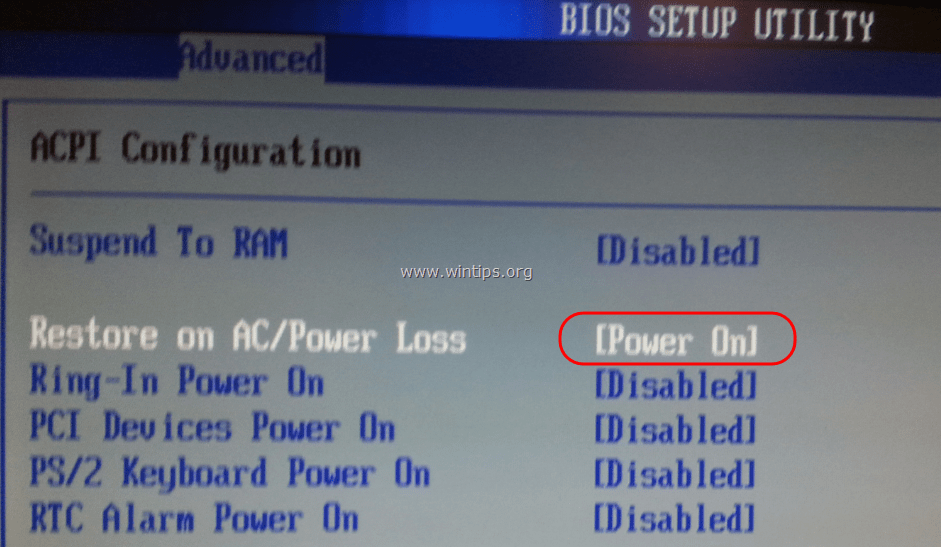
4. Save and exit from BIOS settings.
Step 2. Modify Windows to startup normally after power corruption.
In Windows 7 & Vista OS, after power failure Windows launches by default the “Startup Repair” settings instead of starting normally. But in repair mode, you can not control your PC unless you sit in front of it. To bypass this situation and to force Windows to start in normal mode after power outages or improperly shutdown, do the following:
1. Open an elevated command prompt window by going to:
- Start > All Programs > Accessories
- Right-click to “Command prompt” item and choose “Run as administrator”.
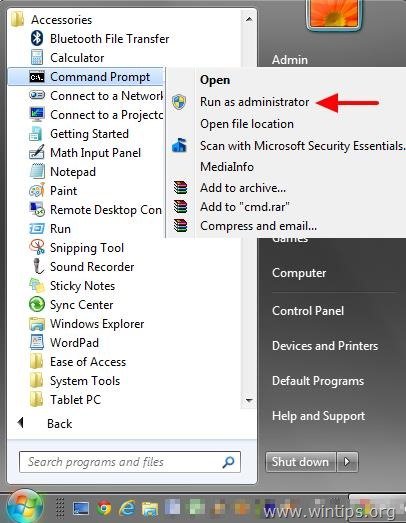
2. In the command window, type the following command and press Enter.
- bcdedit /set {default} bootstatuspolicy ignoreshutdownfailures

After pressing the “Enter” key, Windows should return an “Operation completed successfully” message.

3. Close command prompt window and you ‘re done!
Attention: Always use a UPS (Uninterruptible power supply) to protect your computer hardware from voltage outages and voltage strikes. Power outages can cause serious problems on your hardware like PSU (Power Supply Unit) destruction or HDD (Hard disk) destruction (data loss).


- Remote Desktop (RDP/RDS) Stops Working After September 2026 Windows Update: How to Fix - September 15, 2026
- Windows 11 KB5124008 Causes No Sound or USB Audio Code 10: How to Fix - September 14, 2026
- Copilot Missing or Grayed Out in Outlook: How to Fix - September 10, 2026

February 22, 2025 @ 6:09 am
I have an old Windows 7 ThinkPad that is just a server at a remote location. I have made all the BIOS changes and ‘do nothing’ settings in Control Panel, as you suggested. I also have a smart plug on a UPS that lets me remotely power cycle the ThinkPad (batteries are removed). However, I cannot get past the need to press the power button on the ThinkPad in order to complete the restart following power restoration. Any ideas?
February 22, 2025 @ 10:33 am
I think once you connect a UPS, the laptop is powered by the UPS batteries. To verify this, check if the laptop turns on after you unplug the power cord and then plug it back in. If the laptop does not turn on after doing this, verify in the BIOS settings that the "AC/Power Loss Recovery" setting is enabled and also check the manufacturer's manual to see if there is any other setting that you need to modify.
March 26, 2023 @ 4:00 am
thanks now im not worried my PC RouterOS need to on manually after the AC is back
November 14, 2019 @ 5:32 pm
Well, good article.
My problem is my PC will shutdown automatically if I run some heavy programs on it(e.g. a big game plus a movie player plus some webpages) . Why? Do I need update my PC power? give it bigger watt number?
November 14, 2019 @ 6:00 pm
Yes, buy a new PSU.
August 15, 2022 @ 6:13 am
i think your PC is overheated, please check the fan or other cooling system
October 14, 2019 @ 9:12 pm
Need more help. Entered BIOS ok but NONE of the options you list for setting power show up in the menu. My BIOS version is 1.3.4.
I am guessing there must be a different way to automatically restart the computer when power is restored.
October 15, 2019 @ 8:44 am
What is the exact model of Motherboard?
January 13, 2017 @ 6:58 pm
Hi. Thanks for a great article.
I am attempting to do something similar with a Windows 10 Tablet (UEFI BIOS). Can this be done with a tablet? (i.e. if the power supply is turned on, the tablet will start itself). This has been a feature of Nokia (and now Windows) phones however, I have not been able to find any info around tablets.
Thanks in advance.
January 14, 2017 @ 9:58 am
@James: I think that there isn't exist a such power setting (Restore on AC/Power Loss) on a tablet.
July 24, 2019 @ 2:51 pm
Hello, have you found how to do this on a tablet? I am very interested in the question.
January 9, 2017 @ 7:14 pm
Thank you very much, it work so perfect to me.
100% with Five stars
Thank you.
November 2, 2016 @ 7:02 am
I have set up in bios setting in Power management setup Ac Back Function- Always On. It was working Properly but from some days its not working and the second problem is when power come it does not start normally i have to unplug my power cable of my computer and plug it again then it start otherwise not in my server computer. what may be the reason. Plz help
November 2, 2016 @ 10:24 am
@chandan: Hi, the reason may be the Power Supply.
July 2, 2016 @ 4:12 pm
There is no ac power recovery on compaq cpu but there is AFTER Power loss
June 29, 2016 @ 7:14 pm
Thanks a lot for your help