
How to Connect to an FTP Server from Windows Explorer
Windows offer an easy way to connect to an FTP Server and its FTP Shared folders, by using the Add Network Location wizard. After running the wizard, you 'll be able to easily manage (copy, move, delete, create, rename, etc.) all the contents hosted on the FTP server from Windows Explorer.

The 'Add Network Location' wizard, helps you to add a shortcut to FTP Shares in Windows Explorer, without having to install a third party FTP Client program to access and manage the FTP Server's Shared files.
Keep in mind that, the "Add Network Location" creates only a shortcut to FTP in Windows Explorer and doesn't map assign a drive letter to FTP. In the case that you want to map an FTP Share to a drive letter and make the FTP mapping permanent, then read this guide: How to Assign/Map an FTP Share to a drive letter.
In this tutorial you 'll learn how you can access an FTP Server via Windows Explorer.
How to connect/access FTP by using Windows Explorer.
Before connecting to an FTP server you must know it's hostname (URL or IP address) and of course the required login credentials (if any) to access the shared FTP contents.
To access the shared contents on an FTP Server via Windows Explorer (file explorer), type in the Address bar ftp:// followed by the hostname (or the URL or the IP address) of the FTP Server.
Example: If the FTP Server's IP Address is: "192.168.1.200" and the FTP port number is the "54557" then type:
-
ftp://192.168.1.200:54557
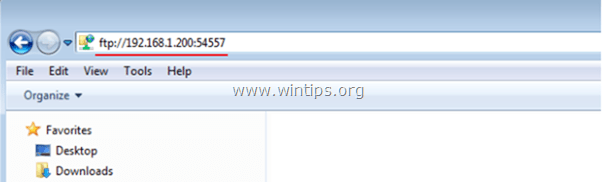
When asked, type your credentials (FTP Login name and Password) to connect to the FTP Server. After that you 'll be able to work with the FTP contents as if it was stored locally on your computer.
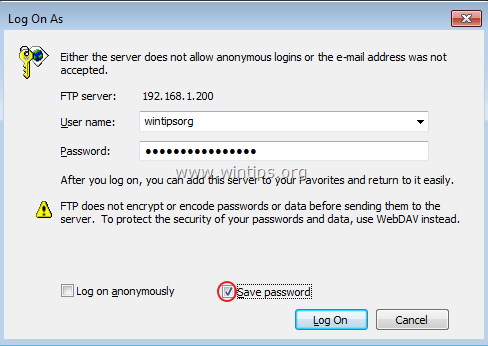
After completing your work, then close the Explorer window to disconnect from the FTP Server.
The above method is useful if you access the FTP contents rarely, but for everyday usage it is unhandy, because you have to apply the same steps, every time you want to access the FTP server. In that case, it is better to use the Add a Network Location wizard, which is offered by Windows, to add a shortcut to the FTP Shared folder in Windows Explorer (file Explorer). *
* Note: If you want to assign a drive letter to the FTP shared folder and make your life easier, then read this article: How to Assign/Map an FTP Share to a drive letter.
How to Add a Shortcut to an FTP Share in Windows Explorer:
1. Open Windows Explorer.
2. Right click on a blank area and choose Add network location.

3. Click Next twice and at the following screen type the IP Address and the port number of your FTP Server. Click Next when done.

4. Uncheck the Log on anonymously checkbox and then type your FTP User name. Press Next.
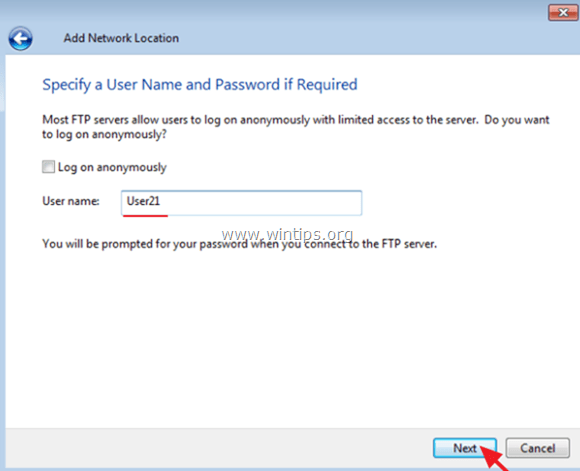
5. Leave the default name (or type a different one) for the new connection and press Next.

6. Click Finish to close the wizard.

7. Finally you will be asked to type your credentials.
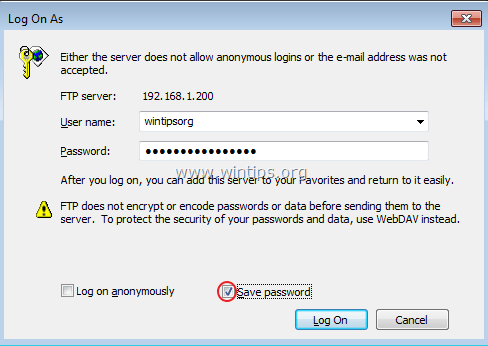
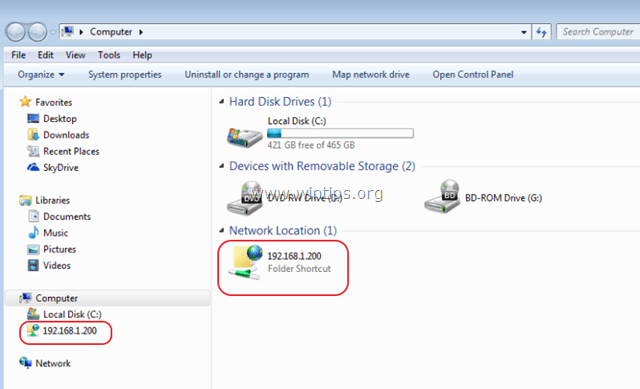
8. After entering your credentials, the new FTP network location will appear (as a shortcut) in Windows Explorer. *
- Related article: How to Assign/Map an FTP Share to a drive letter..
That's it! Let me know if this guide has helped you by leaving your comment about your experience. Please like and share this guide to help others.


- Remote Desktop (RDP/RDS) Stops Working After September 2026 Windows Update: How to Fix - September 15, 2026
- Windows 11 KB5124008 Causes No Sound or USB Audio Code 10: How to Fix - September 14, 2026
- Copilot Missing or Grayed Out in Outlook: How to Fix - September 10, 2026



May 24, 2026 @ 10:48 pm
Fantastic post! Truly enjoyed the way you presented this. Looking forward to more updates like this!
May 18, 2026 @ 4:25 pm
Fantastic post! Really liked the way you explained this. Excited to see more posts like this!
January 25, 2025 @ 5:30 pm
It's like you're not hearing everyone.
So, I can open an FTP link from my file explorer.
But, say there is a PDF in file explorer in the FTP path, if I click on that PDF, it tries to open in Edge.
My defaults are all correct.
What you are suggesting (incorrectly) to users is actually to go to default apps by protocol (the p stands for protocol) and select File Explorer.
However, File Explorer is not an option.
The options are: Internet Explorer, Microsoft Edge, and Look for an App in the Microsoft Store.
If there was an option to search for the correct app, that would be great.
November 17, 2024 @ 1:57 pm
תודה לך ברור ומושלם
August 29, 2024 @ 5:56 am
its working Thank You….
January 22, 2018 @ 4:26 pm
This is a good article that's very detailed. Another suggestion is to use WebDrive. you can make drives to other server types as well as FTP and the drives stay persistent. http://www.webdrive.com