
How to Prevent the Installation of a Windows 10 Update.
As you already know, Windows 10, downloads and install automatically any Windows or driver update, when available. But in some cases, the installation of a specific update in Windows 10, may fail to be installed and for that reason, it is better to prevent Windows 10 to install that update, until Microsoft fixes the bug or releases a new version of that update.
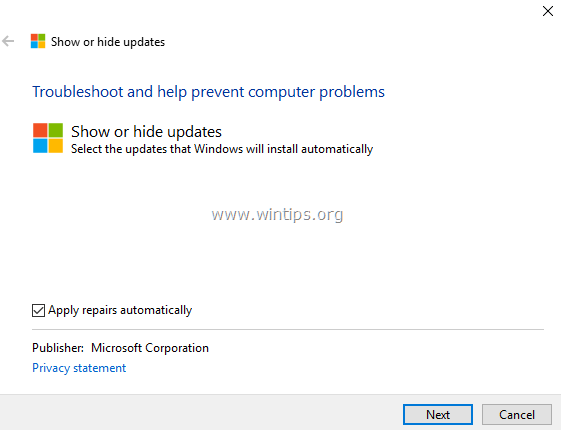
This tutorial contains detailed instructions on how to block the automatic installation of an update in Windows 10.
-
- Related Articles:
How to Block the Automatic Installation of a Specific Update or Driver on Windows 10.
1. Navigate to this link: https://support.microsoft.com/en-us/kb/3073930
2. Scroll down and click at Download the "Show or hide updates" troubleshooter package now link and Save the file to your computer. *
* Notes: Since Microsoft has removed the tool from its support page, you can download it from MajorGeeks.

3. Double click to run the downloaded file "wushowhide.diagcab" and click Next at the first screen.

4. Then click Hide updates.

5. Select the update that you want to block and click Next.

6. Close the "Show Hide updates" utility. *
* Note: If you want to install the blocked update on a future time, run the "Show Hide updates" utility again and select the 'Show hidden updates' option to unblock the hidden (blocked) update.
That's it! Let me know if this guide has helped you by leaving your comment about your experience. Please like and share this guide to help others.


- How to Fix Windows 11 Update Error 0x80073712 - October 5, 2026
- How to Install Windows 11 26H2 on Unsupported Hardware - October 2, 2026
- How to Install Windows 11 version 26H2 - October 2, 2026

February 27, 2025 @ 10:21 pm
Does "Hiding" the optional download link of an unneeded update in Windows-10 effectively removes this update from my Windows-10 "check for updates" list ?
Or is it only "hidden", until Microsoft forces the install of it ?
February 28, 2025 @ 10:20 am
The "hidden" update will not be installed at all.