
FIX: PIN or Password is incorrect even if it is correct in Windows 10. (Solved)
There are many Windows 10 users who have trouble signing in because of an incorrect password/pin and don't know what to do. The messages "Password is incorrect" or "PIN is incorrect" may appear even in cases where the password/pin is 100% correct.

The inability to connect to Windows 10 due to incorrect password or pin, is usually due to entering the wrong password/pin, but in some cases the problem can occur even after typing the correct password/pin and is usually seen after installing a Windows update.
If you are experiencing a similar problem, you are in the right place, because in this guide we will show you several methods to overcome the following issue(s) in Windows 10:
-
- Windows 10 claims that password/pin is incorrect but is not.
- Windows 10 incorrect password despite being correct.
- Windows 10 Login password suddenly incorrect.
- Cannot login to Windows 10 with correct password/pin.
- Windows 10 password not working after update.
- Windows 10 Password is incorrect even if it is correct.
How to FIX: The Password or PIN is incorrect after installing updates in Windows 10/11.
- Reboot Your PC.
- Type and verify Password/PIN with Virtual Keyboard.
- Remove Latest Updates from Recovery options.
- Change your MS Account Password from another device.
- Reset Password using Administrator Account.
Method 1. Reboot Your PC.
Often, this error is temporary and occurs because Windows has not completed installing the updates and has not successfully configured the device. In cases like this, the problem can be resolved by simply restarting your computer. If rebooting your PC does not fix the problem, jump to the next method below.*
* Note – Suggestion: The reported issue usually occur when using a Microsoft account to sign in to Windows 10 rather than with local accounts. So, I suggest you after fixing the problem to switch from Microsoft account to local account.
Method 2. FIX "PIN is Incorrect" issue by typing your Account Password in Virtual Keyboard.
If you type the correct PIN to sign to Windows and you receive the message "The PIN is incorrect. Try again", perform the following actions:
1. Click Sign-in options.

2. Click the Key  icon.
icon.

3. Type you password and press Enter. If you still can't login click OK at "Password incorrect" message and proceed as follows:
4. Click at Easy of Access icon  (located at the lower-right corner) and open the On-Screen Keyboard.

5. Click in the password box and then type your password using the virtual keyboard. When you're done, click on the "eye" icon to check if it's correct and if so, press Enter. If you still can't login to Windows, continue to the next method

Method 3. Uninstall Latest Windows Update using Recovery options.
Because the "incorrect password" issue on Windows 10 usually occurs after installing updates, proceed to uninstall them from the Windows recovery options (this method usually works).
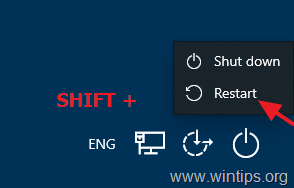
1. In the login screen hold down the SHIFT key and click Power -> Restart
2. After Restart, click Troubleshoot -> Advanced Options -> Uninstall Updates.
3. Click Uninstall latest quality update and when this done try to login to Windows. If you can't, perform the same steps, but this time choose to Uninstall latest feature update.

4. After uninstalling update(s), try to sign-in to Windows 10 by using your PIN/Password.
Method 4. Change your MS Account Password from another device. *
* Attention: This method only applies to users who use a Microsoft Account to sign in to their Windows 10/11 device. If you're using a local account or if you cannot reset your MS password using another device skip to method-5 below.
1. From another PC or device (e.g. your Phone or Tablet), sign-in to your Microsoft Account.
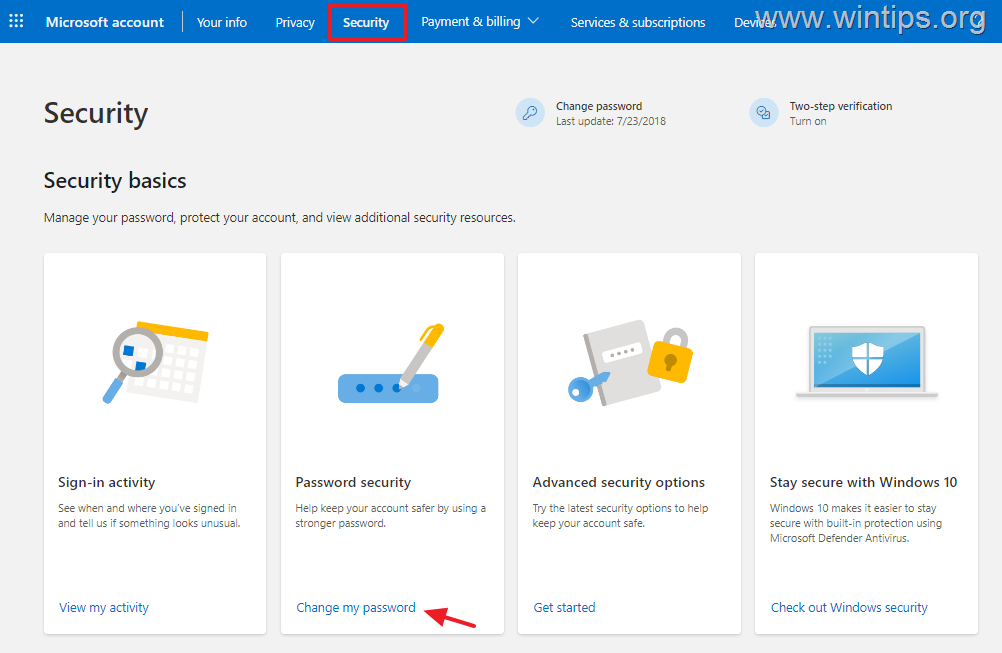
2. Click the Security tab and then type your password to verify your identity.
3. Under Password security click Change my password.
4. After changing the password, restart the computer with the password issue, and login to Windows 10, using the new password. *
* Note: If you cannot login to Windows either after changing your MS account, continue to next method.
Method 5. Gain Access to Windows and Reset Password using the 'Administrator' account.
If none of the above methods helped your to resolve the "password/pin incorrect" issue, then login to Windows using the Hidden Administrator account and then reset your password, as instructed below:
Step 1. Enable Command Prompt in Sign-in screen.
1. On the 'Sign -in' screen, click the Power button, then hold down the SHIFT key on your keyboard and click Restart with your mouse.
![image_thumb[18]](https://www.wintips.org/wp-content/uploads/2024/04/image_thumb18.jpg "image_thumb[18]")
2. After restarting, click Troubleshoot –> Advanced options -> Command Prompt.
![image_thumb[8]](https://www.wintips.org/wp-content/uploads/2024/04/image_thumb8.png "image_thumb[8]")
3. In the Command Prompt window, type the following commands in order (press Enter after typing each command):
- move c:\windows\system32\utilman.exe c:\
- copy c:\windows\system32\cmd.exe c:\windows\system32\utilman.exe
- exit

4. When done, close the Command Prompt window and then click Continue (Exit and Continue to Windows)

5. Now, on the 'Sign in' screen, click the Accessibility icon to the left of the Power button.

6. If you have followed the above instructions correctly, a Command Prompt window will open. If so, continue to step-2 below.
Step 2. Enable the Hidden Administrator account through Registry.
1. In the command prompt window that opened, type "regedit" and press Enter.

2. In Registry Editor navigate to the following location:
- HKEY_LOCAL_MACHINE\SAM\Domains\Account\Users\000001F4
3. At the right pane, double click to open the F REG_BINARY value.

4. Using the down arrow key or your mouse place the cursor on the line 0038 before the number "11" as shown on the screenshot below.

5. Now press once the delete key to delete the number "11" and then just type 1 to insert the number '10'. Then click OK.

6. Now close the Registry Editor and the Command Prompt windows and then click Turn off your PC.

7. Turn on your PC again and in the 'Sign in' screen click on Administrator account at the bottom left. Then let Windows to create and configure the new profile and set your preferred privacy settings.

9. After entering Windows, press the Windows + I keys simultaneously on your keyboard to launch Windows Settings.
10. In the Settings window, click on Accounts from the list of options displayed on your screen.

11. Select Sign-in options from the left pane and then (at the right pane), turn off the toggle for Use my sign-in info to automatically finish setting up my device after an update or restart.

12. Restart your PC and try to login to your normal account. If you can't continue to step-3 below.
Step 3. Reset your Account Password using the 'Administrator' account.
1. Login to Windows with the Administrator account.
2. Then, proceed to reset the password of the account you cannot sign in to due to an incorrect password by following the instructions below depending on your account type:
A. Microsoft Account:
If you receive the message "Password/PIN incorrect" when trying to login to Windows 10 with a Microsoft Account, navigate to Microsoft Reset Password Page and follow the on-screen prompts to reset your password of your MS Account. Then login to Windows using the new password. *
* Note: If after resetting password, you still can't login to your Windows device with the new password, do the following:
- Create a new local account and set it as the Administrator (Read the instructions on Additional Help section on the end of the article to learn how to create a new account).
- Restart your PC, login to Windows with the new account and transfer all your files from your Microsoft Account profile folder to the new account.
- When done, open Command Prompt as Administrator and give the following command to disable the 'Administrator' account.net user administrator /active:no
- Finally, follow the instructions on Step-4 below to restore the function of the 'Accessibility' icon.

B. Local Account:
If you face the "password incorrect" issue, when trying to login to Windows 10 with a local account, proceed and reset the password of your local account, as follows:
1. Simultaneously press the Windows  + R keys to open the Run command box.
2. Type the following command and press Enter:
- control userpasswords2

3. Select your account and click Reset Password.

4. Now, just press OK to clear the current password or type a new password for your account and click OK twice to apply the change.

5. Reboot your PC and login to your account.
5. After entering Windows proceed to Step-4 below to get things back.
Step 4. Disable Command Prompt on the 'Sign in' screen.
After fixing your problem, proceed to disable 'Command Prompt' and restore the "Accessibility" function in the Sign-in screen, as instructed below:
1. Navigate to your C:\ drive and explore its contents.
2. Cut (or copy) the "utilman.exe" file inside the "C:\Windows\System32" folder. Then choose Yes when prompted to give permissions and you're done!
Additional Help
How to create a local account in Windows 10/11.
To add a new local account with administrative rights in Windows 10/11:
1a. Simultaneously press the Windows + R keys to open the run command box.
1b. Type the following command and press Enter.
- control userpasswords2

2. Click the Add button.

3. At the next screen click on Sign in without Microsoft account (not recommended)

4. Then click Local Account.

5. Now type a username for the new account and click Next to create it without a password. Then click Finish to close the "Add User" wizard.

6. Back to 'User Accounts' window, select the new account and click Properties.

7. In the User Properties window, select the Group Membership tab, select Administrator and then click OK.

That's it! Which method worked for you?
Let me know if this guide has helped you by leaving your comment about your experience. Please like and share this guide to help others.


- Apps and Games Crash After KB5124010 Due to AC-3 Audio: How to Fix - October 5, 2026
- How to Fix Windows 11 Update Error 0x80073712 - October 5, 2026
- How to Install Windows 11 26H2 on Unsupported Hardware - October 2, 2026


November 12, 2025 @ 9:32 pm
Creating the Administrator account worked very, very well for Windows 10. Now I have same problem on Win 11 and regedit to line 0038 has either already shown "10", or "00". Have tried changed "00" to "10" but that didn't work. ??
May 31, 2025 @ 10:28 am
It says “this drive is locked by bitlocker drive encryption. You must unlock this drive from control panel”. After the first promt
June 2, 2025 @ 9:28 am
To find out the recovery key, navigate to: "https://onedrive.live.com/recoverykey" and sign with your MS account.
February 22, 2025 @ 9:57 am
I dont understand the step 4 disabling command prompt and enabling accessibility on start up.
where are you cutting or copying it too? I get no prompt for permissions to click yes on….
February 22, 2025 @ 10:19 am
In step-1 you created a backup copy of "utilman.exe" file from drive "C:\". So, to get things back to normal, copy "utilman.exe" from drive "C:\" to folder "c:\windows\system32\utilman.exe".
March 2, 2025 @ 9:00 pm
How can I get back into my local user account. everything worked with administrator. Now when I restart it automatically starts in administrator account. and bypasses login. help please. thank you kindly
March 4, 2025 @ 10:51 am
Right-click on Start menu > Shutdown or sign out> Sign out