
How to Speed Up Windows 11: A Comprehensive Guide for Optimal Performance
Are you finding your Windows 11 PC slow? Do you find yourself waiting for programs to load or for your computer to respond? If so, then use the simple steps in this guide to make it run faster.
Whether you're using a high-end computer or a budget laptop, low performance can be frustrating. Fortunately, you can speed up Windows 11 with a few easy steps. In this guide, we'll show you some helpful tips to optimize your system, improve boot times, and enhance overall performance.
Why might Windows 11 be lagging?
Before we dive into the solutions, let’s understand why Windows 11 might be running slower than expected. Common culprits include:
- Background processes: Too many apps running in the background can drain system resources, leading to sluggish performance.
- Unnecessary services: Services like "SysMain" or "Connected User Experience and Telemetry" can significantly slow down your Windows 11 computer by consuming CPU and memory resources.
- Storage issues: A damaged or nearly full drive, especially the system drive (
C:), can slow down performance due to limited space for virtual memory and file operations. - Visual effects: Windows 11’s animations and transparency effects can put a strain on lower-end hardware, reducing responsiveness.
- Bloatware: Pre-installed apps or unnecessary software can clutter your system, consuming valuable resources.
- Outdated drivers or software: Incompatible or old drivers can cause bottlenecks, reducing system efficiency.
Whatever the reason your Windows 11 computer is slow, below you will find step-by-step instructions to make it faster.
Monitor Performance before the changes:
Before you proceed with optimizing your computer's speed using the instructions below, check its current performance so you can compare it after the changes. To do this:
-
- Press Ctrl + Shift + Esc to open Task Manager.
- In the Processes tab, check at the top the total CPU, RAM, Disk, and Network usage, and below which process is consuming too many resources.

-
- Then, select the Performance tab to see more details about overall system performance and the current speed of your CPU.

How to optimize Windows 11 for better performance.
Follow these easy steps for optimizing your Windows 11 system, improving boot times, and enhancing overall performance:
- Disable Unnecessary Startup Programs.
- Disable Unnecessary Services.
- Clean Temporary Files.
- Free Up Disk Space.
- Uninstall Unwanted Apps and Bloatware.
- Turn Off Visual Effects.
- Optimize Power Settings.
- Update Windows & Drivers.
- Scan for Malicious Programs.
- Repair System Files.
Step 1. Disable Unnecessary Startup Programs.
Too many startup programs can slow down your system. So, the first step to fix slow performance issues is to turn off unnecessary applications that start at Windows startup and run in the background:
- Press Ctrl + Shift + Esc to open Task Manager.
- Click on the Startup apps tab.
- Click Status to sort startup applications by whether they are "Enabled" or not (Disabled).
- For each "Enabled" startup application, decide whether it is necessary for it to start at Windows startup and run in the background.
- Then, for each app that doesn't need to run in the background, click the Disable option after selecting it.
* Note: Many apps like "Mobile Devices", "Phone Link", "Terminal", or "Xbox" are not needed to run in the background and can be safely disabled.

6. After disabling the unwanted startup apps, restart your PC and check if it working smoothly.
* Note: If you are having problems with a program that you have disabled after restarting, reopen Task Manager and enable it again.
Step 2. Disable Unnecessary Background Services.
The following Windows 11 services are not needed for Windows to run smoothly and can significantly slow down your system. So, it is safe to disable them:
- Connected User Experience and Telemetry (DiagTrack): This service collects and sends diagnostic and usage data to Microsoft.
- SysMain (formerly known as "Superfetch"): This service is supposed to maintain and improve system performance, but it has been observed to dramatically reduce the performance of Windows 11.
- Windows Insider Service (wisvc): This service provides infrastructure support for the Windows Insider Program.
* Note: Do not disable this service if you are participating in the Windows Insider program and testing preview builds.
To disable these services:
- Press the Windows + R keys to open the Run command box.
- In the run command box, type
services.mscand press Enter to open the Windows Services control panel.

- Right-click on each of the above-mentioned services and select Properties.

4. Change the Startup type to Disabled and click Apply > OK.

- After disabling the unwanted services, restart your PC.
Step 3. Delete Temporary Files.
The next step to optimize Windows 11 performance is by cleaning the temporary files:
- Press the Windows + R keys to open the Run command box.
- In the run command box, type
%temp%and press Enter to open the folder containing the temporary files.

- Press Ctrl + A to select all the temporary files and then press the Delete button to remove all of them.

4. For any file that cannot be deleted, select Do this for all current items and click Skip.

Step 4. Free up disk space with Disk Cleanup.
Disk Cleanup is a built-in Windows utility that helps free up space on your hard drive by removing unnecessary files like temporary files, system logs, and old Windows updates, allowing you to delete them safely and improve system performance.
- In Search, type "disk cleanup" and then open the Disk Cleanup tool from the results.

- In the Disk Cleanup utility, click Clean up system files.

- Now select to delete the following items* and click OK.
- Windows Update Cleanup
- Windows Upgrade log files
- Downloaded Program Files
- Temporary Internet files
- Recycle bin
- Temporary Files
* Note: Optionally, choose to delete the following items if you recently upgraded Windows to its latest version and everything is working smoothly.
- Previous Windows Installations
- Temporary Windows Installation files

Step 5. Uninstall Unwanted Apps or Programs.
Proceed and delete the programs that you're not using, by doing the following:
- Navigate to Start > Settings > Apps > Installed apps.
- Here, explore the installed applications and if you don't need any of them, click on the three dots menu next to it and select Uninstall.

Step 6. Disable Visual Effects.
Windows 11 has a range of visual effects that can make your PC look more attractive, but they can also slow it down. So, another way to fix the slow performance issues on Windows 11 is to disable visual effects.
- Press the Windows + R keys to open the Run command box.
- In the run command box, type
sysdm.cpland press Enter to open the System Properties.

- In 'System Properties', select the Advanced tab and then click Settings under Performance.

- Here, select Adjust for best performance to disable all effects, or choose Custom and uncheck options like "Animate windows when minimizing and maximizing", "Animations in the taskbar", "Show shadows under mouse pointer", "Show shadows under windows", etc. When done, click OK & OK again to apply the changes.

Step 7. Optimize Power Settings.
- Navigate to Settings > System > Power & battery.
- Change Power mode to Best performance.

Step 8. Update Windows & Drivers.
Outdated system files and drivers can slow down performance. So, ensure that Windows is fully updated. To do this:
- Navigate to Start -> Settings -> Windows Update and click Check for updates to download and install all available updates.

- After installing the new Windows updates, click Advanced options and under Additional Options click Optional Updates.

- Finally, in 'Optional updates', check all the checkboxes to install all the available Windows and the Driver updates and click Download & install.

4. After installing the optional updates (if any), navigate to your computer's manufacturer support page and download and install all the latest drivers for your system's components (Chipset, Video Adapter, etc.).
Step 9. Scan your computer for Malware.
Because malware can be the cause of slow Windows 11 performance, verify that your computer is 100% clean from harmful programs like rootkits, malware, or viruses. To do this, scan your computer first with your antivirus programs and then with Malwarebytes.
* Related article: How to install and clean your computer with Malwarebytes
Step 10. Repair System Files.
Repairing system files in Windows 11 is essential for ensuring the stability, security, and optimal performance of your operating system. To repair the system files:
- In Search, type "cmd" and then open Command Prompt as Administrator.

- At the command prompt window, type the following command & press Enter:
dism.exe /Online /Cleanup-Image /Restorehealth
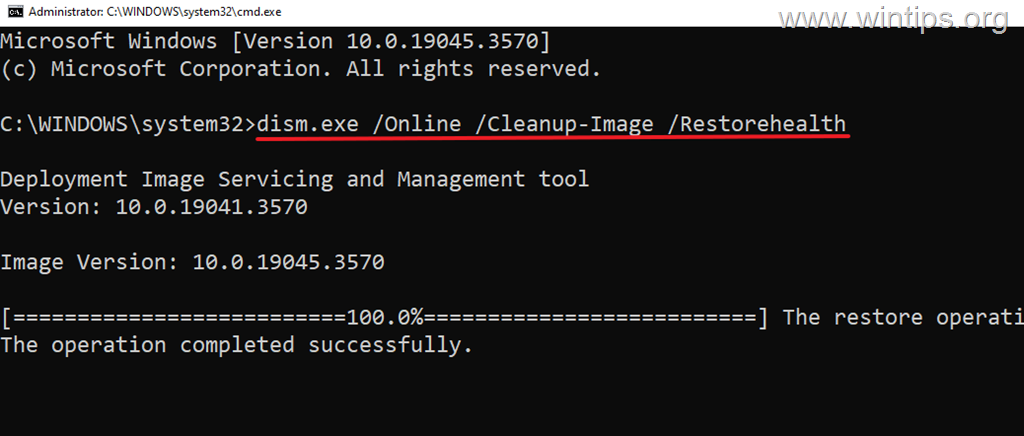
- Be patient until 'Deployment Image Servicing and Management' (DISM) tool repairs the component store.
- When the operation is completed, give the command below to repair the system files and press Enter:
sfc /scannow
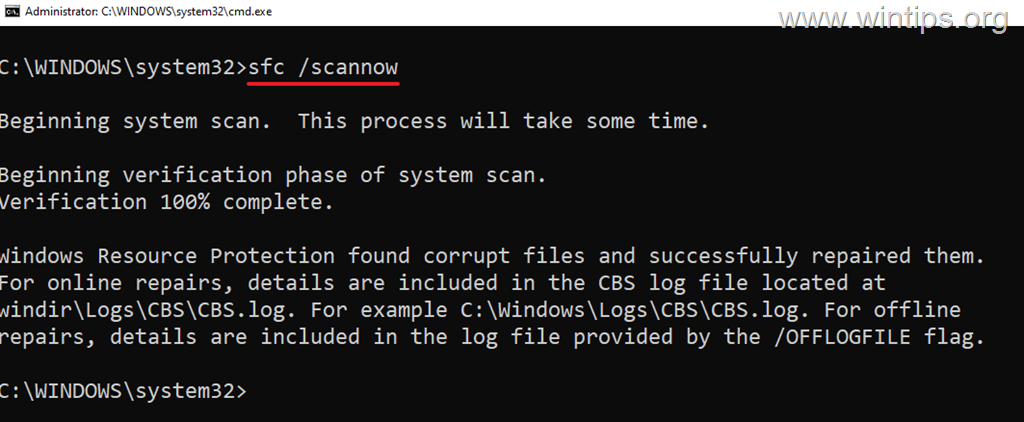
- When SFC scan is completed, restart your computer.
Summary
By following these steps, you can speed up Windows 11 and ensure your PC runs at its best, whether you're gaming, working, or just a home user. From disabling startup programs to optimizing power settings, these tweaks are simple yet effective.
If your computer is still running slowly despite applying all of the above tips, then try the following:
- Check if your system is overheating with HWiNFO or HWMonitor.
- Check the Disk's health with CrystalDiskInfo and replace it if necessary.
- Reset Windows: Resetting Windows 11 to its default state is an effective method to fix speed issues.
- Clean Install Windows: Backup your files and perform a fresh installation of Windows 11.
- Upgrade Hardware: If after following the above suggestions your system is still running slow, then it might be time for a hardware upgrade. Consider adding more RAM, switching to a solid-state drive (SSD) for faster performance, or even buying a new, faster computer for a significant speed boost.
* Suggestion: Always check the health of your hard drive(s) and replace them if needed.
That's it! Let me know if this guide has helped you by leaving your comment about your experience. Please like and share this guide to help others.
Frequently Asked Questions
Why is my Windows 11 computer running slow?
Common reasons for a slow Windows 11 computer include too many background processes, unnecessary services, storage issues, visual effects, bloatware, and outdated drivers or software.
How can I see which processes are using the most resources on my Windows 11 PC?
Press Ctrl + Shift + Esc to open Task Manager. In the Processes tab, check the total CPU, RAM, Disk, and Network usage at the top, and see which processes are consuming the most resources.
What are some steps to take to improve performance on Windows 11?
Steps include disabling unnecessary startup programs and services, cleaning temporary files, freeing up disk space, uninstalling unwanted apps, turning off visual effects, optimizing power settings, updating Windows and drivers, scanning for malicious programs, and repairing system files.
How do I disable unnecessary startup programs on Windows 11?
Open Task Manager with Ctrl + Shift + Esc. Click the Startup apps tab, sort applications by their status, and disable those that are unnecessary to run at startup by selecting them and clicking 'Disable.'
Still having trouble fixing this issue?
💬 Get WinTips Remote Support →

- How to Set Microsoft Edge as the Default Browser on iOS Devices Using Intune. - November 2, 2026
- How to Fix SecurityHealthSystray.exe – Bad Image Error (0xc000012f) on Windows 11. - October 26, 2026
- FIX: Windows Hello for Business PIN error 'Your credentials could not be verified' with 'status: 0xc000005e substatus: 0x0' or 'status: 0xc0000bb, substatus: 0x0'. - October 20, 2026

July 8, 2026 @ 2:15 am
Please, review the defrag part, as for SSDs, Windows runs "trim" and not regular HDD defragmentation. Desabling optimization (trim) on SSDs is not recommended.
July 10, 2026 @ 1:21 pm
Yes, you're correct, and thank you for pointing this out. Disabling defragmentation was generally recommended for older SSDs and earlier versions of Windows. Windows 11 primarily uses TRIM to optimize SSDs rather than performing traditional HDD-style defragmentation. Therefore, disabling automatic drive optimization for SSDs is generally not recommended, and the corresponding instructions have been removed from our guide.
May 12, 2025 @ 1:45 pm
complete