
FIX: Outlook Not Responding after pressing Send or Reply.
If Microsoft Outlook becomes unresponsive and freezes when sending or replying emails, follow the steps in this guide to resolve the issue.
Problem in details: When trying to reply to an email, or after pressing the 'Send' button to send an email message in Microsoft Outlook, Outlook freezes and you receive the error message "Microsoft Outlook not responding".
Common causes of "Outlook not responding" issue in Send.
The "Not responding" and "freezing" issues in Microsoft Outlook when replying/sending an email message, usually occur for one of the following reasons:
- An installed add-in is interfering with Outlook.
- Outlook Autocomplete list is corrupted.
- The installed antivirus software conflicts with Outlook.
- Outlook Navigation Pane is broken.
- Outlook data file is oversized.
- Outlook data files are corrupted or damaged.
- Microsoft Office installation is damaged.
How to FIX: Outlook freezes and not responding when Sending or Replying to emails.
To resolve the "Not responding" error in Microsoft Outlook after pressing the 'Send' or the 'Reply" button to send/reply an email message, follow the methods below.
Method-1. Check if an Outlook Add-on is causing the problem.
Because Outlook may be unresponsive due to a problematic add-in, start Outlook without Add-ins and check if the problem persists.
1. Press the Windows  + R keys to open the Run tool.
2. Now type outlook.exe /safe and press Enter to start Outlook in Safe Mode (without add-ins).

3. Now try to send an email and according the result, proceed as follows:
- If the reported issue occurs again when Outlook is running in safe mode, skip to Method-2.
- If the reported issue doesn't occur in Outlook safe mode, proceed to disable the Outlook Add-ins as described below.
4. From the File menu select Options.
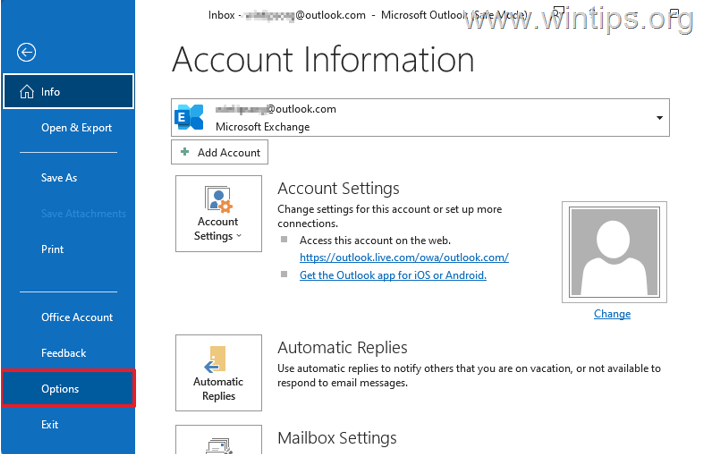
5. Select Add-ins at the left pane and then choose COM Add-ins on the right (beside 'Manage'). Then hit the Go… button.

6. Uncheck all the boxes to disable all Add-ins, then press the OK button.

7. Now restart Outlook and check again if the issue is resolved. If so, open the COM add-ins settings again and enable the disabled add-ins* one by one (and restart Outlook) until you find out which Add-in is causing the problem.
* TIP: If you see a third-party antivirus add-in in this list, disable it first because it usually causes the Microsoft Outlook not responding issue.
Method-2. Disallow Outlook to match names with email addresses.
"Automatic name checking" (also known as "Autoresolve"), is a feature in Outlook that helps you quickly find an email address as you type the recipient's name. In some cases, this feature can cause Outlook to become unresponsive, so go ahead and disable it to find out if that was the problem.
1. From the File menu select Options to open Outlook Options.
2. Select the Mail tab and uncheck the feature "Automatic name checking", to prevent Outlook from automatically matching recipient names with email addresses. When done, click OK.

3. Now try to send your email again and according the result do the following:
- If your message is sent without any problem, you're done here!
- If Outlook is not responding again, continue to next method.
Method-3. Disable or Empty the "Auto-complete list".
When selecting a recipient's address from Outlook's "Auto-complete list" and that address is corrupted, it can cause Outlook to become unresponsive. So, try the following:
1. In the email message you want to send, type the first few letters of the recipient's address, then delete the contact from the Autocomplete list that appears below.

2. When done, re-type the recipient's address in the "To" field and try to send you message. Then, according the result do the following:
- If Outlook is not responding again, skip to next method.
- If your message is sent without Outlook freezing, do the following:
3. Re-open the Outlook Options, select the Mail tab and uncheck the Use Auto-Complete to suggest names when typing in the To, Cc, and Bcc lines box to stop using the AutoComplete list when typing the recipient addresses, or Empty the Autocomplete-List to rebuild the list from scratch.

Method-4. Disable Third-Party Antivirus.
If you're using a third-party security program to protect your computer, go ahead and disable it temporarily to verify that it's not causing Outlook to become unresponsive.
Alternatively, disable the AV plugin in Outlook using the steps in method-1 above, or disable the email Integration in AV settings. *
* Note: The issue usually appears when using an ESET product for protection. If you are in such a case, apply the following actions to disable the protection in Outlook:
- ESET Antivirus: go to Advanced setup > Protections > Email client protection > Mailbox protection > Integration.
- ESET Endpoint Security: go to Advanced setup > Email client protection > Integrate into Microsoft Outlook.

Method-5. Reset Outlook Navigation Pane.
The navigation pane is the left pane in Outlook where you can find all Outlook E-mail folders and your Calendar, Contacts, Tasks, etc. If the navigation pane's settings become corrupted, then Outlook may become unresponsive when receiving or sending emails. To fix the issue:
1. Close Outlook.
2. Simultaneously press the Windows  + R keys to open run command box.
3. Type the below command to reset the Outlook navigation pane and press Enter:
- outlook.exe /resetnavpane

4. Check if the problem persists.
Method-6. Check if Outlook data file is oversized
All versions of Microsoft Outlook have a maximum limit on the size of the Outlook data file (.PST or .OST), and exceeding this limit can cause Outlook to become unresponsive.
More specifically, the maximum size limit of the Outlook data file is 50GB in all the latest versions of Microsoft Outlook (Outlook 2013, 2016, 2019, 2021 or Outlook for Office365). So go ahead and check if this limit has exceeded, or not. To do that:
1. Type "control panel" in the Search and then open the Control Panel app.

2. Navigate to Control panel, set View by to Small icons, then open Mail (Microsoft Outlook).

3. At Mail Setup window click Data Files…
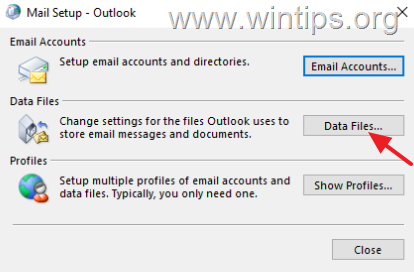
4. At Data files tab, notice the name of the Outlook data file (e.g. "Outlook.PST" or "yourusername@company.com.ost"), and click Open File Location to open its storage location on the disk.

5. Then right-click on the Outlook data file select Properties and see if its size exceeds 50 GB. Then according the result, proceed as follows:
- If the Outlook data file size is much less than 50 GB, then skip to Method-6.
- If your Outlook data file is approaching or exceeds the 50 GB limit, proceed with the below steps to increase its size limit.
6. Close Outlook.
7. Open Registry editor. To do that:
1. Simultaneously press the Windows
+ R keys to open run command box.
2. In run command box, type: regedit and press Enter.

8. In Registry Editor navigate to the following location, according your Outlook version:*
- Outlook 365, 2021, 2019, 2016: HKEY_CURRENT_USER\Software\Microsoft\Office\16.0\Outlook\PST
- Outlook 2013: HKEY_CURRENT_USER\Software\Microsoft\Office\15.0\Outlook\PST
- Outlook 2010: HKEY_CURRENT_USER\Software\Microsoft\Office\14.0\Outlook\PST
- Outlook 2007: HKEY_CURRENT_USER\Software\Microsoft\Office\12.0\Outlook\PST
* Note: If the "PST" key doesn't exist under the Outlook key, you have to create it manually. To do that:
a. Right-click on the Outlook key and from the menu that appears, choose: New > Key.
b. Give at the new key the name: PST and press Enter.

9a. Select the PST key on the left and then, right-click at an empty space on the right pane and select New > DWORD (32-bit) Value

9b. Give at the new value the name:
- MaxLargeFileSize
10. Repeat the steps 9a & 9b, and create a 2nd DWORD value with name:
- WarnLargeFileSize
11. Now, double click at MaxLargeFileSize value, choose Decimal and in the value data type the new file size in Megabytes (MB). Click OK when done. *
* Note: To calculate the new size in MB keep in mind that 1GB = 1024MB. *
For Example: If you want to increase the size limit of the Outlook data file from 50GB to 70GB (70 x 1024), type "71680" in the Value data box.
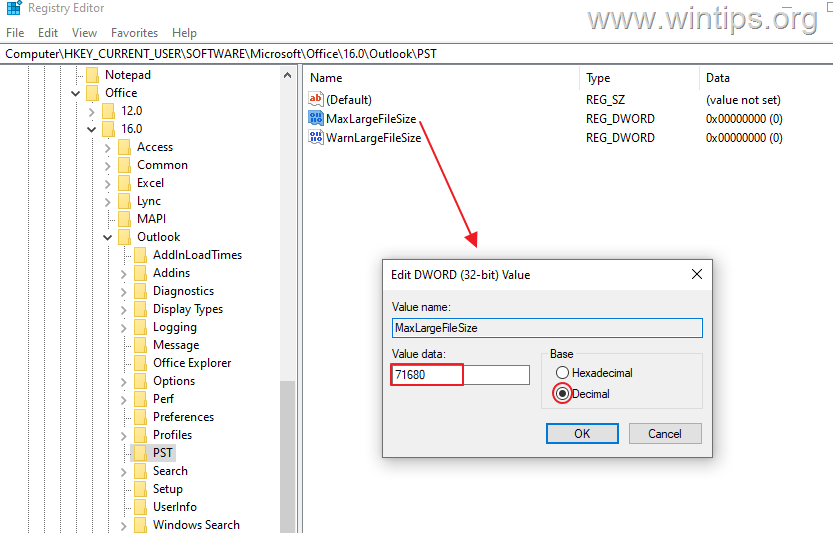
12. Then double click at WarnLargeFileSize value, choose Decimal and in the value data, type the new warning file size in Megabytes (MB), considering that the warning file size must be 95% of the MaxLargeFileSize value you specified above.
For example: If the value of MaxLargeFileSize is 71680, then the WarnLargeFileSize value must be: 71680 x 95% = "68096"

13. Close the Registry Editor.
14. Open Outlook and and check if the problem persists.
Method-7. Repair or Recreate the Outlook Data File.
If your Outlook data file (PST or OST) is corrupted, you may experience the "Not Responding" problem when working with Outlook.
To deal with this problem proceed and repair or rebuild the Outlook data file, according you account type (POP3, IMAP, Exchange, O365, etc.)
1. Close Microsoft Outlook.
2. Follow the steps 1-4 in Method-5 above to find out the location of the Outlook data file (PST or OST) on disk. Then proceed as follows, according your account type:
A. If you have an Exchange, Office 365, Gmail or Outlook.com email account:
-
- Delete or rename the Outlook .OST file (eg from "yourusername@company.com.ost" to "yourusername@company.com.ost.BAK").
- Then open Outlook and wait for Outlook to re-download all your emails from the mail server and rebuild the .OST file.
- When this done, check if the problem persists and if so, skip to next method..
B. If you own a POP3 or IMAP email account, proceed to next steps below to repair the corrupted PST or OST Outlook data file using the Inbox Repair Tool (SCANPST.EXE).
3. Open File Explorer and depending on your installed version of Office & Windows, navigate to the location listed below to find and open the SCANPST.EXE tool:
Office 365, Office 2019 & Outlook 2016 Click to Run versions:
- C:\Program Files\Microsoft Office\root\office16\
Outlook 2019, 2016 (32-bit) & Windows (32-bit):
- C:\Program Files\Microsoft Office\root\Office16\
Outlook 2019, 2016 (32-bit) & Windows (64-bit):
- C:\Program Files (x86)\Microsoft Office\root\Office16\
Outlook 2019, 2016 (64bit) & Windows (64bit):
C:\Program Files\Microsoft Office\root\Office16\
Outlook 2013 (32bit) & Windows (32bit):
- C:\Program Files\Microsoft Office\Office15
Outlook 2013 (32bit) & Windows (64bit):
- C:\Program Files (x86)\Microsoft Office\Office15
Outlook 2013 (64bit) & Windows (64bit):
- C:\Program Files\Microsoft Office\Office15
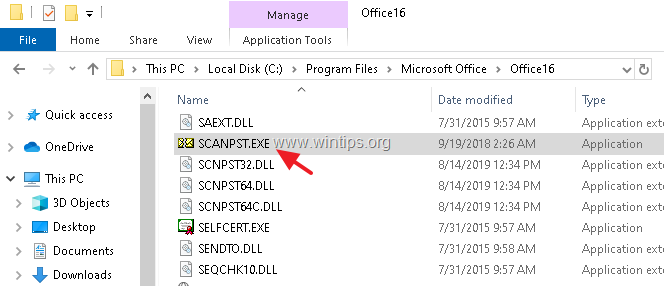
5. At 'Microsoft Outlook Inbox Repair tool', click Browse and select the Outlook .PST (or .OST) file from the location you noticed above. (If you don't see the outlook data file in the location you noticed, enable hidden files).
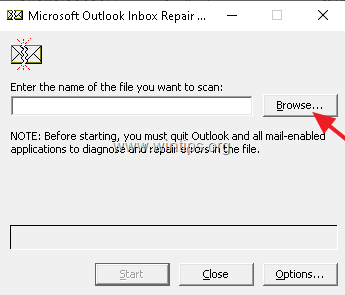
6. Finally, click the Start button to start the repairing process.

7. Now wait the repair process to complete. *
* Note: At the final repair phase, you will be asked if you want to create a backup. Click Yes if you have enough free space on the disk, otherwise click No.
8. When the repair process is completed, close the Inbox Repair Tool utility.
9. Launch Outlook and check if the problem persists.
Method-8. Repair Microsoft Office.
The next method to resolve the mentioned issue, is to repair the Office installation by following the steps below:
1. Simultaneously press the Windows + R keys to open run command box.
2. In run command box, type: appwiz.cpl and press Enter.

3. In Programs and features, select the Office version you have installed, and click Change.
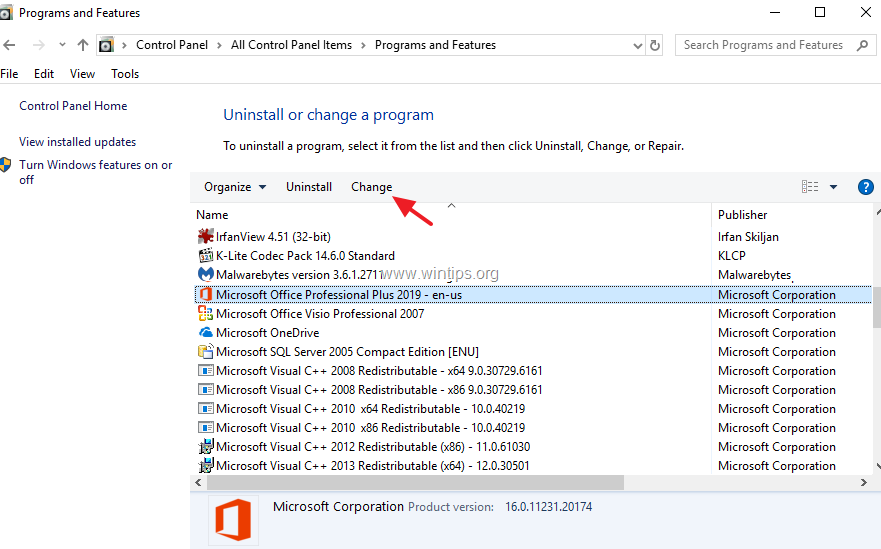
4. Leave the Quick Repair option selected and click Repair.
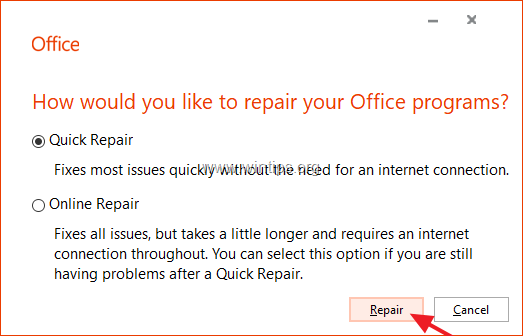
5. When the Office repair process is completed, launch any Office application and see if the problem persists. If so, then follow the same steps but this time select the Online Repair option. *
* Note: The "Online Repair" process, will remove and then will reinstall all the Office applications on your PC.

Method-9. Completely Uninstall & Re-Install Microsoft Office.
The final method to solve the mentioned problem is to uninstall and reinstall MS Office.
1. Close all Office programs.
2. Download Microsoft's Office Uninstall support tool utility (Source).
3. Double-click to run the downloaded SetupProd_OffScrub.exe file and then click Install.

4. Choose I Agree at License Agreement and then let the Troubleshooter to find the installed MS Office products.
5. At Uninstall Office Products, select to uninstall all Office products and click Next.

6. When the Office uninstallation is complete, restart your computer.
7. Finally, proceed to install Microsoft Office again. *
* Notes:
1. To install Office 2019, 2016 or Office 2013, follow these instructions: Download and install or reinstall Office 2019, Office 2016, or Office 2013
2. To install Office 365 or Office 2019, follow these instructions: Download and install or reinstall Microsoft 365 or Office 2021 on a PC or Mac.
That's it! Which method worked for you?
Let me know if this guide has helped you by leaving your comment about your experience. Please like and share this guide to help others.
Frequently Asked Questions
Why does Microsoft Outlook sometimes become unresponsive when sending or replying to emails?
Outlook may become unresponsive due to reasons such as interference from installed add-ins, corrupted autocomplete lists, antivirus conflicts, a broken navigation pane, oversized data files, corrupted data files, or a damaged Microsoft Office installation.
How can I resolve the issue of Outlook freezing when sending or replying to emails?
To resolve this issue, you can try several methods: start Outlook in Safe Mode to check add-ins, disable automatic name checking, or clear the Auto-complete list. Each method addresses potential common causes of the problem.
How do I start Outlook without add-ins to troubleshoot freezing issues?
Press the Windows + R keys to open the Run tool, type 'outlook.exe /safe', and press Enter. This starts Outlook in Safe Mode without add-ins, allowing you to check if add-ins are causing the issue.
What should I do if Outlook is unresponsive due to a problematic add-in?
First, disable all add-ins from the COM Add-ins settings: go to the File menu, select Options, choose Add-ins, then COM Add-ins, and hit Go. Uncheck all add-ins and restart Outlook. Enable each add-in one by one to identify the problematic one.


- Remote Desktop (RDP/RDS) Stops Working After September 2026 Windows Update: How to Fix - September 15, 2026
- Windows 11 KB5124008 Causes No Sound or USB Audio Code 10: How to Fix - September 14, 2026
- Copilot Missing or Grayed Out in Outlook: How to Fix - September 10, 2026




November 3, 2025 @ 1:42 pm
Actually, the fix is much more simple than this. Just change from POP3 to IMAP and it will work perfectly. Be sure to create or save your .PST files before you create the IMPP.
December 22, 2024 @ 8:46 am
Another option which worked well previous time this happened is to revert the office version 1-2 versions back.
run this command to revert back to October release
“C:\Program Files\Common Files\microsoft shared\ClickToRun\officec2rclient.exe" /update user updatetoversion=16.0.18025.20160
or
for November release which is I think before this started happening:
“C:\Program Files\Common Files\microsoft shared\ClickToRun\officec2rclient.exe" /update user updatetoversion=16.0.18129.20158
another option is to download the office deployment tool, rename xml file to config.xml and change the section to:
Run from same directory: "setup.exe /configure config.xml"
Then opened an office app and ran the update now option.
After all done, office versions back to 20160.
will have to wait a few days to see if office still hangs.
Also after done, be sure to disable updates for time being till Microsoft fixes this mess again!