How to Start a Program at Startup using Task Scheduler.
If you want to learn how to start a program automatically at Windows Startup or at specific time by using the Task Scheduler, then continue reading this tutorial.

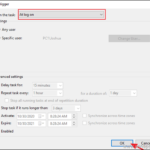
If you want to learn how to start a program automatically at Windows Startup or at specific time by using the Task Scheduler, then continue reading this tutorial.

The error message "The referenced account is currently locked out and may not be logged on to", usually appears on domain computers where the user has entered their password incorrectly multiple times and has been locked out of the domain.

In recent years many times I have encountered the following issue in Windows 10: Suddenly and for no apparent reason, email hyperlinks in Windows 10 Mail app or Outlook 2013, 2016, 2019 and Office 365, do not open in the web browser with several errors.

If you try to delete an OU or an object in Active Directory, and you receive the error "You do not have sufficient rights or object is protected from accidental deletion", continue reading below. The error "You do not sufficient privileges to delete this object, or this object is protected from accidental deletion"

The "Password Expiration Policy" defines the number of days that users can use the same password before it expires. In domain environments, the default password expiration time is 42 days, which means that after that time users must change their password to continue using their computer and access network resources.

If you want to set a password expiration date for accounts on Windows 10, continue reading below. To maintain your security it is a good idea to periodically change your password in Windows 10.

If you receive the following error in SharePoint "Running out of space. This site is almost out of storage space. To free up space, delete files you don't need and empty the recycle bin", continue reading below to learn how to free up storage space in SharePoint.
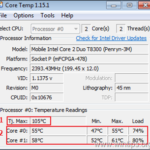
Laptop overheating can cause serious hardware problems and can completely damage your laptop if you do nothing to address the issue. The overheating problem usually occurs on a laptop that has been in use for a long time and is usually due to dust collected on the CPU fan and its vents.
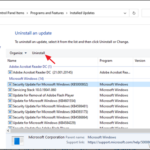
If you try to open a program, or a picture/photo in Windows 10, and you receive the error "Explorer.exe: Class not Registered" continue below to fix the problem. The "Class not registered" error, usually indicates an unregistered DLL file that is necessary for the program to run correctly.
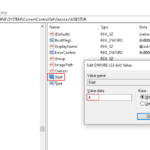
If you want to block the access to USB storage devices in Windows, continue reading this tutorial. As you may know, one of the most efficient ways to backup your data, or to transfer data between two different computers, is by using a USB storage device.