
How to fix Windows 10 Freezing, BSOD or Reboot issues.
Up to today I have seen several Windows 10 computers which freeze randomly, without obvious reason(s) and with different symptoms: for example in some Windows 10 computers when the system becomes unresponsive (the user cannot do anything on the computer), the only method to get Windows 10 back and working is to continuously press the Power button to completely shutdown the system. In other cases Windows 10 freeze (hang) for a while and then the system crashes, displays a BSOD (Blue Screen Of Death) error or restarts automatically.
The Windows 10 freezing issues, has been observed even in newly installed PCs or in PCs which were upgraded from a previous version of Windows (e.g. Windows 7 or Windows 8, 8.1) in which versions they worked without problems.
In this troubleshooting guide you can find several solutions to fix freezing and BSOD issues on a Windows 10 computer.
How to resolve Windows 10 Freezing & BSOD issues.
Note: After applying a solution, try to work at your PC and see if it freezes, before you apply the next solution.
Solution 1. Modify PCI Express Link State Power Management settings.
Solution 2. Disable Sleep, Hibernate and Fast Startup.
Solution 3. increase the virtual memory (Paging file).
Solution 4. Disable the MSI mode in StorAHCI Controller.
Solution 5. Run the System Maintenance task.
Solution 6. Uninstall Graphic Adapter's drivers.
Other Solutions to fix Windows 10 Freezing problems.
Solution 1. Modify PCI Express Link State Power Management settings.
1. Right-click on the Start menu  and choose Control Panel.
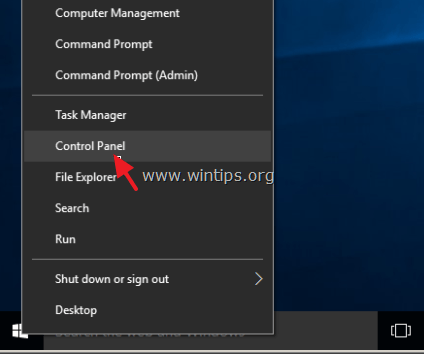
2. Change the View By (at the up right) to Small icons and then open Power Options.
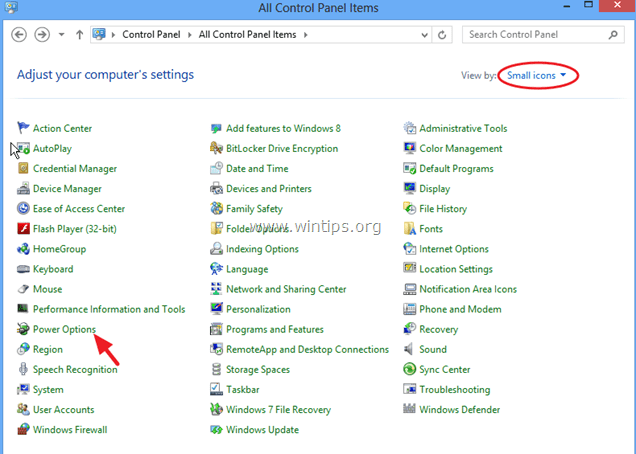
3. Click Change plan settings (next to "Balanced") and then select Change advanced power settings.
4. Scroll down to find and expand the PCI Express setting.
5. Now set the Link State Power Management to:
a. Maximum power savings if this setting is already set to OFF, or,
b. Put this setting to OFF if this setting is already enabled. (Maximum/Minimum power savings).

6. Press OK to apply settings and restart you computer.
Solution 2. Disable Sleep, Hibernate and Fast Startup.
1. From Control Panel open Power Options.
2. At the left choose "Choose what the power buttons does".

3. Click at "Change settings that are currently unavailable" option.

4. Scroll down and uncheck the "Turn on fast startup (recommended)" option and click Save changes.

5. Then, at Power Options main window, select Change plan settings.
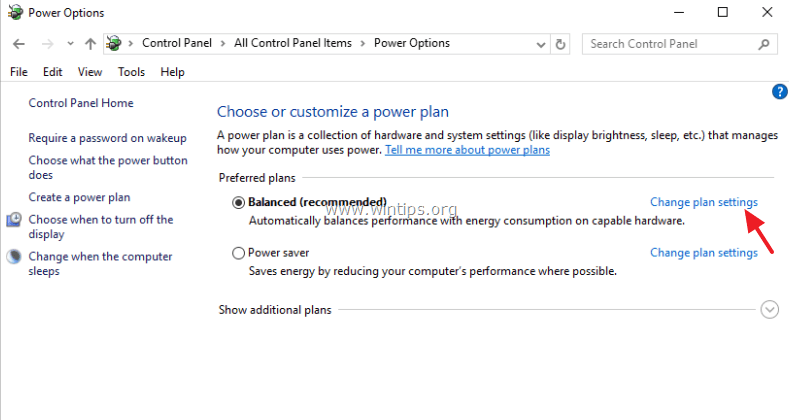
6. Click Change advanced power settings.
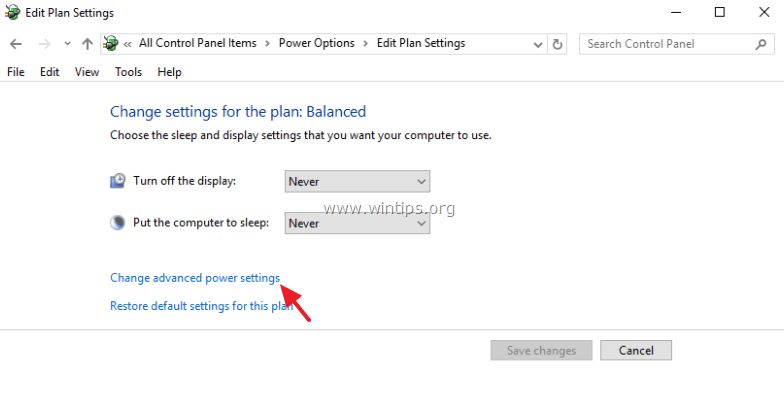
7. Expand Sleep and then set the Sleep after and Hibernate after options to Never.
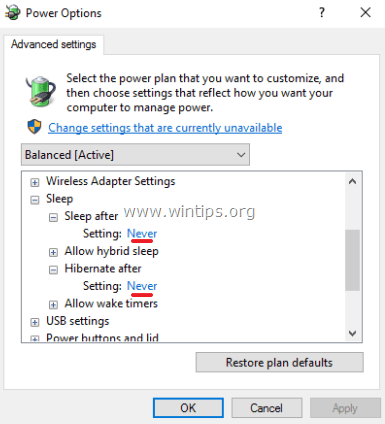
8. Press OK to apply settings.
9. Restart your computer and check if Windows stop freezing.
Solution 3. Increase the virtual memory (Paging file).
1. In Windows Explorer, right click on Computer icon (Name) and select Properties.
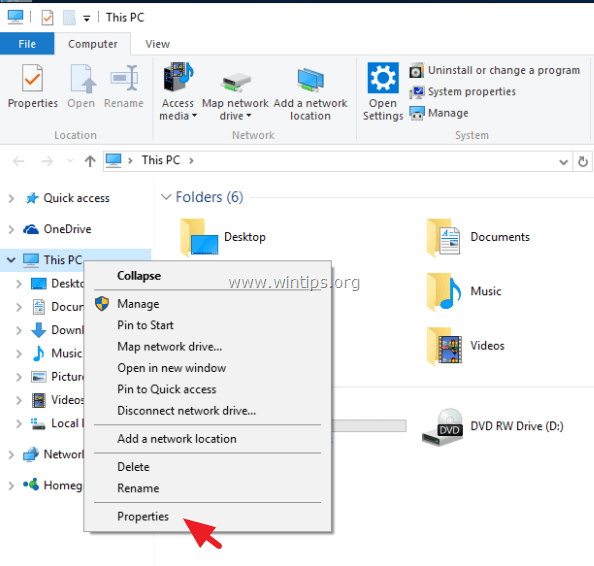
2. Click Change Settings.

3. At Advanced tab select Settings at Performance section.
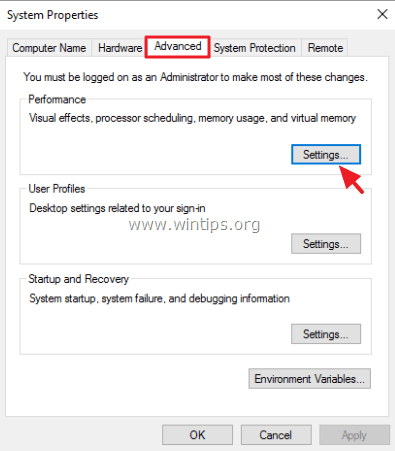
4. At Performance options, click the Advanced tab and then select Change at Virtual memory section.

5. Uncheck the "Automatically manage paging file size for all drives" check box.
6. Check the "Custom size" radio button.
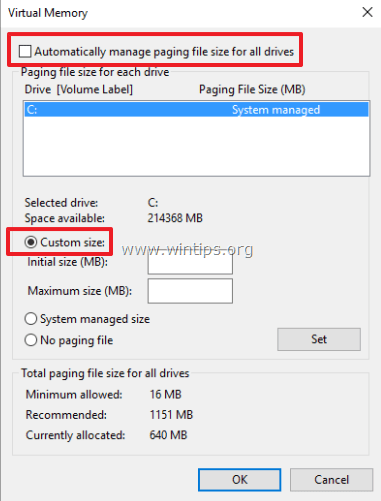
7. Set the Initial size and Maximum size values to twice and half (2,5) of your RAM size in MB* and then press the Set button.
For example: If your RAM's size is 4GB (4096MB), then type the value 10240 (4096MB x 2,5 = 10240MB) in the Initial & Maximum size (MB) fields.

8. Click OK three (3) times to exit.
9. Restart your computer.
Solution 4. Disable the MSI mode in StorAHCI Controller.
In some Windows 10 computers, the Advanced Host Controller Interface PCI-Express(AHCI PCIe) doesn't operate properly and causes high CPU usage problems, when the Message Signaled Interrupt (MSI) mode is enabled when running with the inbox StorAHCI.sys driver.*
* Note: This issue has discovered from Microsoft at the following article: KB3083595.
At this case you have to disable the MSI mode for the inbox StorAHCI driver.
Step 1. First identify if you are running the inbox AHCI driver (StorAHCI.sys).
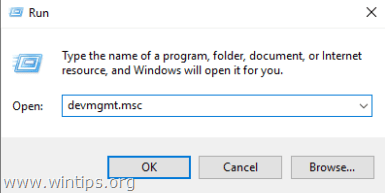
1. Right-click on Start menu select Run.
2. Type the following command and press Enter to open device manager:
- devmgmt.msc
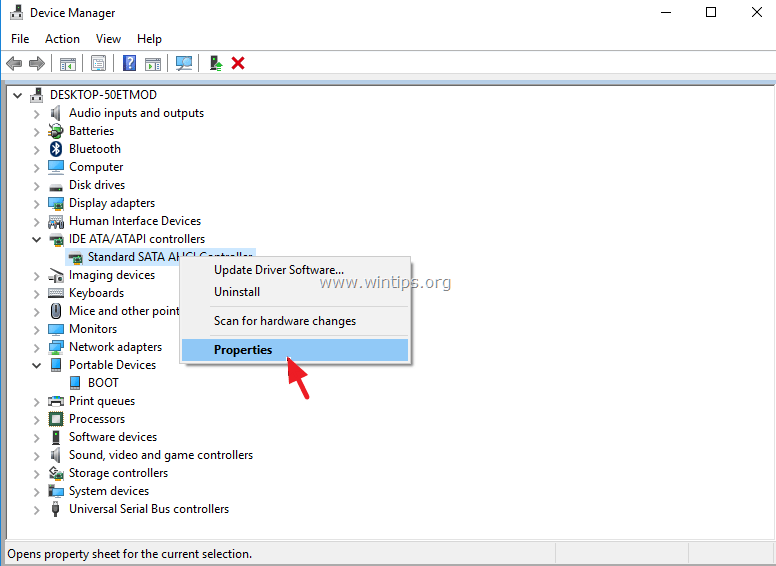
3. Expand the IDE ATA/ATAPI controllers.
4. Right click at the “Standard SATA AHCI Controller” and select Properties.
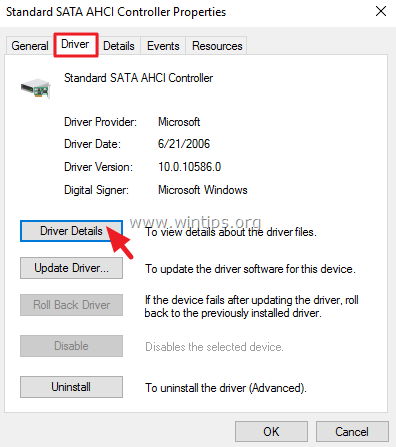
5. At the Driver tab, click Driver Details.
6. If you see the “storahci.sys” on the list then you are running the inbox StorAHCI.sys driver. *
Attention: If you are not running the inbox StorAHCI.sys driver, then skip this solution because it is not applied to your system.

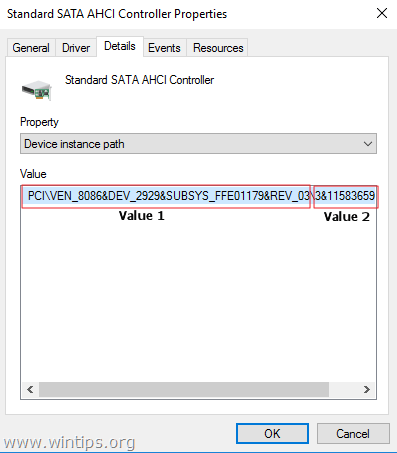
6. Click OK at the open window, navigate to Details tab and select Device Instance from the "Property" drop-down menu:

7. At this window note the two (2) AHCI Controller's values marked on the screenshot below. Leave this window open and continue to step-2.
Step 2. Disable MSI mode for the inbox StorAHCI controller in the registry:
1. Right-click on Start menu select Run.
2. Type the following command and press Enter to open registry editor:
- regedit

3. Inside registry editor navigate (expand) to this path on the left:
HKEY_LOCAL_MACHINE\System\CurrentControlSet\Enum\PCI\<AHCI Controller's Value 1>\<AHCI Controller's Value 2>Device Parameters\Interrupt Management\MessageSignaledInterruptProperties
e.g. In this example the path is:
HKEY_LOCAL_MACHINE\SYSTEM\CurrentControlSet\Enum\PCI\VEN_8086&DEV_2929&SUBSYS_FFE01179&REV_03\3&11583659&0&FA\Device Parameters\Interrupt Management\MessageSignaledInterruptProperties
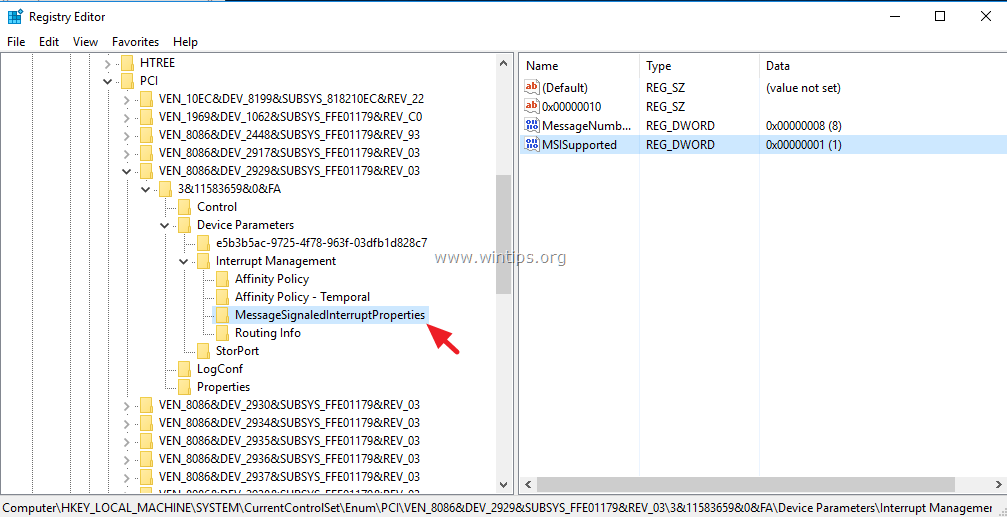
4. At the right pane double click to open the MSISupported key and set the value data from "1" to "0" (Zero).
5. Click OK and close registry editor.

6. Restart your computer. *
* Note: If you have more than one AHCI controllers, then repeat the above steps and disable the MSI mode to all of them.
Solution 5. Run the System Maintenance task.
Run the System Maintenance troubleshooter to automatically fix system's problems.
1. From Control Panel open Troubleshooting.
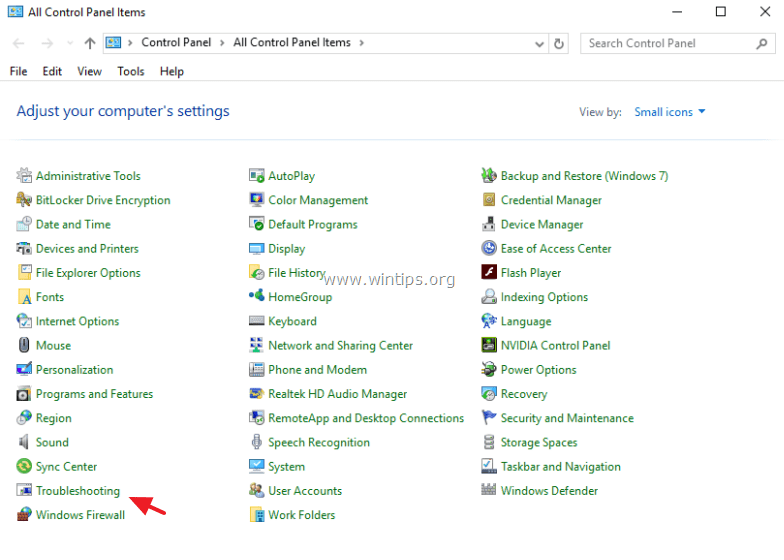
2. Click on View all.

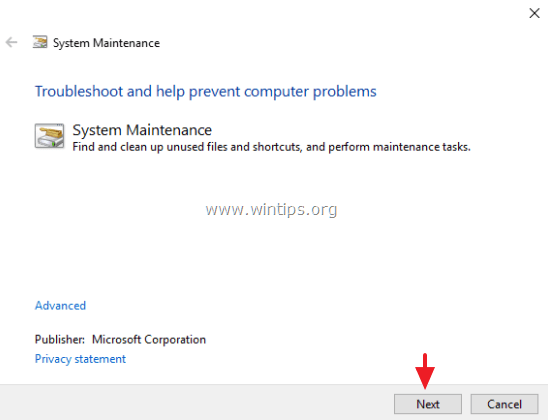
3. Double click at System Maintenance.

4. Press Next and then follow the onscreen prompts to run the System Maintenance troubleshooter.
Solution 6. Uninstall Graphic Adapter's drivers.
1. Uninstall the installed Video drivers and restart your computer.
2. After the restart, let Windows to search and find the appropriate driver for your graphic card and then reboot the computer.
3. If the problem persists, uninstall the currently installed display drivers and then download and install a previous driver version for your display adapter. Detailed steps on how you can do that you can find here.
Other Solutions to fix Windows 10 Freezing problems.
- Make sure that you have installed the latest drivers for your computer hardware especially the drivers for:
a. Chipset.
b. Intel® Rapid Storage Technology. - Uninstall and re-install the latest version of your antivirus program. Also make sure that only one antivirus is active on your system.
- If you have "Acronis True Image" or "Get Office" programs installed on your PC, then uninstall them.
- Disable these Services: "Cortana" & "OneDrive".
- Disable Notifications.
- Uninstall the antivirus program and then perform a repair install of Windows 10 with an in-place upgrade.
- Backup your files and then perform a clean Windows 10 installation.
That's it! Let me know if this guide has helped you by leaving your comment about your experience. Please like and share this guide to help others.


July 19, 2026 @ 11:07 am
IF THE ABOVE STEPS AS IN THIS ARTICLE DO NOT WORK THEN TRY THE FOLLOWING :
In latest JULY 2026 ISSUE win 10 ESU system freezing/Hanging problems such as system hangs after 5 mins or 4 mins but runs perfectly fine till then such a problem here is resolved by us and a team of experts in this way:
1) Check for viruses or malware etc IF NOTHING FOUND
2) Check for any specific process that is causing this problem IF NOTHING FOUND
3) TRY REINSTALLATION OF THE WINDOWS 10 thru a USB/ IF Cloud install allows otherwise USB THEN
4) DOWNLOAD ONLY NECESSARY UPDATES FOR THE SYSTEM TO RUN PERFECTLY AND GET RID OF WINDOWS UPDATES COMPLETELY SHUT DOWN THE WIN UPDATES BY USING ANY GOOD SOFTWARE FOR THE SAME.
OUR MAIN REASON FOR THIS PROBLEM WAS WINDOWS UPDATES WHICH KEEP ON COMING FOR THE OLDER SYSTEMS ON ESU AS WELL AND OLDER SYSTEMS DO NOT HAVE THAT KIND OF PROCESSORS OR DEVICE DRIVERS WHICH CAN ABSORB HEAVY MICROSOFT WINDOWS UPDATES HENCE HANGS OVER ESPECIALLY AFTER THE 2026-07 22H2 WIN 10 LATEST UPDATE ( WHICH IS THE CAUSE OF THIS HANGING PROBLEM) AND ONCE THE WINDOWS UPDATES WAS TURNED OFF THEN THE HANGING PROBLEM WAS COMPLETELY RESOLVED. NOW MY SYSTEM IS WORKING PERFECT FOR THE LAST 2 DAYS WITH NO PROBLEM AND WILL CONTINUE LIKE THIS FOREVER.
THANKS ALL
October 21, 2018 @ 1:27 pm
none of that works, my freeze/locking up has gotten worse with these new builds. it use to be 2 or 3 times a month, now its 2 to 3 times a day.
October 23, 2018 @ 9:37 am
@Mike: Make sure that your hard drive is "healthy". How to test and diagnose your HDD drive for problems.
January 12, 2018 @ 11:13 pm
my problem started from the time I upgraded from 8.1 to 10. The solution was to use another desktop and leave this all-in-one just for mail. Now I need it for programming and the problem persist. I determined that I have the problem described in Solution 4. (Disable the MSI mode in StorAHCI Controller.) I went though all the steps but no luck!!!
I will try now all the other steps but I am really frustrated with LENOVO and MICROSOFT.
Thank anyhow for this suggestions
March 13, 2017 @ 9:20 am
Great artcle…
January 23, 2017 @ 2:47 pm
One of the Best HOW TO's
Keep it up
Thunmbs up for your efforts
:)
June 13, 2016 @ 2:40 pm
Hi,
Great post. I actually followed and did everything as Windows 10 froze like hell. I even contacted Microsoft and they remotely checked my PC and said that I may have a faulty RAM stick on my laptop. Considering that I am broke at the moment, I decided to give Ubuntu 16.04 a try.
I installed it alongside Windows 10 and after using it for a week, I found no issues whatsoever. I played games, watched videos, did everything I used to do on Windows.
This morning, I booted to windows 10 and it froze..Again!. I finally found a solution to this issue.
I just reset my PC back to windows 7. It works. No freezes. Gets the job done. I honestly prefer windows 10 over windows 7 or Ubuntu but I have no choice. I cannot afford to spend more time on this sh*t especially wince I am out looking for a job. So congrats M$, you screwed me back to Windows 7.