
FIX: 0x8007001f on Windows 11 v24H2 Installation.
If you are trying to upgrade your system to Windows 11 v24H2 and the installation fails with error 0x8007001f, continue reading below to fix the problem..
Problem: When you try to upgrade from Windows 10 to Windows 11 or when you try to upgrade Windows 11 to a newer version (e.g. from v23H2 to v24H2), the installation starts and then fails with an install error – 0x8007001f "There were some problems installing updates, but we'll again later".
Cause: The installation error 0x8007001f in Windows Update can be caused by many reasons, with the most common being corrupted Windows files, poor internet connection, lack of sufficient free space for the update installation, Antivirus software, etc..

In this guide you'll find step by step instructions to solve the Windows 11 upgrade error 0x8007001f.
How to FIX: Windows 11 24H2 Install error 0x8007001F.
IMPORTANT: Before applying the methods mentioned below to troubleshoot the install error 0x8007001f on Windows 11 24H2 update, do the following and try again to upgrade your system:
- Make sure you have more than 64 GB of free space on your C: drive before you install the update.
- Delete the useless files with Disk Cleanup. by using the instructions in this tutorial: How to Free Up Disk Space with Disk Cleanup.
- Disable -or better- temporarily uninstall all non-Microsoft security software (antivirus, antimalware, firewall, etc.), to avoid installation problems during the upgrade.
- Install the latest GPU drivers and all the Driver updates from Windows Update > Advanced Options > Optional Updates.

Method 1. Force Windows to re-download and install the update from scratch.
The first method to fix Windows Update installation error 0x8007001f is to force Windows to re-download and install the update from scratch. To do this, go ahead and delete the "SoftwareDistribution" folder where Windows stores updates so that it can recreate it and re-download the updates from the beginning.
1a. Press the Windows  + R keys to open the Run command box.
1b. In run command box, type "services.msc" and press Enter to open the Windows Services control panel.

2. Right-click on Windows Update service and select Stop.

3. Then, open Windows Explorer, navigate to C:\Windows folder and open it to explore its contents.
4. Select and Delete the “SoftwareDistribution” folder. (Click Continue at "Folder Access Denied" window).
* Notes:
1. After deleting this folder, the next time the Windows Update will run, a new empty "SoftwareDistribution" folder will be automatically created by Windows to store updates.
2. If you cannot delete the folder because of error "Folder in use – try again", then delete it after starting Windows in "Safe Mode".

5. Restart your computer and then try to install updates.
Method 2. Fix Windows Update Error 0x8007001f by repairing system files.
The next method to fix the install error 0x8007001f in Windows 11 update, is to repair the Windows installation and System Files using the DISM and SFC tools.
1. Open Command Prompt as Administrator. (To do that, type "cmd" in Search and then at "Command Prompt" result, select "Run as Administrator")

2. At the command prompt window, type the following command & press Enter:
- dism.exe /Online /Cleanup-Image /Restorehealth
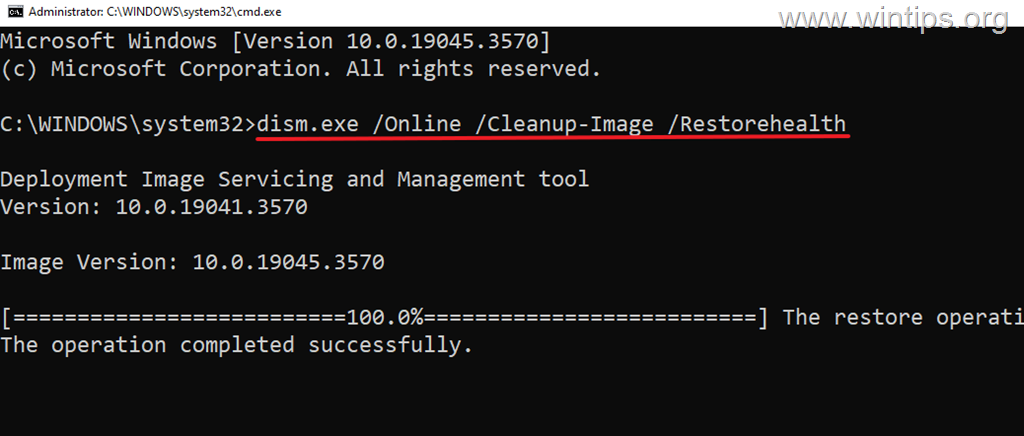
3. Be patient until 'Deployment Image Servicing and Management' (DISM) tool repairs the component store.
4. When the operation is completed, give the command below to repair the system files and press Enter:
- sfc /scannow
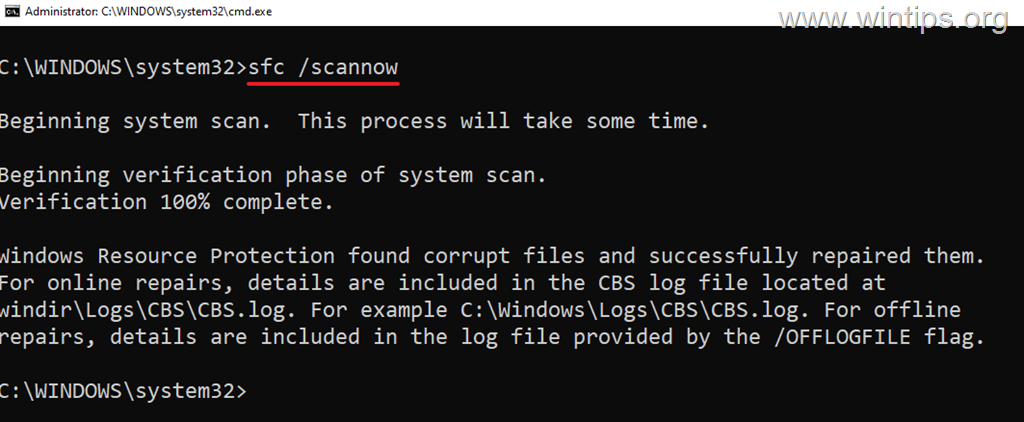
5. When SFC scan is completed, restart your computer.
6. After restarting try to install the update again.
Method 3. Delete Unknown Profile(s) in System Settings.
A common cause of the Windows Update error 0x8007001f is an unknown user profile present on the computer. So do the following:
1. Open File Explorer, right-click on This PC shortcut on the left pane and select Properties.
* Alternately, go to Start > Settings > System > About.

2. Click Advanced system settings.

3. Then click Settings in Users Profiles section.

4. Check if there is an "Account Unknown" profile here and if so, select it and then delete it.
5. After profile deletion, restart the computer and then retry to install the update again.

Method 4. Remove the SID of the Duplicate Profile in Registry.
Sometimes, Windows may create a duplicate user profile during a previous upgrade. This could be another reason why Windows 11 may not be able to install an update with error 0x8007001f. To see if this happens, do the following:
Step 1. Examine the 'Setupact.log' file.
1. Open File Explorer and from the View menu > Show, click to check the Hidden items to display all the hidden files and folders.

2. Then navigate to the below mentioned location and open the "setupact.log" file in Notepad.
- C:\$WINDOWS.~BT\Sources\Panther\setupact.log
3. In Notepad, press CTRL + F keys to open Find.
4. Copy & paste inside the 'Find' field "Duplicate profile detected for user", and press Enter

5. If you find a warning that says a "duplicate profile was detected"* for a user, like in screenshot below, then notice the SID number which mentioned after the "vs."** and continue to next step.
* Notes:
1. If you don't see a warning for a duplicated profile skip to next method.
2. The SID number listed after "vs." usually indicates a "faulty" or corrupted user profile.
For example: In the screenshot below, according the warning "Duplicate profile detected for user S-1-5-21-2001762966-3714454678-3319139375-1012(C:\Users\John) vs. S-1-5-21-2001762966-3714454678-3319139375-1009(C:\Users\john)", the "faulty" profile SID is the "S-1-5-21-2001762966-3714454678-3319139375-1009"

Step 2. Verify that the profile SID you noticed is not yours.
1. Important: After you find the "faulty" profile SID, open the command prompt and issue the following command to make sure the SID you noticed is not yours.
- whoami /user
2. After issuing the above command, notice your profile SID and ensure that is different than the SID you noticed above (after the "vs."). Once is different, continue to next step to remove the "faulty" profile SID from the registry.*
* Notes:
1. If the SID you noticed in step-1 above is the same as yours, then stop here and continue to next method.
2. If the computer is used also by other users, issue the following command to see the SID's of all users:
- wmic useraccount get name, sid

Step 3. Delete the Faulty Profile SID in Registry.
* Important: Since making changes to Registry settings is risky because even a small mistake can lead to system damage, it is important to back up the registry before modifying it and to create a System Restore point.
1. Simultaneously press the Windows + R keys to open Run command box.
2. In run command box, type "regedit" and press Enter.

3. In Registry Editor navigate to this path:
- HKEY_LOCAL_MACHINE\SOFTWARE\Microsoft\Windows NT\CurrentVersion\ProfileList
4. Now, expand the ProfileList key and below select and delete the "faulty" profile SID you noticed in step-1 above. (e.g the "S-1-5-21-2001762966-3714454678-3319139375-1009" in this example.
5. When done, close Registry Editor, restart the PC and try to install the update again.

Method 5. Upgrade to Windows 11 24H2 using the Installation Assistant.
The next method to fix the install error 0x8007001f in Windows 11 version 24H2, is to upgrade your system using the "Windows 11 installation assistant". To do this:
1. Navigate to Windows 11 download site to download the Windows 11 Installation Assistant.

2. Then run the "Windows11InstallationAssistant.exe" and choose YES at the UAC warning
3. Accept the License Terms and then wait the Installation Assistant to download the required files and install the update.

4. When the process is complete, click Restart Now to complete the installation

5. After restart, the installation will continue and after a few minutes will end.
6. Finally, navigate to Windows Update and check if there are any other updates available to install. If so, let Windows to install them and you're done!
Method 6. Upgrade to Windows 11 24H2 using Windows 11 ISO file.
Another method to solve the mentioned problem is to repair & upgrade Windows from a Windows ISO file. For this task, read the instructions in the following article:
Method 7. Reset Windows 11.
Resetting Windows to their default state, is another method to fix problems in Windows 10/11. For this task, read the instructions in this article: How to Reset Windows 11.
Method 8. Clean Install Windows.
The final method to fix the mentioned problem, is to backup your files and to perform a fresh installation of Windows. For this task, read the instructions in the following article:
That's it! Which method worked for you?
Let me know if this guide has helped you by leaving your comment about your experience. Please like and share this guide to help others.
Frequently Asked Questions
What is the error 0x8007001f when trying to upgrade to Windows 11 v24H2?
The error 0x8007001f typically occurs when attempting to upgrade from Windows 10 to Windows 11 or updating to a new version like v24H2. The installation starts but then fails with a message indicating problems installing updates.
What are common causes of error 0x8007001f during a Windows update?
The error can be caused by several issues, including corrupted Windows files, a poor internet connection, insufficient free space for the update, or interference from antivirus software.
What should I do before troubleshooting Windows 11 install error 0x8007001f?
Ensure you have over 64 GB of free space on your C: drive, use disk cleanup to remove unnecessary files, temporarily uninstall any non-Microsoft security software, and install the latest GPU drivers along with any driver updates from Windows Update's optional updates.
How can I resolve Windows 11 error 0x8007001f by repairing system files?
Open Command Prompt as an Administrator and run the command 'dism.exe /Online /Cleanup-Image /Restorehealth', followed by 'sfc /scannow'. After these operations, restart your computer and attempt the update again.


- Remote Desktop (RDP/RDS) Stops Working After September 2026 Windows Update: How to Fix - September 15, 2026
- Windows 11 KB5124008 Causes No Sound or USB Audio Code 10: How to Fix - September 14, 2026
- Copilot Missing or Grayed Out in Outlook: How to Fix - September 10, 2026



November 10, 2025 @ 4:29 pm
THANK YOU Konstantinos. After a 5-month battle with the 0x8007001f error (Windows Update, Update Assistant and the ISO route) trying to upgrade my Windows 10 22H2 HP laptop to Windows 11 24H2 …… I came across your wintips.org website article featuring this solution I had not heard of before:
"Method 3. Delete Unknown Profile(s) in System Settings."
Yes it worked, and the "hp14" has been saved from premature retirement. But there's an extra thing that happened after the "Account Unknown" deletion and restart. You might be interested in this or it may be familiar. The almost empty user account I used for a "microsoft account" (and switched back and forth to "local" once or twice) then immediately lost a few taskbar targets – these turned out to be Windows System apps which had gone missing from the (user)\AppData\Roaming path (a similar system app in the C:\ProgramData path was still present). So it seemed that the deleted "Account Unknown" may have had a parallel function and the taskbar links had been directed there instead (?!) Anyway, who knows what else, so I deleted this "known" account also (via (admin) Settings>Accounts this time), went back to my standard local "internet" account and the next thing I knew was that Windows Update had succeeded with the upgrade.
So thank you for providing the missing link, I'd tried everything else.
February 12, 2025 @ 12:28 am
I was deep in a rabbit hole with no solution to Windows 11 not updating. This page was enormously helpful. I systematically worked through the potential solutions and finally hit one that worked (#7). It's rare to find content that is so clear, concise, complete, accurate and up-to-date. Many thanks indeed.